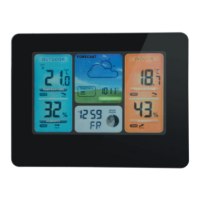
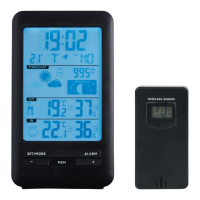
Press and hold the SET/MODE button for 2
The temperature unit starts fl ashing.
Use the “+” and “-” buttons to choose
between the temperature units °C and °F.
Press the SET/MODE button to confi rm the
The air pressure unit starts fl ashing.
Use the “+” and “-” buttons to choose
between the air pressure units hPa and inHg.
Press the SET/MODE button to confi rm the
The 12/24 hour display will start to fl ash. Use
the “+” and “-” buttons to choose between 12
Press the SET/MODE button to confi rm the
The radio mast icon starts fl ashing.
Use the “+” and “-” buttons to switch the daily
reception of a time signal on (ON) and off
Press the SET/MODE button to confi rm the
The time zone starts to fl ash. Use the “+” and
“-” buttons to set the time zone (-12 to +12).
Press the SET/MODE button to confi rm the
The hour number starts to fl ash. Use the “+”
and “-” buttons to set the hour.
Press the SET/MODE button to confi rm the
The minute number starts to fl ash. Use the
“+” and “-” buttons to set the minute.
Press the SET/MODE button to confi rm the
The icon for month and date starts to
fl ash. Use the “+” and “-” buttons to change
between displaying month/date and date/
Press the SET/MODE button to confi rm the
The year 2014 starts to fl ash. Use the “+” and
“-” buttons to set the year.
Press the SET/MODE button to confi rm the
The month starts to fl ash. Use the “+” and “-”
buttons to set the month.
Press the SET/MODE button to confi rm the
The date starts to fl ash. Use the “+” and “-”
Press the SET/MODE button to confi rm the
The language for the day of the week
starts to fl ash. The day of the week can be
displayed in 7 languages: German, English,
French, Italian, Spanish, Dutch and Danish.
Use the “+” and “-” buttons to select the
Press the SET/MODE button to confi rm and
The time is then displayed.
After 20 seconds without any button being
pressed, the weather station switches from
setting mode to displaying the time.
Press the SET/MODE button to switch
between displaying the date, day, time with


 To Next Page