Outdoor temperature alarm
Press and hold the ALERT button for 2
seconds. The icon for the upper temperature
Use the “+” and “-” buttons to set the upper
Press the ALARM button to confi rm.
The icon for the lower temperature alarm
Use the “+” and “-” buttons to set the lower
Press the ALARM button to confi rm.
Switch the outdoor temperature alarm on
and off by pressing the ALERT button.
If the outdoor temperature falls outside
the set limits, an alarm sounds 5 times
every minute, the temperature alarm icon
fl ashes, and “HI” (high) or “LO” (low) fl ashes
on the display to indicate that the outdoor
temperature is too high or too low.
If the temperature outside falls to between -1
and +3 °C, the frost alert symbol will fl ash.
The weather station has a built-in barometer
and shows the current air pressure.
The graph indicates if the air pressure is
falling, stable or rising.
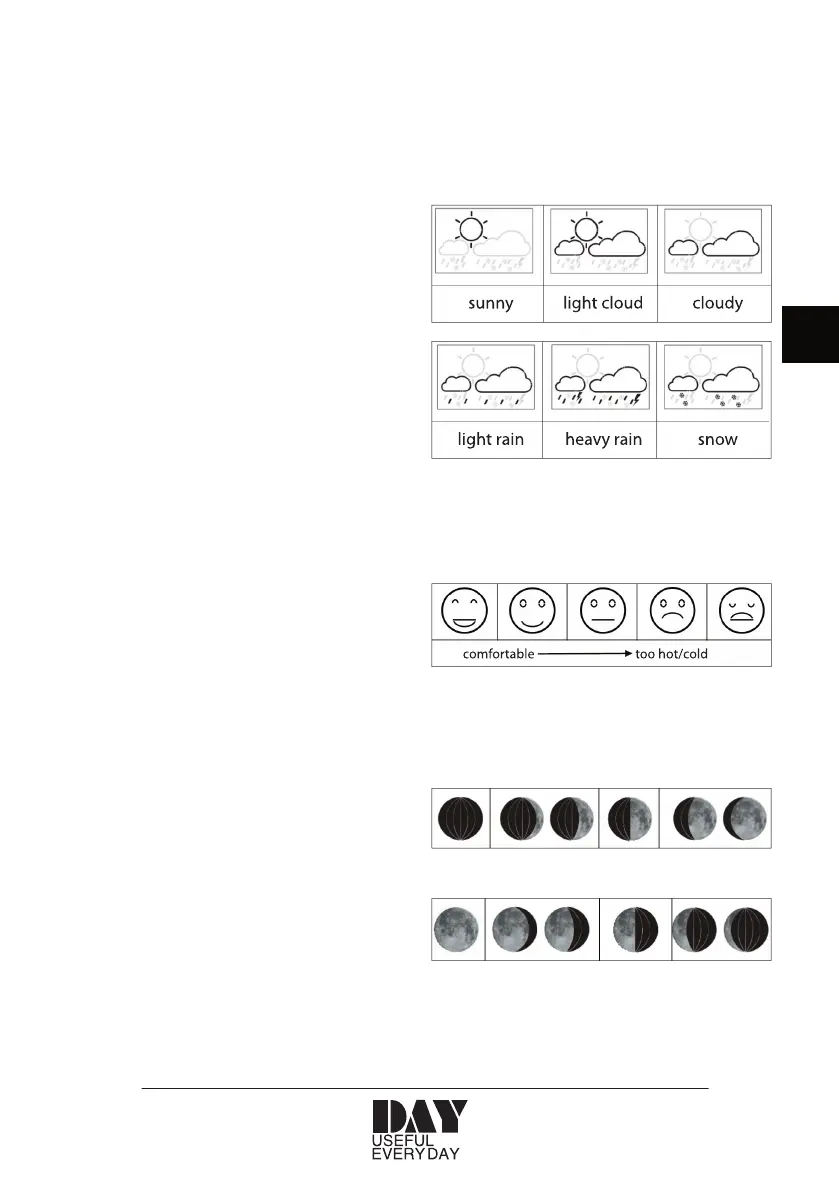
The weather station can calculate a simple
weather forecast for the next 12 hours based
The weather forecast is displayed with the
The weather station displays a smiley to
indicate how comfortable the combination
of the indoor temperature and humidity is:
The weather station displays the moon phase


 To Next Page