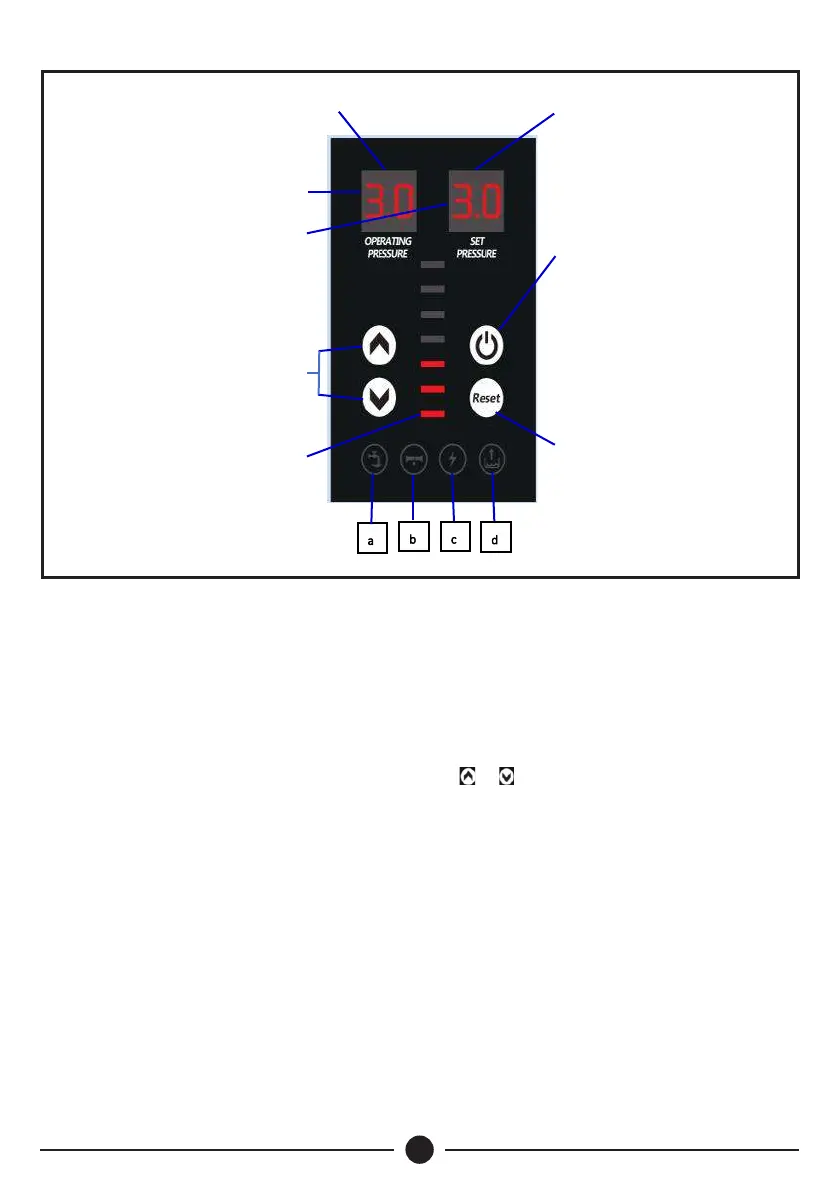
Control Panel
Troubleshooting Error
Code “E”
1. In pressure mode, this indicator displays the pump’s operating pressure. In speed mode,
this indicator displays digits of thousands and hundreds for the current running speed.
2. In pressure mode, this indicator displays the pump’s set pressure. In speed mode, this
indicator displays digits of tens and ones for the current running speed.
Operation
Ÿ Press power button to start the pump (may take 3 seconds), switch light on.
Press the power button to stop the pump, switch light off.
Ÿ Press and hold power button for 10 seconds to switch between pressure mode and speed
mode.
1
2
3
4
5
6
Troubleshooting Error
Code “1~12”
11
Notes:
Pressure mode:
The indicator displays the operating pressure and set pressure. To adjust the pump's pressure,
press the button. The pressure can be set within a range of 1.5 to 7.0 bar.
Speed mode:
The indicator displays the running speed (r.p.m). In this mode, the pump does not stop
automatically. To adjust the pump's speed, press the or button. The speed can be set within
a range of 2,500 to 5,200 r.p.m.


 To Next Page