17
Operation
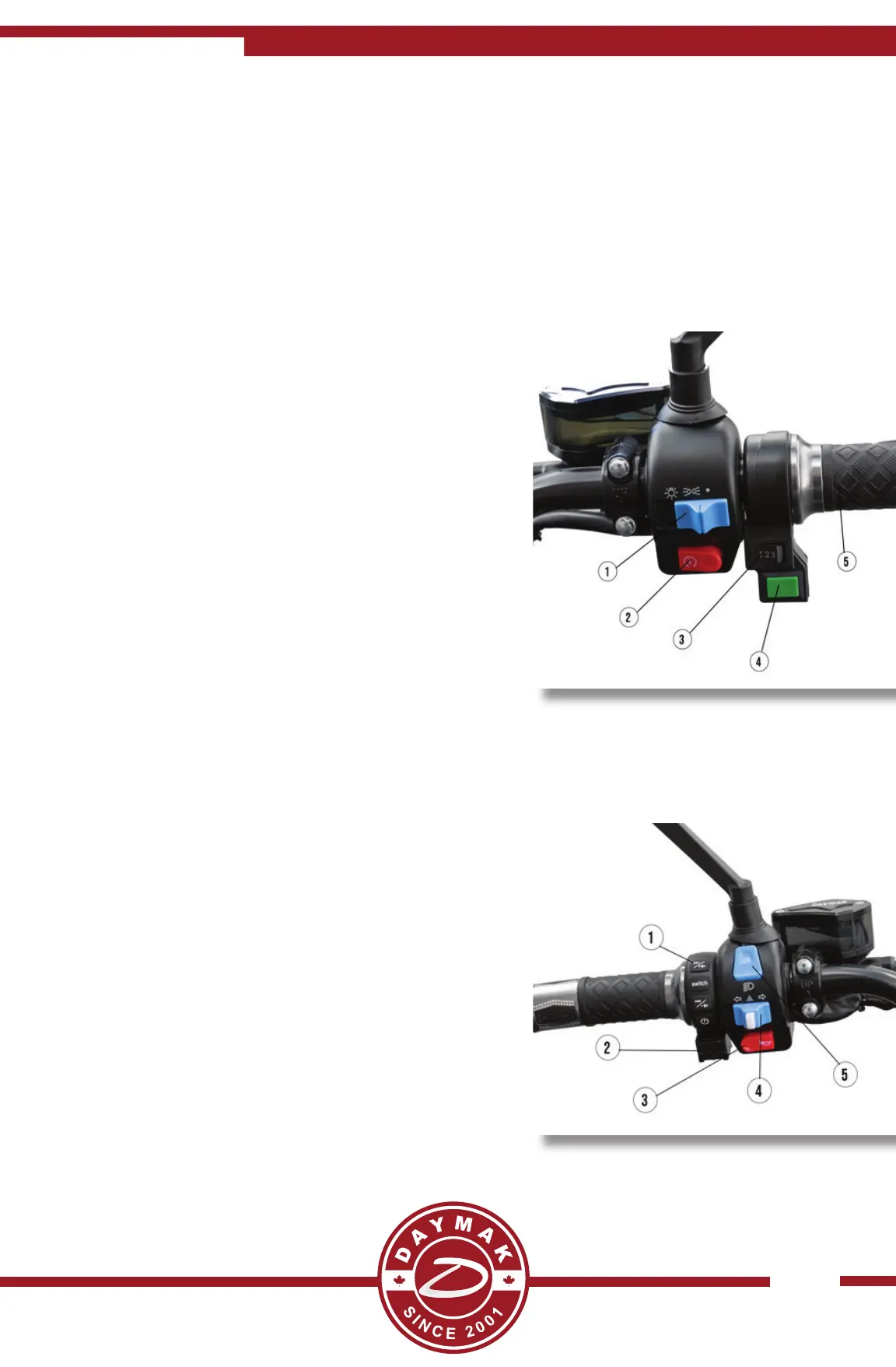
Right handle bar
1. Lights - The far right posi on is all lights o .
The Middle Posi on is just running brake lights
and far le posi on is all lights on.
2. Flasher - Press this to ash your headlights
on and o quickly.
3. Speed Switch - Turn this to easily monitor
your speed. Speed 1 - Slowest speed / Longest
Range Speed 3 - Fastest Speed / Shortest Range
4. Cruise Control - While the unit is running
press this bu on to remain at this speed without
the thro le being rotated. To disengage cruise
control just hit either brake lever. *Manual cruise
must be on in bluetooth se ngs*
5. Thro le - Turn this towards you to engage
the motor to go!
Left handle bar
1. MP3 / MPEG Controls - See next page for
more detailed informa on
2. USB Plug - See next page for more detailed
informa on
3. Horn - Press this to honk the horn
4. Turn Signals - Press this to the le to indicate
turning to the le . Press the middle white bu on
once the turn is complete.
5. High Beam / Low Beam - Press up to angle
your lights hight and press down to angle the
lights down.


 To Next Page