19
When opera ng the Road Warrior, insert the keys
into the igni on seen here and turn it clockwise.
Once on, simply turn the thro le towards
you to ride.
Keys
The Road Warrior comes with two sets of keys and
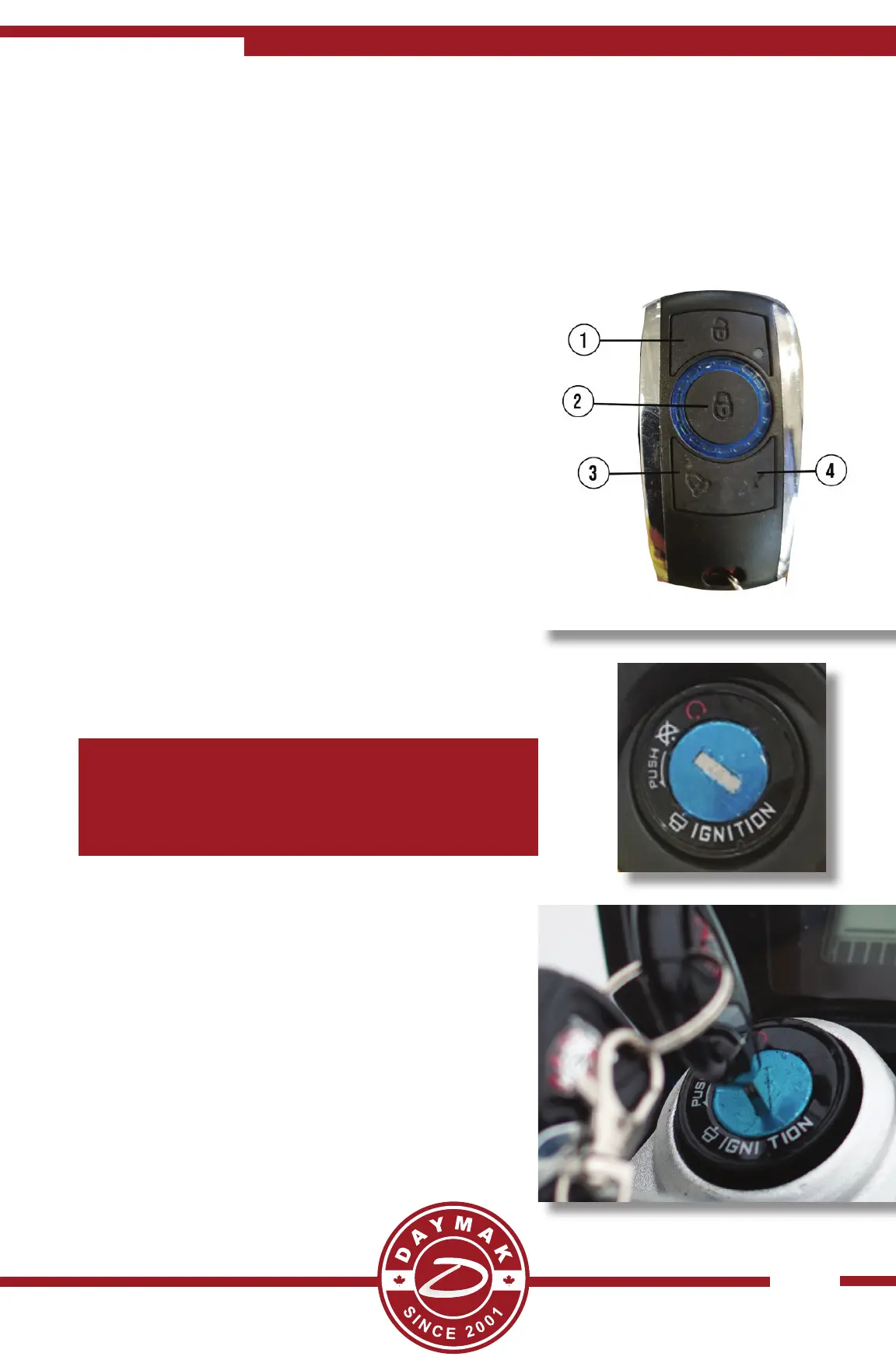
two remotes. There are four bu ons on the remote:
1. Set Alarm - This bu on will set the alarm.
A er pressing it wait for 5 seconds. A erwards
if someone moves the bike the alarm will sound.
2. Remove alarm - This will disengage the
alarm. Use this before riding your bike. **Also
disengeages remote start*.
3. Panic Bu on - This will automa cally set the
alarm o .
4. Remote Start - Press this twice to start the
bike without using the keys. Press the remove
alarm bu on (2) to disengage the remote start.
Steering Lock
When you are trying to engage the wheel lock:
Turn the handlebars so that it is poin ng to the le
and then push the key in a bit further and turn to
counter clockwise. This feature will allow you to
prevent the .
Note: The fi le format must be MPEG 2 with a maximum resolu on of 480p and a
perferred resolu on of 852 x 480
Warning : Do not ride the vehicle while videos are playing as it can be distrac ng and
can lead to injuries.


 To Next Page