
 Need help?
Do you have a question about the DBPOWER 3 COLORS BACKLIT GAMING KEYBOARD and is the answer not in the manual?
Register within 2 weeks of receiving your new product to activate your 12-month warranty and claim an exclusive gift.
Contact support at support@dbpower.co or follow @dbpower.co on social media for assistance.
Prevent dust and liquids. Unplug immediately if liquid enters. Dry with cold air and cover after use.
Learn how to turn the backlight on/off, change breathing effects, and adjust brightness using FN key combinations.
Discover how to unlock different functions for buttons using FN key combinations.
Switch WASD keys to arrow keys and revert to factory mode using FN key combinations.
Troubleshoot connection issues by checking the USB interface and replugging the keyboard.
Resolve issues with turning the backlight on or off by using specific FN key combinations.
Learn how to safely clean the keyboard by removing keycaps and avoiding direct water use.
Contact support for quality issues; options include 30-day money back, replacement, and a 2-year warranty.
This document describes the DBPOWER 3 Colors Backlit Gaming Keyboard.
The DBPOWER gaming keyboard features 3-color backlighting and is designed for gaming. It offers various functions related to its backlighting and general keyboard use. Users can activate a 12-month warranty and an exclusive gift by registering their product within two weeks of receipt.
Backlight Settings:
* key.FN + *.FN + PG Up or FN + PG DN.FN + F1 through FN + F12.FN + W to toggle WASD keys to function as Up/Down/Left/Right arrows. To revert to factory mode, press FN + W again.FN + * three times.Troubleshooting:
* to toggle the backlight. To turn it off, press and hold FN + PG DN until it turns off. To turn it on, press FN + PG UP.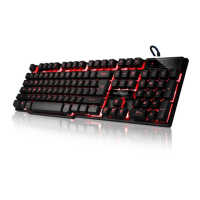

 To Next Page
 General