EasyManua.ls Logo

dbx 122 - Page 22

dbx 122
45 pages
Print Icon
To Next Page IconTo Next Page
To Previous Page IconTo Previous Page
Loading...
TAPE
RECORDERA
‘APE
RECORDER
B
TAPE
RECORDER
A
TAPE
RECORDER
B
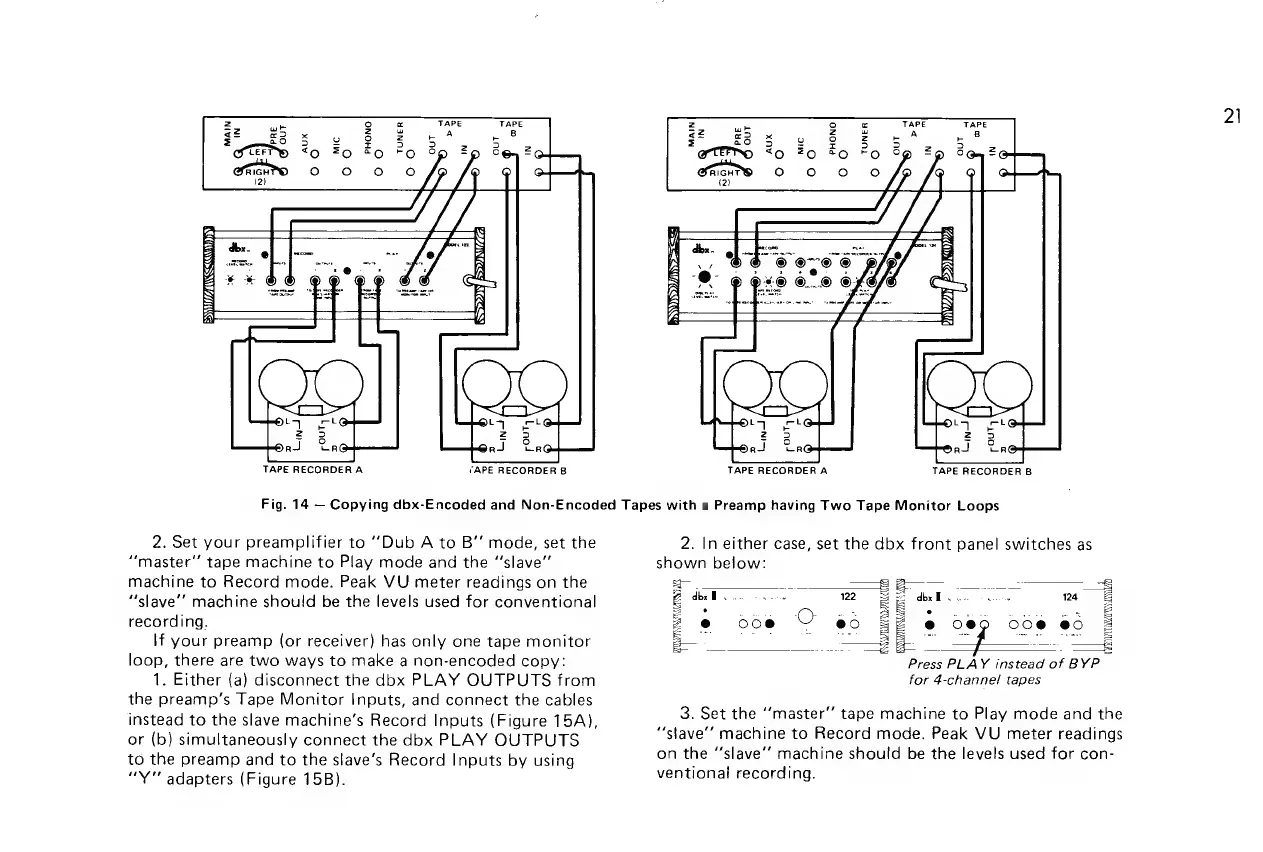
Fig.
14
Copying
dbx-Encoded
and
Non-Encoded
Tapes
with
a
Preamp
having
Two
Tape
Monitor
Loops
2.
Set
your
preamplifier
to
““‘Dub
A
to
B”
mode,
set
the
“master
tape
machine
to
Play
mode
and
the
“‘slave”’
machine
to
Record
mode.
Peak
VU
meter
readings
on
the
“slave’’
machine
should
be
the
levels
used
for
conventional
recording.
\f
your
preamp
(or
receiver)
has
only
one
tape
monitor
loop,
there
are
two
ways
to
make
a
non-encoded
copy:
1.
Either
(a)
disconnect
the
dbx
PLAY
OUTPUTS
from
the
preamp’s
Tape
Monitor
Inputs,
and
connect
the
cables
instead
to
the
slave
machine’s
Record
Inputs
(Figure
15A),
or
(b)
simultaneously
connect
the
dbx
PLAY
OUTPUTS
to
the
preamp
and
to
the
slave’s
Record
Inputs
by
using
“Y"
adapters
(Figure
15B).
2.
In
either
case,
set
the
dbx
front
panel
switches
as
shown
below:
:
es
sa-—
B
dbx
ee
122
RE
dbx
Fv
oe
40
6G
2
@
oo@e
O
@0
di
eo
O0@
@0
&
capes
ge
ee
Bs
BS
Press
PLAY
instead
of
BYP
for
4-channel
tapes
3.
Set
the
‘‘master”
tape
machine
to
Play
mode
and
the
“stave”
machine
to
Record
mode.
Peak
VU
meter
readings
on
the
“slave’’
machine
should
be
the
levels
used
for
con-
ventional
recording.
21

Related product manuals