USER MANUAL - STEAM IRON
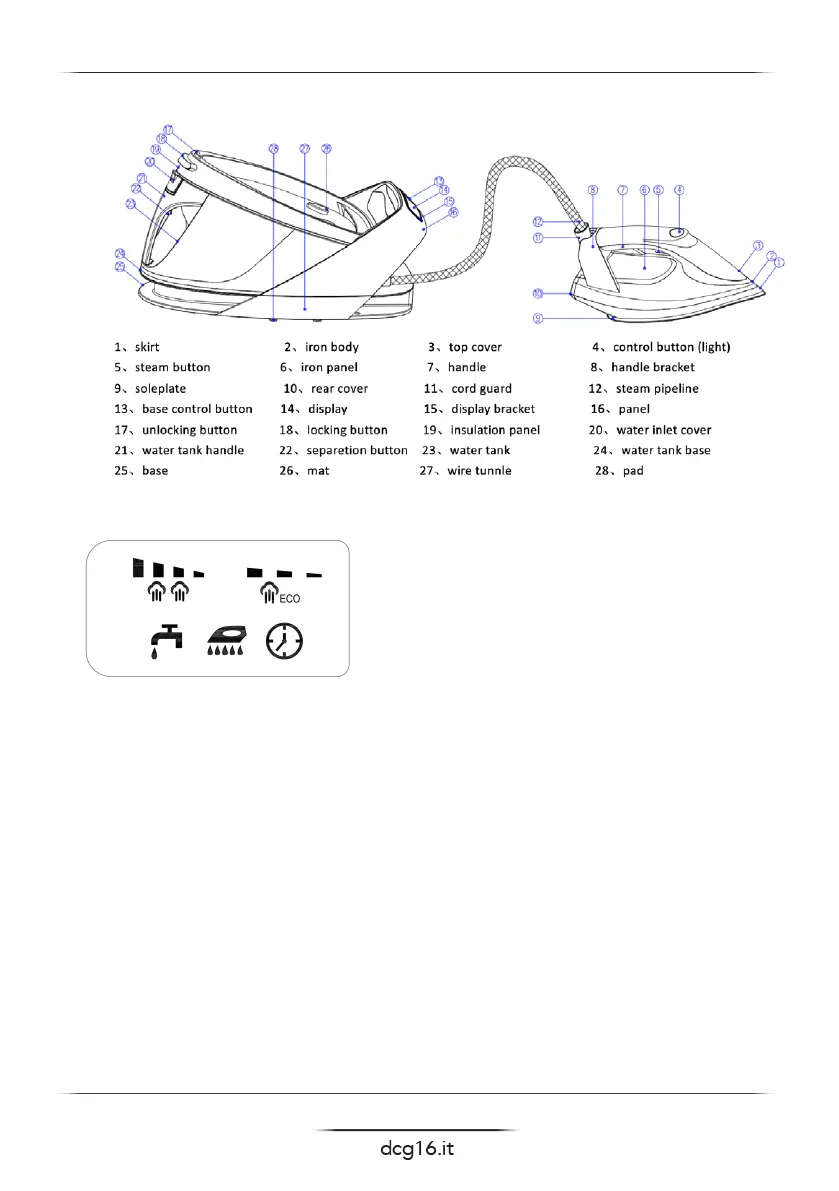
Part name
Display screen display content:
Temperature setting
1. This product is capable of sensing the temperature of the bottom plate through NTC and
cooperating with the electronic plate for temperature control.
2. After energizing the product, it will enter into standby state. Long press(2s) the control button on
the iron or long press(2s) the control button on the base to enter the heating state.
3. This product is set for constant temperature, only one gear temperature, plate temperature
range 135°~165°C
4. The atiron control button indicator light ashes to indicate that the iron is heating, and the
atiron control button indicator light is long to indicate that the product is not heating.
5 The heating time of this product is relatively long. It is recommended to fully heat the product
(2min) before steam operation.
ll water
1 The plug must be removed from the power socket to cut off the electric iron,Or remove the tank
from the product before adding water
2 Electric iron should use pure water or steam water, do not put water or other liquids into the
electric iron
3 The water in the electric iron water tank shall not exceed the maximum water level
4 After grasping the handle of the water tank and pressing the separation button, the water tank



 To Next Page
 Loading...