8
MANAGE FILES VIA PC
Access memory card of your Dash Cam from PC with USB data
cable, double click on movable disk, open DCIM folder, there will be
4 folders under it:
Normal:
20171019075657_78.mp4
The dash cam records in normal
mode by default.
Time-lapse:
S-20171019081231_2460_
30.MP4
It continuously recording footage
at 1 frame per second, therefore
15 minutes of footage can be
reviewed in 30 seconds. The
camera activates and star ts normal
recording once detected motion.
Motion :
G_20181119084020_0005_
L.jpg
When motion is detected, it saves a
snapshot. L means a video (you can
find it in 200video by its time) is
related to this photo.
Snapshot:
N_20171013101728_0003
_X.jpg
Photos taken by Snapshot Remote
Button. X means there is no video
related to this photo.
N_20171023134544_21_18_T
.jpg
Thumbnails are automatically
shown for event recording files.
9
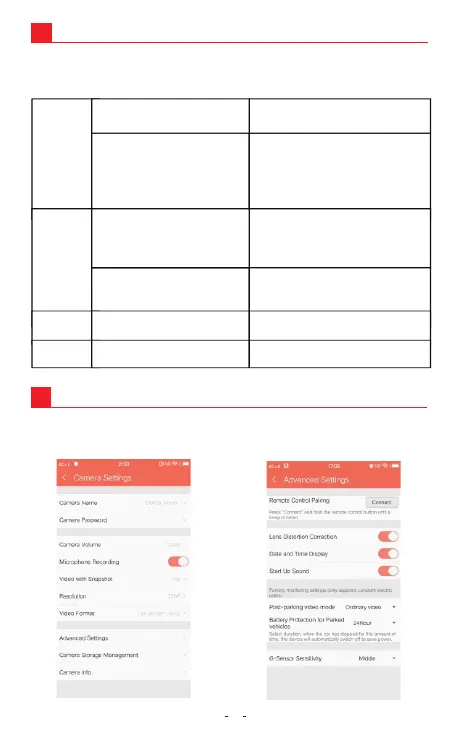
SETTINGS
1. Connect your Dash Cam to DDPAI App.
2. Tap on Me->Settings->Camera Settings.
12
202video
202thumb
202photo
20181130172044_94_D.gpx
Sports data.
203gps


 To Next Page