8
NOTE
Ÿ The download speed is about the same as the video playback speed. The
video which is downloaded to the mobile phone is compressed, HD videos
are stored on the build-in memory card and can be viewed in PC.
Ÿ App will automatically download the video which was not completely
downloaded last time once connect to dash cam.
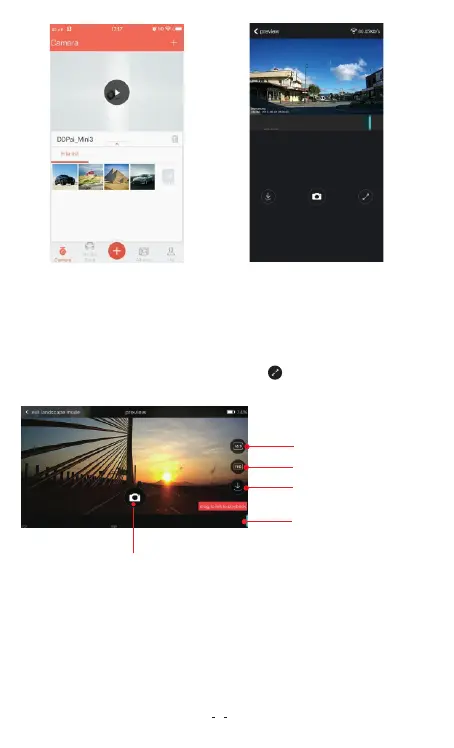
Aspect ratio setting
Resolution setting
Download
S h ut te r b u tt o n
Time line bar
Rotate your smart phone or press expand icon, turn preview
screen to landscape mode.
TIP: If the time line bar
does not display, tap on
video screen.
6.2 Resolution Settings
Tap on FHD to set the video/ photo resolution in landscape mode, if
the FHD icon is not showing, tap on the video screen.
Note
Ÿ FHD icon only display in landscape mode.
Ÿ You also can set up resolution from App by: Going to Me-> Settings->
Camera Settings-> Resolution.
3


 To Next Page