3.Assembly and Installation
Steps
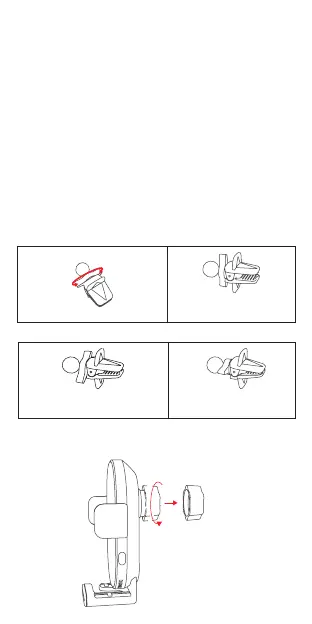
The wireless car charger holder can be fixed at the air
outlet through the air outlet clip, or fixed on the central
control table through 3M glue bracket.
Attention: Please adjust the air outlet clip properly, and
do not use the air outlet clip too tight. Do not adjust it to
the smallest thickness, otherwise it might be damaged.
Note: It is recommended that the holder can be fixed
at the air outlet firstly. When the air outlet clip is not
compatible with the air outlet, then use 3M glue bracket
to fix it.
Open
I. Tight
0.24inch-0.39inch
II. Tighter
0.12inch-0.24inch
III. Tightest
0inch-0.12inch
Tighter
Method 1- Using with the air outlet clip
Step 1.
Unscrew the grip nut from the holder and remove it.


 To Next Page