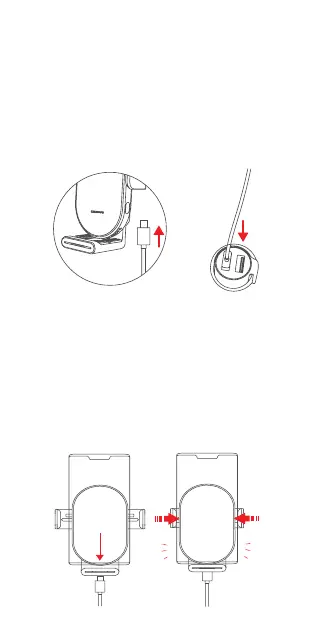
4.Switch on Power Supply,
Wireless Charging
Step 1.
Plug the car charger into the car’s cigarette lighter base
( Note: The car charger is not included in the package).
Step 2.
Plug the charging cable USB connector into the car
charger. Insert the charging cable Type-C connector into
the charging port of the holder to turn on the power.
Step 3.
Put the phone into the holder, then the clamping arms will
grip the phone automatically and the wireless charging
will start in a few second. The indicator light will always
turn blue.
The holder supports 9V/2A and 12V/1.5A car chargers.
The use of 5V/2A, 5V/1A and 5V/0.5A car chargers with low power will
cause the device to work abnormally or charge efficiency low.
Note: Please adjust the adjustable bottom tray to adapt
to mobile phones of different sizes.


 To Next Page