Em50 Series 5 EM50G CELLULAR COMMUNICATION
logging by choosing a measurement interval. The Em50G uploads
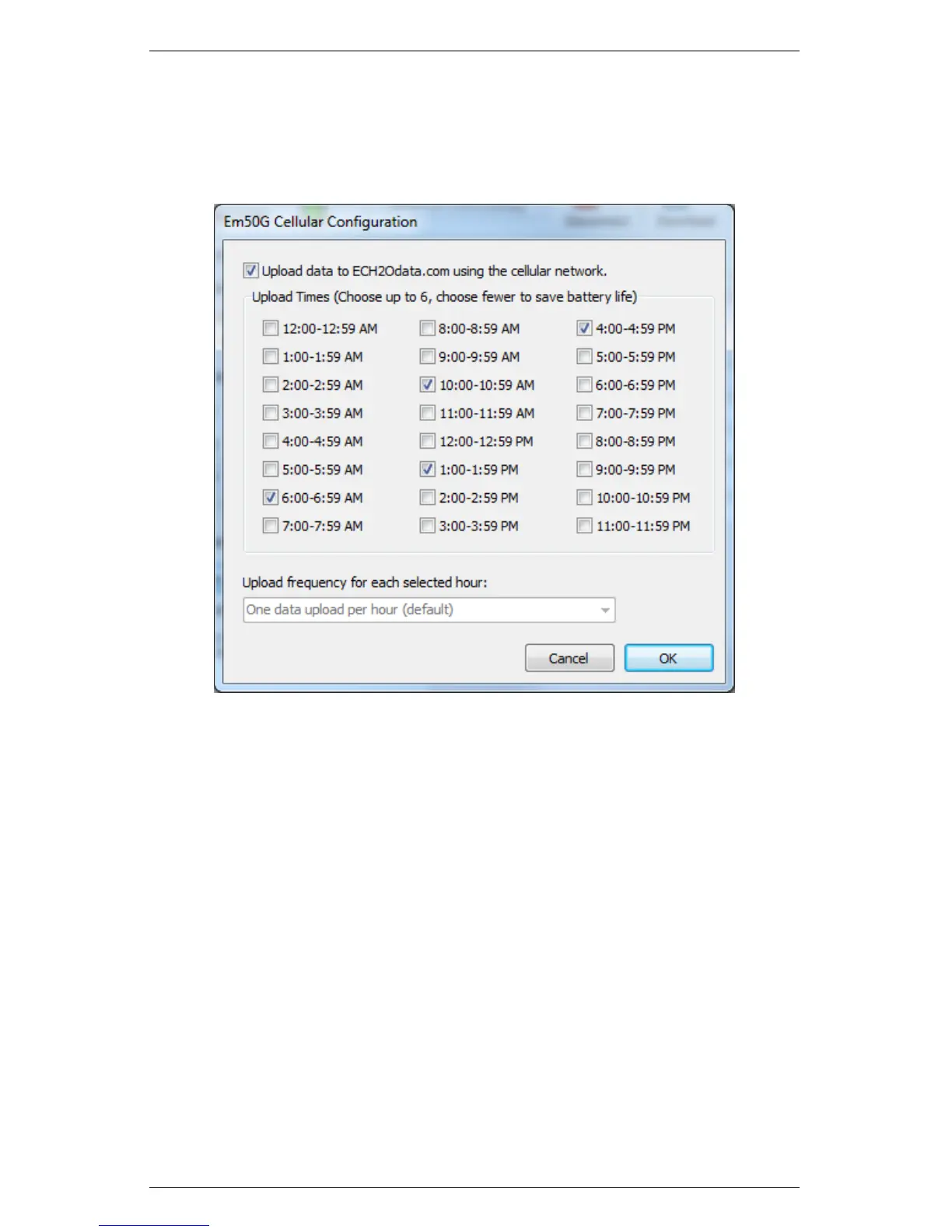
data according to the default schedule (uploading between 6-7 AM,
10-11 AM, 1-2 PM, 4-5 PM each day).
Figure 9: Em50G Cellular Configuration Window
Use ECH20 Utility to change these default settings. To turn the
Em50G cellular network on, off, or to change the upload times,
click the “Configure” button in the “Communication Option” sec-
tion. The cellular network is active when you check the “Upload
data to ECH2OData.com” box and is off when you uncheck the box.
Choose up to six upload times that correspond to the times when
you want to download the most up-to-date sensor data. (Figure 9)
The Em50G uses a random time within the hour to reduce resource
loads on the cellular network and Data Service. To conserve battery
power, choose fewer upload times.
Note: Please contact Decagon if your application requires measur-
ing sensors more often than every five minutes or if you need data
uploads more often than six times a day.
37


 To Next Page