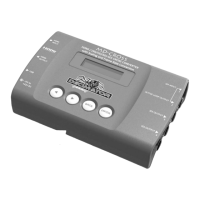
MD‐CROSSOPERATINGMANUALVERSION1.0
Copyright©2013DecimatorDesignPtyLtd,Sydney,Australia
7
4.Scaling/TPG/SD2SDASPECT(HasSUB‐MENUwithparameter)
ThisistheaspectratioconversionusedwhentheScalerisconvertingSDtoSD.
Whenthesubmenuishighlighted,presstheENTERbuttontoenterthissub‐menu.
Pressthe<and>buttonstomoveleftorrightthroughthe31aspectratioconversionslistedbelow
andthe
BACKbuttontoleavethisSUB‐MENU.
1.ANAMORPHIC(INandOUThavesameaspect) 17.IN=14:9with4:3PB,OUT=16:9with4:3ZM
2.IN=16:9FS,OUT=14:9with16:9LB 18.IN=14:9with4:3PB,OUT=14:9with4:3ZM
3.IN=16:9FS,OUT=4:3with16:9LB 19.IN=14:9with16:9LB,OUT=4:3with16:9LB
4.IN=16:9FS,OUT=14:9with16:9CC 20.IN=14:9with16:9LB,OUT=14:9with16:9CC
5.IN=16:9FS,OUT=4:3with16:9CC 21.IN=14:9with16:9LB,OUT=4:3with16:9CC
6.IN=16:9with14:9PB,OUT=4:3with14:9LB 22.IN=4:3FS,OUT=16:9with4:3PB
7.IN=16:9with14:9PB,OUT=4:3with14:9CC 23.IN=4:3FS,OUT=14:9with4:3PB
8.IN=16:9with14:9PB,OUT=16:9with14:9ZM 24.IN=4:3FS,OUT=16:9with4:3ZM
9.IN=16:9with4:3PB,OUT=14:9with4:3PB 25.IN=4:3FS,OUT=14:9with4:3ZM
10.IN=16:9with4:3PB,OUT=16:9with4:3ZM 26.IN=4:3with16:9LB,OUT=14:9with16:9LB
11.IN=16:9with4:3PB,OUT=14:9with4:3ZM 27.IN=4:3with16:9LB,OUT=14:9with16:9CC
12.IN=14:9FS,OUT=16:9with14:9PB 28.IN=4:3with16:9LB,OUT=4:3with16:9CC
13.IN=14:9FS,OUT=4:3with14:9LB 29.IN=4:3with14:9LB,OUT=16:9with14:9PB
14.IN=14:9FS,OUT=4:3with14:9CC 30.IN=4:3with14:9LB,OUT=4:3with14:9CC
15.IN=14:9FS,OUT=16:9with14:9ZM 31.IN=4:3with14:9LB,OUT=16:9with14:9ZM
16.IN=14:9with4:3PB,OUT=16:9with4:3PB
5.Scaling/TPG/SD2HDASPECT(HasSUB‐MENUwithparameter)
ThisistheaspectratioconversionusedwhentheScalerisconvertingSDtoHD.
Whenthesubmenuishighlighted,presstheENTERbuttontoenterthissub‐menu.
Pressthe<and>buttonstomoveleftorrightthroughthe11aspectratioconversionslistedbelow
andthe
BACKbuttontoleavethisSUB‐MENU.
1.ANAMORPHIC(INandOUThavesameaspect) 7.IN=14:9with4:3PB,OUT=16:9with4:3ZM
2.IN=16:9with14:9PB,OUT=16:9with14:9ZM 8.IN=4:3FS,OUT=16:9with4:3PB
3.IN=16:9with4:3PB,OUT=16:9with4:3ZM 9.IN=4:3FS,OUT=16:9with4:3ZM
4.IN=14:9FS,OUT=16:9with14:9PB 10.IN=4:3with14:9LB,OUT=16:9with14:9PB
5.IN=14:9FS,OUT=16:9with14:9ZM 11.IN=4:3with14:9LB,OUT=16:9with14:9ZM
6.IN=14:9with4:3PB,OUT=16:9with4:3PB
6.Scaling/TPG/HD2SDASPECT(HasSUB‐MENUwithparameter)
ThisistheaspectratioconversionusedwhentheScalerisconvertingHDtoSD.
Whenthesubmenuishighlighted,presstheENTERbuttontoenterthissub‐menu.
Pressthe<and>buttonstomoveleftorrightthroughthe11aspectratioconversionslistedbelow
andthe
BACKbuttontoleavethisSUB‐MENU.
1.ANAMORPHIC(INandOUThavesameaspect) 7.IN=16:9with14:9PB,OUT=4:3with14:9CC
2.IN=16:9FS,OUT=14:9with16:9LB 8.IN=16:9with14:9PB,OUT=16:9with14:9ZM
3.IN=16:9FS,OUT=4:3with16:9LB 9.IN=16:9with4:3PB,OUT=14:9with4:3PB
4.IN=16:9FS,OUT=14:9with16:9CC 10.IN=16:9with4:3PB,OUT=16:9with4:3ZM
5.IN=16:9FS,OUT=4:3with16:9CC 11.IN=16:9with4:3PB,OUT=14:9with4:3ZM
6.IN=16:9with14:9PB,OUT=4:3with14:9LB
7.Scaling/TPG/HD2HDASPECT(HasSUB‐MENUwithparameter)
ThisistheaspectratioconversionusedwhentheScalerisconvertingHDtoHD.
Whenthesubmenuishighlighted,presstheENTERbuttontoenterthissub‐menu.
Pressthe<and>buttonstomoveleftorrightthroughthe3aspectratioconversionslistedbelow
andthe
BACKbuttontoleavethisSUB‐MENU.
1.) ANAMORPHIC(INandOUThavesameaspect)
2.) IN=16:9with14:9PB,OUT=16:9with14:9ZM
3.) IN=16:9with4:3PB,OUT=16:9with4:3ZM


 To Next Page
 Loading...