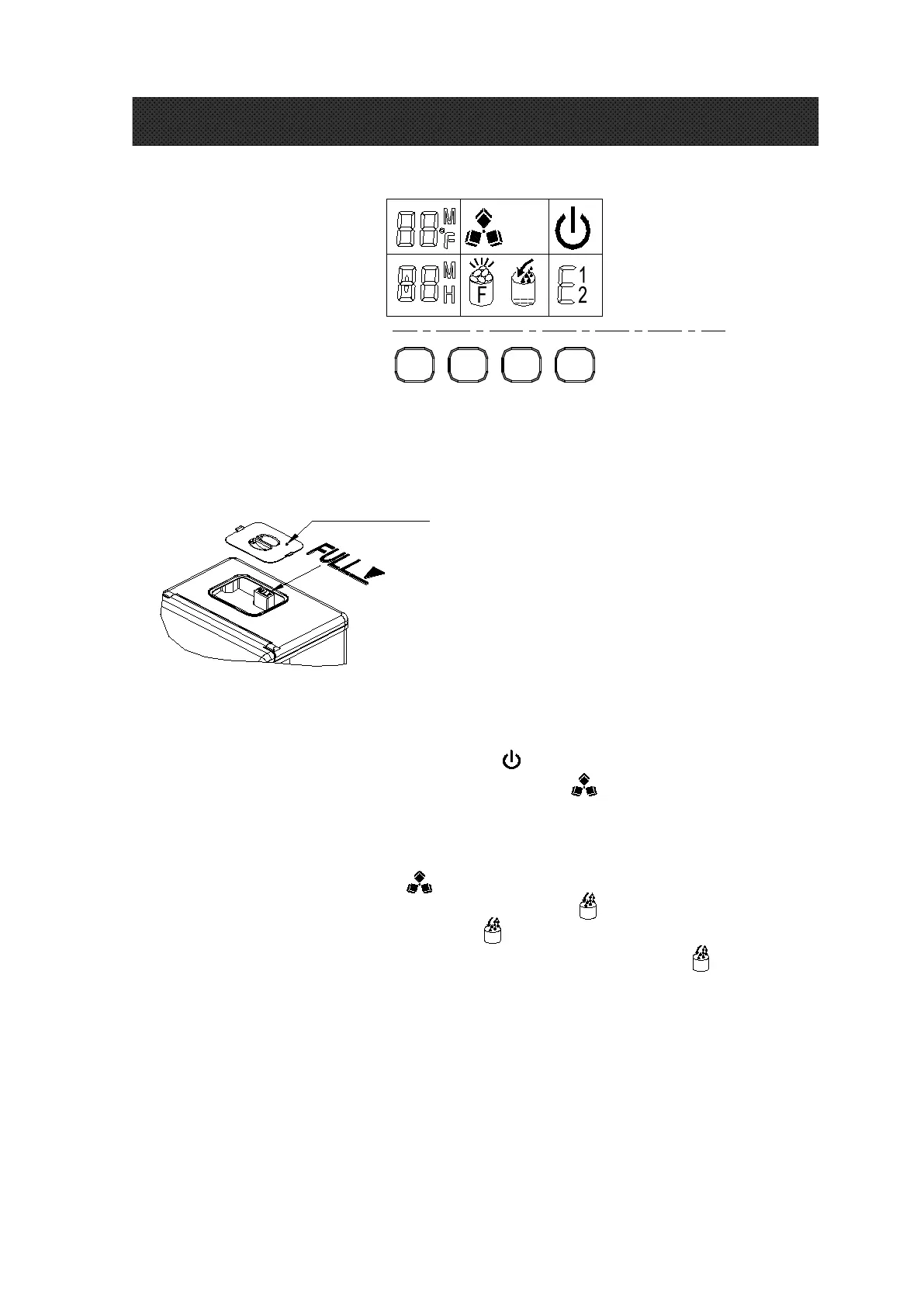
Operation panel and display area
1. Remove the cover of the water reservoir and pour potable water into water reservoir.
And be sure to keep water level below the max level with FULL mark displayed in following
picture. Then cloe the cover at once to avoid the entry of unwanted materials.
Cover for the
water reservoir
Warning: Do not pour water into the internal water tank located underneath the ice
basket. This tank is not big enough and will affect ice making performance.
2. When you plug in the unit, the power symbol< > will flash. Press the <ON/OFF> button
and it will start making ice cubes; the ice making symbol< > will keep be visible. The left
upper corner of display area will show the ambient temp, i.e: 80℉ means the ambient temp is
80 ℉. After several minutes, this area will show a flashing number, this is the ice making
countdown, i.e: 10M means the ice making process will finish in 10 minutes.
3. When ice maker harvest, this < > will flash. Water will flow from the top water reservoir
to bottom water tank through the solenoid valve, the < > will display. When the water
in the bottom water tank is full. The symbol < will shut off, then the next ice making cycle
start again. When there is no water in the water reservoir, the symbol < > will stay on.
Turn off the unit and fill water again, then restart the unit to make ice cubes. Or fill
water directly and wait 20mins, the unit will restart the process.
Note: The ice making cycle lasts about 13 to 25 minutes, depending on the room temperature.
During first use and based on initial water temperature, the ice-making time will be a little longer. In
extreme room temperatures ice-making time may vary, but will not exceed 35 minutes.
If you think the ice cubes are not thick enough, during ice making process press the <+> and <-> to
set the ice making times. Press one time and the ice making cycle will increase or
decrease one min, 6 minutes at most in either direction. This will start for the next cycle.
OPERATION AREA
DISPLAY
AREA
TIMER
ON/OFF
-
+


 To Next Page