7
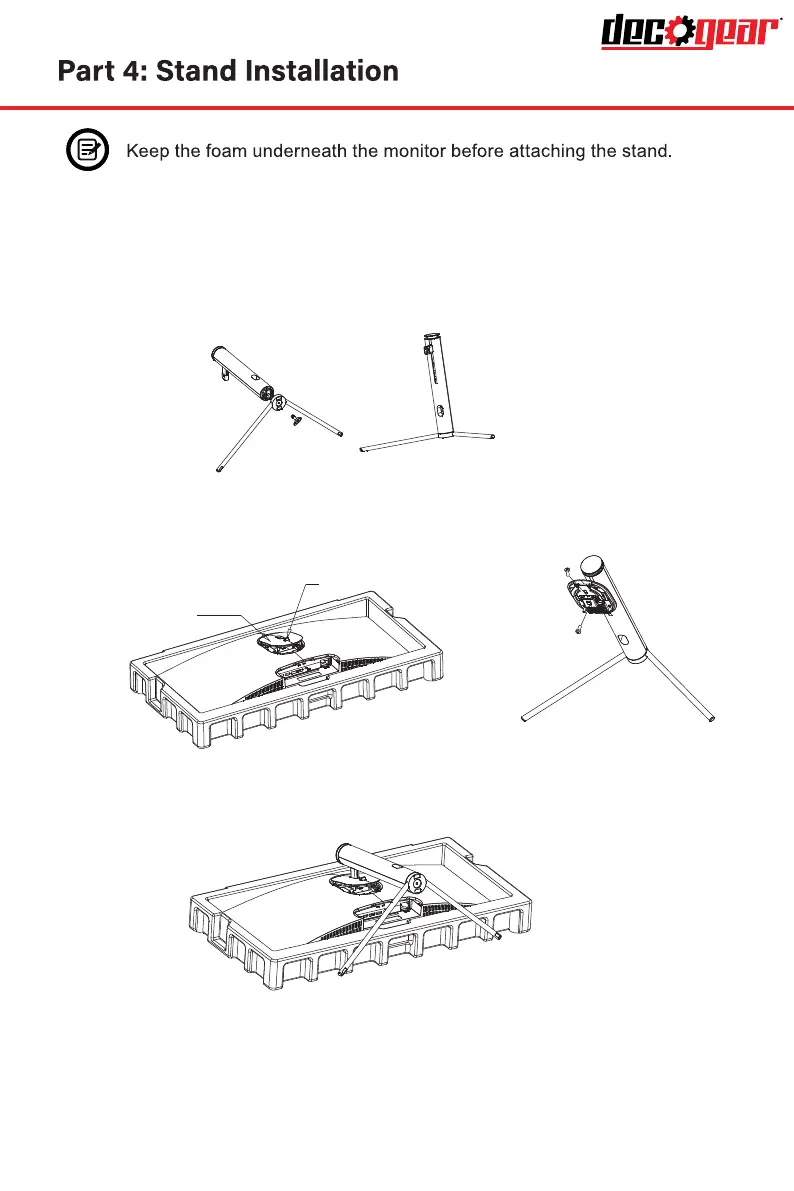
2. Take out the upper polfoam and the inner package bag, lower polyfoam place
on a desktop or table, keep the lower foam underneath the monitor.
3. See picture, fasten the stand stem and base with a screw.
1. Open the package and take out the product with foam still attached.
Gently place it on a desktop or table.
4. Press the button to remove the stand plate, Fix the stand plate into the stand
stem with the screw PM5*11mm.
5. Fix the whole assembled stand into the monitor, and check carefully to
make sure it is fastened.
6. Hold on the stand stem and stand the monitor up on a flat, level desktop or table.
Note: Don’t touch the screen during standing it up, to avoid screen being broken
stand plate
Button
Screw PM5*11
Screw PM5*11



 To Next Page