7
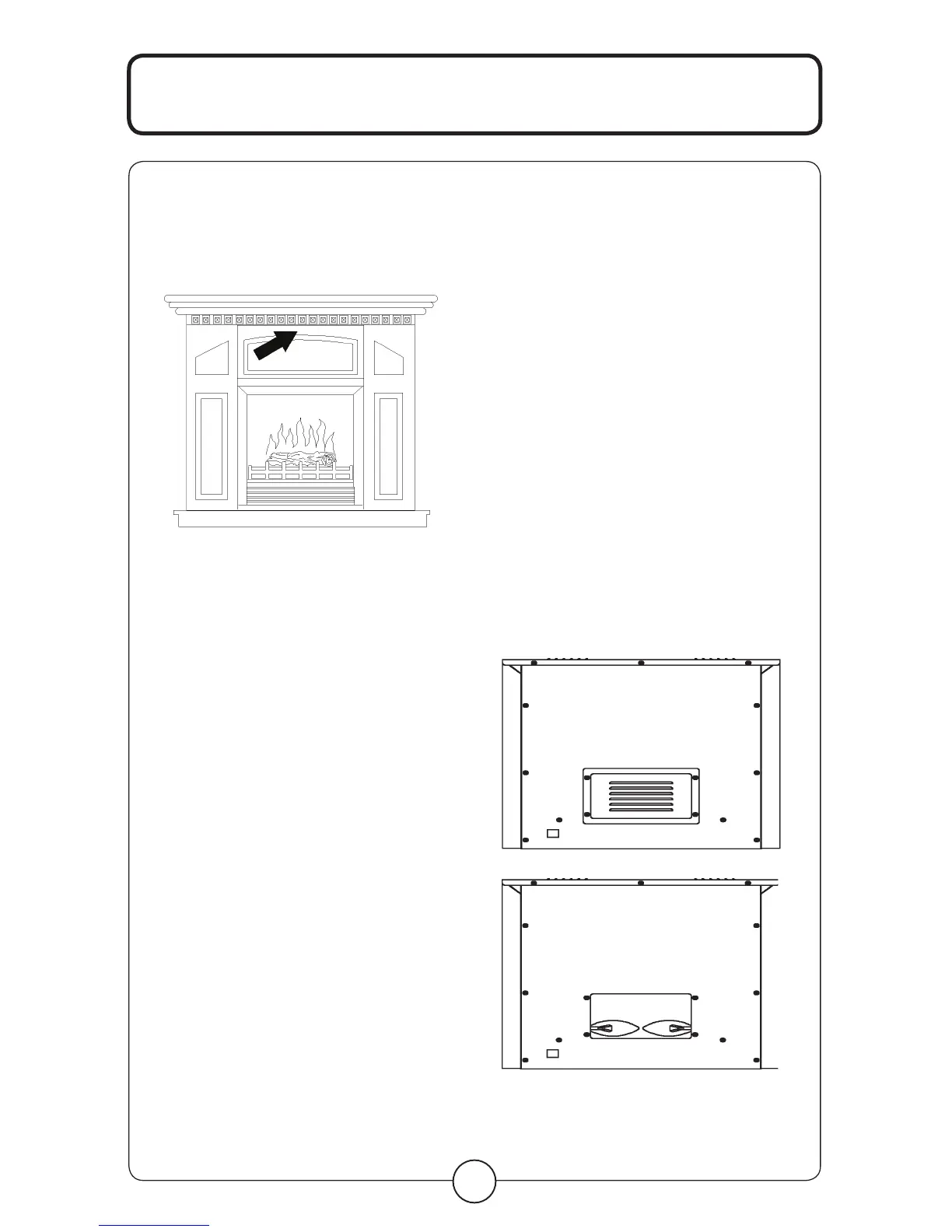
Push the top of UPPER FRONT panel to
loosen the door and pull to open the door.
See Fig. C
MAINTENANCE
WARNING
Disconnect power and unplug the power
cord before attempting any maintenance or
cleaning to reduce the risk of fire, electric
shock or damage to persons. The bulbs in
your unit can become extremely hot. Allow
at least 10 minutes between turning off the
unit and removing the light bulbs to avoid
the accidental burning of the skin.
RISK OF FIRE:
Do not exceed the
recommended bulb
wattage.
M A I N T E N A N C E
REPLACING THE
LIGHT BULBS
Step 1: Remove 4 screws on the back
of fireplace and remove the rear
cover of the unit.
Step 2: You will find 2 X 40W Type B-10
bulbs under log-set bed.
Step 3: Loosen and remove burnt
out bulb(s) and replace with
new bulb(s).
Step 4: Close the rear cover and secure
with the 4 screws.
Step 5: Plug in the unit.
fig. C



 To Next Page