charged at temperatures below 3°C / 37.4°F. Please take your Deeper Sonar to room temperature conditions
and resume charging.
A red light means there is a problem with charging. In this case, first please try a different charger and
cable. Next, please leave the device charging for a longer period (over 1 hour). If the light is still red, please
contact Support.
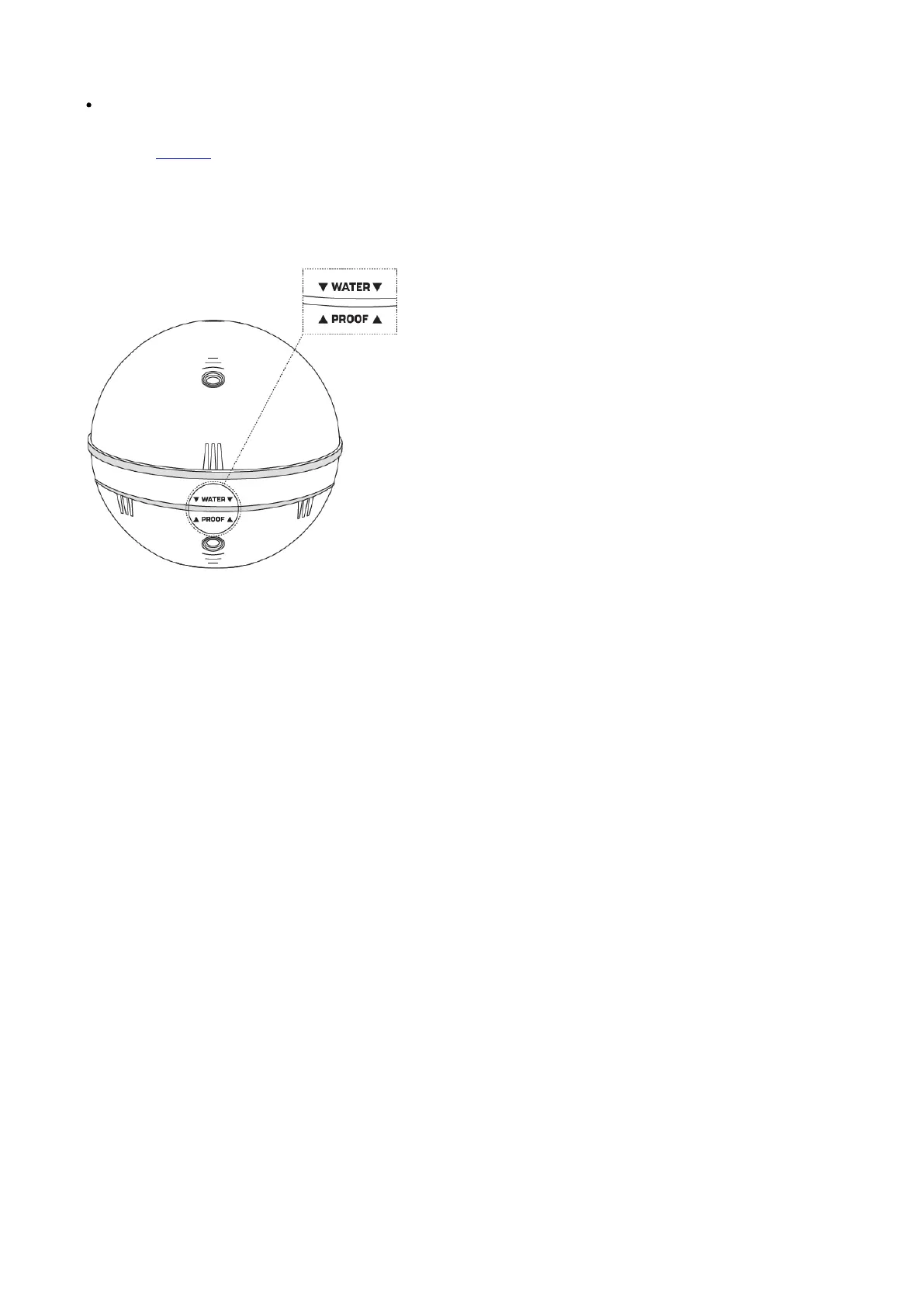
Once your device is charged, screw the top cover back on, ensuring it is closed tightly so that the words ‘Water’
and ‘Proof’ align perfectly.
ⓘ Never put your Deeper in water when it is connected to the charger cable. This could damage the device and any
damage will not be covered by the warranty. Always ensure the top cover is firmly closed and the Water Proof
marks are perfectly aligned before putting your Deeper Sonar in water.
ⓘMake sure that the threads of the Deeper top cover and body are always clean, do not attach the top cover if there
is sand or dirt on the thread of the top cover or the Deeper. Clean it first.
ⓘ Please note you can only connect to one Deeper Sonar at a time from your phone or tablet. And your Deeper
Sonar can only connect to one phone or tablet at a time.
How sonars work
Before you start using your Deeper device, it is important to understand some basic points about how sonars work.
1. Sonars scan in cones.


 To Next Page
 Loading...
