DFR-021D Phase Fail Relay
The DFR-021D is a single open-phase detector designed to identify and alarm open phases or load unbalance within a three-phase circuit. It achieves this by monitoring the current in the normal operating state. The device utilizes the MCT-A31 as an input converter to measure and detect the three-phase load current. The MCT-A31 takes the secondary current of the Main CT as its input, with an I/O current ratio of 3,000:1.
Technical Specifications
DFR-021D:
- Control Power: AC/DC 100 to 240V, 50/60Hz, < 3VA
- Rated Input: AC 1 to 160A (primary current of MCT), 3Phase, 50/60Hz
- Reference Current Setting: 1.0 to 10.0A (0.1 step)
- Unbalance Rate Setting: 10 to 90% (1 step)
- Start-Lock Time Setting: 1.0 to 60.0sec (0.5 step)
- Alarm Operation Time Setting: 1.0 to 60.0sec (0.5 step)
- CT Ratio Setting: 5 to 1,000A (5 step)
- Alarm Reset Setting: Auto / Manu
- Output Pulse Action Mode: Pulse / Latch
- Pulse Retention Time: 0.1 to 10.0sec (0.1 step)
- Motion Precision: ± 10% at setting value
- Motion Indication: LCD blinking red
- Insulation Resistance: More than 100M Ω with DC 500V Megger
- Insulation Strength: 2,000V AC rms 1 minute
- Surge / Impulse: IEC255-4: 5kV (1.2X50 μs) / IEC255-22-1: 2.5kV (1MHz)
- Case Material: LUPOY (Black Color) resin
- Output Contact: AC240V/DC30V, 16A
MCT-A31:
- Rated Input: AC 1 to 5A (secondary current of CT), 3Phase, 50/60Hz
- Rated Output: 5A: 1.667mA (3,000 : 1)
- Insulation Resistance: More than 100M Ω with DC 500V Megger
- Insulation Strength: 2,000V AC rms 1 minute
- Case Material: LUPOY (Black Color) resin
Usage Features
The DFR-021D features an intuitive display and a menu-driven interface for configuration.
Display Screen:
Upon power-up, the device alternately displays two screens every two seconds:
- The average value of the 3-phase input current.
- The current unbalance rate (%).
SET Menu:
The SET menu allows users to configure various operational parameters:
-
Reference Current Setting:
- Accessed by pressing the 'M' (Menu) key.
- The 'SET' indicator blinks, and 'CURRENT' blinks when 'SET' is pressed.
- Use 'A' to increase value, '▽' to decrease value.
- 'M' key shifts, 'SET' key saves.
- Range: 1.0 to 10.0A (0.1 step).
- This setting establishes the reference value for stabilized operating current calculation after motor start-up.
-
Unbalance Rate (%) Setting:
- Accessed by pressing '▽' from the Reference Current Setting screen.
- The 'SET' indicator blinks.
- Use 'A' to increase value, '▽' to decrease value.
- 'M' key shifts, 'SET' key saves.
- Range: 10 to 90% (1 step).
- The device operates if the unbalance rate exceeds the configured percentage based on the Reference Current.
-
Start-Lock Time Setting:
- Accessed by pressing '▽' from the Unbalance Rate Setting screen.
- The 'SET' indicator blinks, and 'TIME' and 'PICKUP' indicators are on.
- Use 'A' to increase value, '▽' to decrease value.
- 'M' key shifts, 'SET' key saves.
- Range: 1.0 to 60.0sec (0.5 step).
- This sets the stabilization time after motor start-up, during which unbalance operation is inactive.
-
Alarm Operation Time Setting:
- Accessed by pressing '▽' from the Start-Lock Setting screen.
- The 'SET' indicator blinks, and 'TIME' and 'TRIP' indicators are on.
- Use 'A' to increase value, '▽' to decrease value.
- 'M' key shifts, 'SET' key saves.
- Range: 1.0 to 60.0sec (0.5 step).
- This sets the delay time for unbalance operation.
-
CT Ratio Setting:
- Accessed by pressing '▽' from the Operation Time Setting screen.
- The 'SET' indicator blinks, and 'MODE' is on.
- Use 'A' to increase value, '▽' to decrease value.
- 'M' key shifts, 'SET' key saves.
- Range: 5 to 1,000A (5 step).
- This sets the CT ratio for the motor side.
-
Alarm Reset Setting:
- Accessed by pressing '▽' from the CT Ratio Setting screen.
- The 'SET' indicator blinks, and either 'AUTO' or 'MANU' is on.
- Use 'A' to increase value, '▽' to decrease value.
- 'M' key shifts, 'SET' key saves.
- Allows selection between automatic or manual alarm reset. Manual reset is performed by pressing the 'RESET' key.
-
Output Pulse Setting:
- Accessed by pressing '▽' from the Reset Setting screen.
- The 'SET' indicator blinks, and 'TIME' indicator blinks, showing 'PULS' and 'LACH'.
- Use 'A' to increase value, '▽' to decrease value.
- 'M' key shifts, 'SET' key saves.
- If Pulse Output is selected, the Pulse Retention Time must be set.
-
Pulse Retention Time Setting:
- Accessed by pressing '▽' from the Output Pulse Setting screen.
- The 'SET' indicator blinks, and 'TIME' is on.
- Use 'A' to increase value, '▽' to decrease value.
- 'M' key shifts, 'SET' key saves.
- Range: 0.1 to 10.0sec (0.1 step).
- This determines the duration for which the alarm output contact remains active.
Display upon Start-Lock Operation:
During an unbalance event, the 'PICKUP' indicator illuminates, and a count from 1 to 9 (at 0.1 scale) begins, corresponding to the time set in the Operation Time Setting. If the unbalance is resolved during this count, the display reverts to the normal screen.
Alarm Display:
If unbalance persists after the Start-Lock Count, the 'TRIP' indicator illuminates, and a count from 1 to 9 (at 0.1 scale) begins, corresponding to the Alarm Operation Time Setting. If the unbalance is resolved during this alarm count, the display reverts to the normal screen. After the alarm count, the LCD shows a blinking red backlight and cycles through three screens every second, displaying:
- The current before the unbalance.
- The unbalance rate (%).
- The operation time.
If manual return is set, pressing the 'RESET' key is required to restore the display.
Maintenance Features
TEST Mode:
The Self-Test Menu allows users to verify the integrity and operational condition of the circuit.
- To activate, press the 'SET' key and 'TEST' key simultaneously for 5 seconds. This design prevents accidental activation.
- The 'TRIP' indicator will illuminate, and the LCD will show a blinking red backlight. The output contact operates simultaneously during this test.
- To exit TEST mode and restore the status display and contacts, press the 'RESET' key. Note that only manual return is available for TEST RESET, regardless of the automatic reset setting.

 Need help?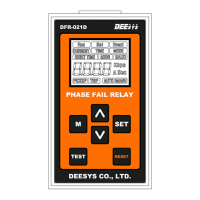

 To Next Page
 General