EasyManua.ls Logo

Defender FORSAGE DRIFT GT - User Manual

Defender FORSAGE DRIFT GT
4 pages
Print Icon
To Next Page IconTo Next Page
Loading...
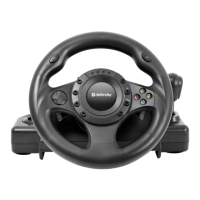
DEFENDER FORSAGE DRIFT GT
GAMING WHEEL
OPERATION MANUAL
Thank you for buying our product! Now you are the owner of the gaming wheel compatible to
PC, PlayStation2 PlayStation3. Please read the operation manual before using.
Peculiarities
1. Compatible to PlayStation2/PlayStation3
2. Compatible to Win98/ME/2000/XP/Vista/Windows 7
3. Automatic detection of game console
4. 2 axes, 12 active buttons
5. Gear box mode selection
6. Clamps to attach securely to the desktop
7. Automatic centering function
8. Sensitivity adjustment
9. Digital and analog modes in PS2
10. The button for instant shift to the PS3 menu
11. Realistic feedback effect
12. Fast button response
13. Rubberized coating and ergonomic design
Description
A. Steering wheel
1. Rotation angle 270 degree
The wheel analog output provides the feedback equal to the motion of the wheel itself. Please
do not try to rotate the wheel more than 270 degrees. It may damage the product.
2. Analog / Menu Button
In PlayStation2 such button allows to select between the analog and digital modes. In
PlayStation3 it provides the instant access to the main menu.
3. D-pad
Most standard joystick are equipped with such buttons, they are used to navigate and
execute the commands in the menu.
4. Active buttons
These buttons are set according to the game peculiarities the detail description of which is in
the setting menu.
5. Automatic centering function
This function is on automatically while connecting the product.
Note:
While connecting the wheel must be in starting position. If while connecting the steering
1
Question and Answer IconNeed help?

Do you have a question about the Defender FORSAGE DRIFT GT and is the answer not in the manual?

Summary

Peculiarities

Description

Steering wheel

Details the wheel's rotation, analog/menu button, D-pad, active buttons, and auto-centering.

Pedals

Explains pedal mapping for PS2, PS3, and PC, including button assignments for gas and brake.

Button description

Provides a visual guide and explanation for various buttons, axes, and functions on the gaming wheel.

Installation

Connecting the pedals to the steering wheel

Instructions on how to physically connect the pedal set to the main steering wheel unit.

Connecting the wheel to the video game console or PC

Steps for connecting the gaming wheel to consoles like PlayStation or computers.

Connecting to the USB port of PC

Guide on how to connect the wheel to a PC via USB, including driver installation.

System requirement for PC

Lists the necessary hardware and software specifications for PC compatibility.

Safety precautions

Important safety guidelines and warnings for using the gaming wheel.

Overview

This document describes the Defender Forsage Drift GT Gaming Wheel, an input device designed for an immersive racing experience across multiple platforms.

Function Description:

The Defender Forsage Drift GT Gaming Wheel is a versatile gaming peripheral compatible with PC, PlayStation 2, and PlayStation 3. It offers a realistic driving simulation with features designed to enhance gameplay. The device includes a steering wheel and a set of pedals (gas and brake).

Important Technical Specifications:

  • Compatibility: PlayStation 2, PlayStation 3, and PC (Windows 98/ME/2000/XP/Vista/Windows 7).
  • Input: 2 axes, 12 active buttons.
  • Steering Wheel Rotation: 270 degrees.
  • Pedals: L-Pedal (brake), R-Pedal (gas).
  • Feedback: Realistic force feedback effect.
  • Connectivity: USB for PC, specific ports for PlayStation 2/3.
  • PC System Requirements:
    • OS: Microsoft Windows 98/ME/2000/XP/Vista/7.
    • RAM: At least 32MB (64MB recommended) for Win 98/ME; at least 64MB (128MB recommended) for Win 2000/XP/Vista/7.
    • Disk Space: 32MB.
    • Other: CD-ROM drive, VGA monitor (256 colors).

Usage Features:

  • Automatic Detection: The wheel automatically detects the connected game console.
  • Gear Box Mode Selection: Allows for different gear shifting modes.
  • Desktop Mounting: Equipped with clamps for secure attachment to a desktop.
  • Automatic Centering: The steering wheel features an automatic centering function that activates upon connection. It's crucial to ensure the wheel is in the starting position during connection to avoid incorrect calibration.
  • Sensitivity Adjustment: A dedicated switch allows users to adjust the sensitivity level. A higher setting results in a more responsive wheel, where even slight rotations lead to intensive maneuvers in-game.
  • Digital and Analog Modes (PS2): On PlayStation 2, the "Analog / Menu Button" allows switching between analog and digital modes.
  • Instant PS3 Menu Access: On PlayStation 3, the "Analog / Menu Button" provides instant access to the main menu.
  • D-Pad: Standard D-pad for navigation and command execution in menus.
  • Active Buttons: 12 programmable buttons, configurable according to game specifics via the setting menu.
  • Pedal Configuration (PS3): By default, L-Pedal corresponds to "□" and R-Pedal to "x". This can be changed to L-Pedal="R2" and R-Pedal="L2" by simultaneously pressing and holding "SELECT" and "START" buttons for one second. This ensures compatibility with all games.
  • Fast Button Response: Designed for quick and precise input.
  • Ergonomic Design: Features a rubberized coating for comfortable use.

Installation:

  1. Pedal Connection: Connect the pedal plug to the dedicated port on the steering wheel.
  2. Console/PC Connection:
    • For PS2/PS3: Ensure the PlayStation console is switched off before connecting the wheel. Always connect the wheel to the port designated for a single player.
    • For PC: Install the driver from the included installation disk before connecting the wheel to the USB port. Follow the on-screen instructions.
  3. Wheel Position: Always ensure the steering wheel is in its starting (centered) position during connection to prevent the automatic centering system from fixing a wrong position.
  4. Fixing: Secure the wheel to a comfortable distance from the computer or TV using the clamps.

Maintenance Features / Safety Precautions:

  • Temperature: Avoid using the wheel in high temperatures or direct sunlight (recommended operating temperatures: 5°C to 35°C).
  • Environment: Keep liquids and dust away from the device.
  • Weight: Do not place heavy items on the device.
  • Disassembly: Do not attempt to open the device.
  • Cables: Do not twist or compress the cable.
  • Handling: Do not throw the device.
  • Compatibility Check: If experiencing problems with games, verify that the game's compatibility requirements align with the wheel's specifications.

Defender FORSAGE DRIFT GT Specifications

General IconGeneral
BrandDefender
ModelFORSAGE DRIFT GT
CategoryVideo Gaming Accessories
LanguageEnglish