10
TOUCH CONTROL FUNCTIONS
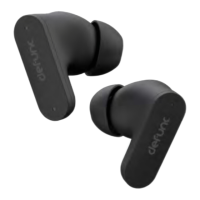
Tap or press the earbud touch area to control different functions.
Switch sound modes: Press the right earbud for 3 seconds to switch from
normal mode to transparency mode. 3 seconds again to switch from
transparency mode to active noise cancellation (ANC) and 3 seconds again
to go back to normal mode. Press the left earbud for 3 seconds to switch
from music mode to gaming mode, and 3 seconds again to go back to
music mode. If the earbuds are turned off, the last setting will be the default
when turned back on.
Power on: Open the charging case for auto-power on or press each
earbud for 3 seconds.
Power off: Put the earbuds back in the charging case and close the cap.
Or press either earbud for 5 seconds. Auto-power off will be
activated after 5-6 minutes without a connected device.
Play/pause: Double-tap either earbud.
Next track: Triple-tap the right earbud.
Previous track: Triple-tap the left earbud.
Volume increase: Tap the right earbud once.
Volume decrease: Tap the left earbud once.
Answer/end phone call: Double-tap either earbud.
Reject call: Press either earbud for 2 seconds.
Voice assistant: Press the left earbud for 3 seconds to activate/deactivate.
Note that most Android phones automatically deactivate the voice assistant.


 To Next Page