/
35 / 46
EN
Operation of the product
3. For the new Rinse Aid setting, set the
Programme Selection Knob to the
relevant position.
4. Press Start / Pause / Cancel key for
once to store the level you have
selected.
5. When you set the Programme Selection
Knob to the “Off” position again, the
machine will enter the normal mode.
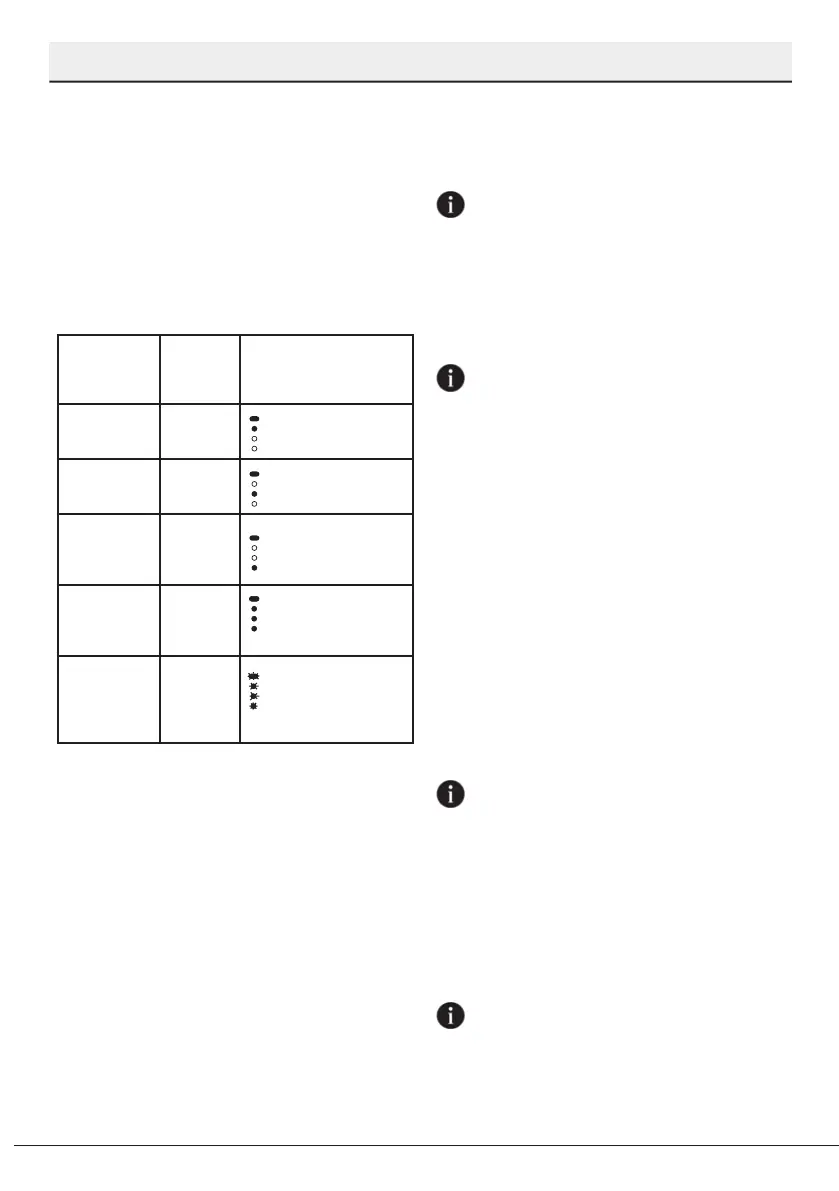
Rinse Aid
Amount
Position of
program
selection
knob
Rinse Aid Adjument
Indicator
1 dose of
rinse aid is
dispensed.
1
Washing lamp
on the panel will
illuminate.
2 doses of
rinse aid are
dispensed.
2
Drying lamp on
the panel will
illuminate.
3 doses of
rinse aid are
dispensed.
3
End lamp on
the panel will
illuminate.
4 doses of
rinse aid are
dispensed.
4
Washing, Drying
and End lamps
on the panel will
illuminate.
No rinse aid
dispensed
in washing
programme.
5
Washing, Drying
and End lamps
on the panel will
ash at 1-second
intervals.
Programmng the Washng
Perod
Time Delay key
You may delay the start time of the program
up to 9 hours with the Delay key. Press the
Start / Pause / Cancel key after delaying.
Program starts automatically when the
delay period is over.
With each press on the Delay key, 3-6-9
hours indicators start to flash. When you
press the Start / Pause / Cancel key while
the delay indicator you have selected is
flashing, the delay indicator illuminated
continuously and the count down starts.
When the delay period is over, the delay
indicator is turned off and the washing
program you have selected starts.
The delay indicators are turned off
if you press the Delay key while the
9-hour delay lamp is flashing. When
you press the Start / Pause / Cancel key
while the delay indicators are off, the
program you have selected shall start
without delay.
You may monitor the remaining time on
the delay from the delay indicators. For
example: When you select the 9-hour
delay option, 6-hour indicator shall
start to illuminate when the remaining
time for the start of washing program
is 6 hours.
To cancel the delay function:
When you press the Start / Pause / Cancel
key for 3 seconds while the delay function
is active, the delay process shall be
cancelled.
Startng of the program
Press the Start / Pause / Cancel key to start
your machine after selecting the program
and additional functions.
Machine softens the water as per the
hardness of the mains water. The
washing period may differ due to the
water softening process. Moreover,
program period may also change while
the program is being executed as a
result of the room temperature, mains
water temperature and the amount of
dishes.
Care to avoid opening of the door
while the machine is being operated.
If you need to open the door, stop the
machine by pressing the Start / Pause
/ Cancel key. Then open the door of



 To Next Page