Page 6
Curtains and slip covers
x Remove from the dryer while slightly damp.
x Iron and hang immediately.
Chenille and candlewick bedspreads
x Dry only one bedspread at a time.
x Remove as much moisture as possible before
placing the bedspread in the dryer.
x Dry completely.
Lingerie
x Remove soon after drying to minimize creasing.
x To avoid tangling, it is recommended that nylon
stockings are enclosed in a nylon mesh bag during
drying.
Knitted synthetics
x Use a dry towel as a buffer, rubbing surfaces may
cause small beads to form, (Turn these articles
inside out).
Corduroy
x Turn inside out.
x Remove while still damp and re-shape.
Silks, Dacron's and Nylons
x Place in the dryer separately.
x Do not over-dry.
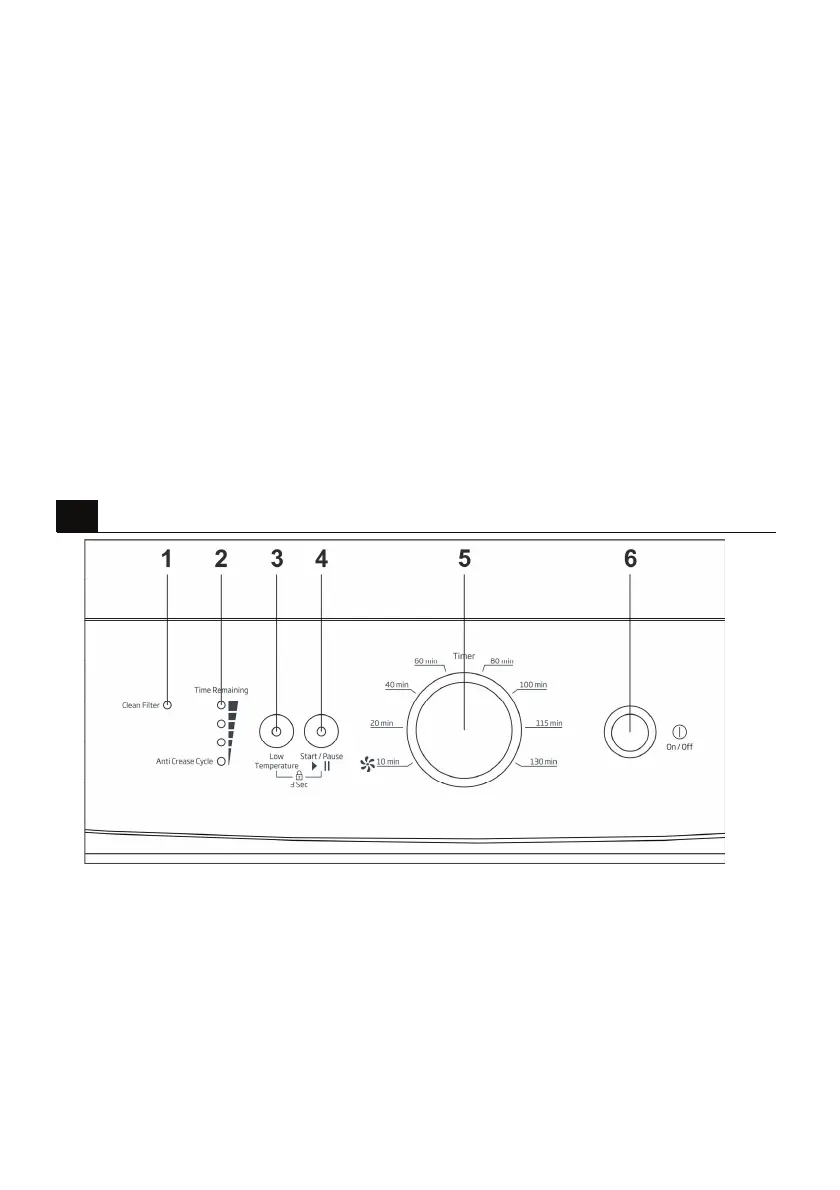
Control panel
4
1. Filter cleaning warning light
Warning light turns on when the filter is full.
2. Programme follow-up indicator
Used to follow-up the progress of the current
programme.
3. Low temperature
Used to dry in low temperatures.
4. Start/Pause button
Used to start and pause the programme.
5. Timer selection knob
Used to select a programme.
6. On/Off button
Used to switch the machine on and off.


 To Next Page