EasyManua.ls Logo

DEGEN DE1125 - User Manual

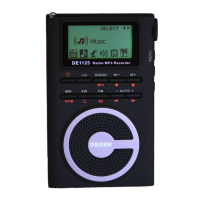
DEGEN DE1125
18 pages
Print Icon
To Next Page IconTo Next Page
Loading...
426
www.degen.com.cn
A-2 3
518053 0755-26918325
0755-26912618 26918406 26918409
: postmaster@degen.com.cn
DE1125
OPERATION MANUAL
..
MP3
FM STEREO MW SW DSP RECEIVER
MP3 PLAYER
DIGITAL RECORDER
SHENZHEN DEGEN ELECTRONICS CO., LTD.
Address: Building 26, Cuigang Industrial Zone, Fuyong Town, Baoan District,
Shenzhen, Guangdong, China
Website: www.degen.com.cn
Office: West Wing, 3/F, A-2 Block, East Industrial Zone, Overseas Chinese Town,
Nanshan District, Shenzhen, Guangdong, China
Postalcode: 518053 Fax: 86-755-26918325
Tel: 86-755-26912618 26918406 26918409
Email: postmaster@degen.com.cn
FM MW
SW
REC
DEL
/
Radio
MP3
V V
AUTO
Voice
Question and Answer IconNeed help?

Do you have a question about the DEGEN DE1125 and is the answer not in the manual?

Overview

This document describes the DEGEN DE1125, a versatile portable device that combines the functionalities of an FM stereo, MW, and SW DSP receiver, an MP3 player, and a digital recorder. The manual provides comprehensive instructions for its operation, maintenance, and troubleshooting, ensuring users can fully utilize its features.

Function Description

The DEGEN DE1125 serves as a multi-functional entertainment and utility device. Its primary functions include:

  • Radio Receiver: It operates as an FM stereo, medium wave (MW), and shortwave (SW) DSP receiver. This allows users to tune into a wide range of radio stations across different frequency bands. The DSP (Digital Signal Processing) technology enhances reception clarity and stability.
  • MP3 Player: The device can play MP3 and WMA audio files, offering a portable music playback solution. Users can transfer music files from a PC to the device's internal memory.
  • Digital Recorder: It features a digital recorder function, enabling users to record radio programs or ambient sounds. These recordings are saved as WAV files in the device's internal memory.

Usage Features

The DE1125 is designed with user-friendly features for easy operation:

Power Management:

  • Battery Installation: The device uses a BL-5C type rechargeable lithium battery. Instructions are provided for correct battery installation, emphasizing polarity and the importance of turning off the device before changing batteries to preserve clock settings.
  • Battery Level Indicator: The display shows the current battery charge level, indicating whether it's full, slightly low, needs charging, or is critically low.
  • Battery Charging: The device can be charged using a dedicated charger or by connecting it to a PC via a USB cable. Charging status is indicated by a flowing battery symbol on the display. It's recommended to avoid listening to the radio during AC charging due to potential interference.
  • First Use Battery Cycle: For optimal battery performance and longevity, it's advised to perform three full charge-discharge cycles when using a new battery for the first time.

On/Off Functions:

  • Quick On/Off: The device can be quickly turned on or off with a short press of the power button.
  • Sleep Timer: Users can set a sleep timer from 5 to 90 minutes. The radio will automatically turn off after the set time, indicated by a sleep timer icon and a countdown on the display.
  • Automatic Standby (MP3/Voice Mode): In MP3 or Voice modes, the device will automatically enter standby after 5 minutes of inactivity to conserve power.
  • Scheduled Power On: A specific time can be set for the device to automatically turn on. This feature is configured in the off state, allowing users to select the hour and minute for activation. The device can be set to turn on to radio, MP3 playback, or recording mode.
  • Key Lock: To prevent accidental operations, the device features a key lock switch. When activated, a lock symbol appears on the display.

Radio Operation:

  • Mode Selection: To listen to the radio, the mode selector switch must be set to "Radio."
  • Band Selection: Users can select FM, MW, or SW bands using dedicated buttons. For shortwave, repeated presses cycle through different meter bands.
  • Volume Control: Volume can be adjusted using dedicated buttons, with the level indicated on the display.
  • Antenna Usage: The telescopic rod antenna is effective for FM and SW reception, and its length can be adjusted for optimal signal strength. The internal magnetic antenna is used for MW reception, and rotating the device can improve signal quality.
  • Tuning Methods:
    • Button Tuning: Frequencies can be adjusted by pressing the tuning buttons. A long press initiates a quick scan until a strong signal is found.
    • Knob Tuning: The tuning knob on the side allows for fine-tuning, with signal strength indicated on the display.
    • Automatic Tuning Storage (ATS): The ATS function automatically scans and stores strong stations within the current band. FM and SW stations are stored from address 50, and MW stations from address 15.
    • Manual Station Storage: Users can manually store a tuned frequency to a specific memory address. The device supports 100 FM, 25 MW, and 100 SW stations.
    • Recalling Stored Stations: Stored stations can be recalled by navigating through the memory addresses using the tuning knob or dedicated buttons.
    • Deleting Stored Stations: Individual or all stored stations within a band can be deleted.
  • FM Frequency Range Selection: Users can switch between FM frequency ranges of 64-108MHz and 87-108MHz in the off state.
  • TV Audio: The device has four pre-set TV audio frequencies (64.25MHz, 72.25MHz, 83.75MHz, 91.75MHz) within the FM band, which can be restored if accidentally deleted.
  • Recording Radio Programs: Users can record currently playing radio programs by long-pressing the record button. The recording time and file ID are displayed. Recordings are saved as WAV files.

Date and Time Settings:

  • Date Adjustment: The date (year, month, day) can be set in the off state.
  • Time Adjustment: The time (hour, minute) can be set in the off state.
  • Clock Format: Users can choose between 12-hour and 24-hour clock formats. The 12-hour format displays "P" for PM.

Alarm Settings:

  • Alarm Setting: An alarm can be set to ring for 1 to 90 minutes. The alarm time is set using the tuning knob in the off state.
  • Alarm Cancellation: The alarm can be cancelled by setting the alarm time to 00.

PC Connection and Music Playback:

  • Connecting to PC: The device connects to a PC via a USB cable, appearing as a removable disk. This allows for transferring MP3/WMA music files.
  • File Management: Users can create folders on the device to organize music files. The device assigns numerical IDs to folders and music files based on their creation/transfer order.
  • Music Playback: In MP3 mode, users can play, pause, fast forward, rewind, and select tracks.
  • Playback Modes: Single track repeat, folder repeat, and all tracks repeat modes are available.
  • A-B Repeat: A specific segment of a song can be set for A-B repeat playback.
  • Deleting Music Files: Individual music files can be deleted directly from the device. Multiple files or entire folders can be deleted via a PC connection.

Recording Functionality:

  • One-Touch Recording: In Voice mode, users can initiate environmental sound recording with a short press of the record button. Recording time and file ID are displayed.
  • Scheduled Recording: Recording can be scheduled to start at a specific time, similar to the scheduled power-on feature.
  • Recording Limits: The device supports up to 99 recording files.
  • Playback of Recordings: Recorded files can be played back in Voice mode.
  • A-B Repeat for Recordings: A specific segment of a recording can be set for A-B repeat.
  • Deleting Recordings: Individual recording files can be deleted from the device. Multiple files can be deleted via a PC connection.

Support Features:

  • Kickstand: The device includes a kickstand on the back for upright placement on a surface.

Maintenance Features

The manual provides essential guidelines for maintaining the DEGEN DE1125 to ensure its longevity and optimal performance:

  • Keep Dry: The device should be kept dry, as moisture can corrode internal components. If it gets wet, remove the battery and allow it to dry completely before reinserting.
  • Avoid Dust and Dirt: Do not use or store the device in dusty or dirty environments, as this can damage removable parts and electronic components.
  • Temperature Control: Avoid storing the device in excessively hot or cold places. High temperatures can shorten the lifespan of components, while extreme cold can cause condensation and damage the circuit board.
  • Handle with Care: Do not drop, knock, or shake the device.
  • Cleaning: Clean the display with a soft, dry cloth. Avoid using harsh chemicals, cleaning agents, or strong detergents.

Battery Safety Information:

  • Operating Environment: Use the battery in normal indoor conditions (20±5℃, 65±20% relative humidity).
  • Charging Cycles: The battery supports approximately 300 charge-discharge cycles under normal conditions.
  • Avoid Heat and High Pressure: Keep the battery away from heat sources and high pressure. Prevent children from playing with the battery.
  • Prevent Short Circuits: Do not short-circuit the battery's positive and negative terminals. Do not disassemble the battery or store it in damp conditions.
  • Long-Term Storage: For long-term storage, keep the battery partially charged and insulated with non-conductive material in a cool, dry place.
  • Disposal: Dispose of old batteries safely and properly. Do not throw them into fire or water.
  • Avoid Direct Sunlight: Do not use the battery in strong sunlight, as this can cause overheating, deformation, smoke, or reduced lifespan.
  • Inspect Before Use: If the battery appears abnormal (e.g., dirty, odorous) during first use, discontinue use and return it to the vendor.
  • Keep Out of Reach of Children: Store batteries where children cannot easily access them.
  • Leakage Prevention: Avoid contact with leaking battery fluid. If contact occurs, rinse with clean water immediately to prevent skin irritation.

Hazard Warnings (Battery):

  • No Disassembly: Do not disassemble the battery, as it contains protective circuits. Improper disassembly can lead to overheating, smoke, deformation, combustion, or explosion.
  • No Short Circuits: Do not connect the positive and negative terminals with metal. Do not store the battery with metal objects. Short circuits can cause excessive current, damaging the battery and leading to overheating, smoke, deformation, combustion, or explosion.
  • No Heating or Incineration: Do not heat or incinerate the battery. Heating or burning can melt the battery's insulation, disable safety functions, or ignite the electrolyte, leading to overheating, smoke, deformation, combustion, or explosion.

Troubleshooting:

The manual includes a section for common issues and their solutions, such as:

  • Poor Reception: Large noise in MW/SW bands, weak signals, or interference from power sources.
  • Charging Failure: Loose connections, damaged battery, or incorrect mode during PC charging.
  • Recording Issues: Program errors requiring reformatting, or memory full.
  • PC Connection Problems: Incompatibility, incorrect mode, or outdated firmware.
  • Playback Freezes: Incompatible file formats or corrupted files.
  • Device Reset: Removing the battery for a few minutes can resolve program errors.

DEGEN DE1125 Specifications

General IconGeneral
Tuning TypeDigital
Frequency Range FM87.5 - 108 MHz
Frequency Range AM522-1710 kHz
DisplayLCD
SpeakerBuilt-in
Additional FeaturesMP3 playback, SD card slot, USB port, Alarm clock, Sleep timer

Related product manuals