GETTING STARTED WITH YOURINSTRUCTION MANUAL
1 Connect the power cable and power up CAD4TBbox
2 Connect the power cable and power up the router
3 Install the Wi-Fi antenna on the router
4 Use the network cable to connect the CAD4TBbox to
the router (if applicable connect the second port of the
router to the X-ray workstation):
POWER UP
YOUR CAD4TB
YOUR CAD4TB
COMPONENTS
CAD4TBBOX ROUTER NETWORK CABLE
SAMSUNG GALAXY
TAB A10
EXTERNAL HARD DRIVE
(OPTIONAL)
4

 Need help?
 General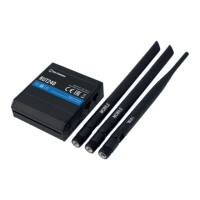

 To Next Page