EasyManua.ls Logo

Dell 3300MP - Lamp Replacement

Dell 3300MP
40 pages
Print Icon
To Next Page IconTo Next Page
To Previous Page IconTo Previous Page
Loading...
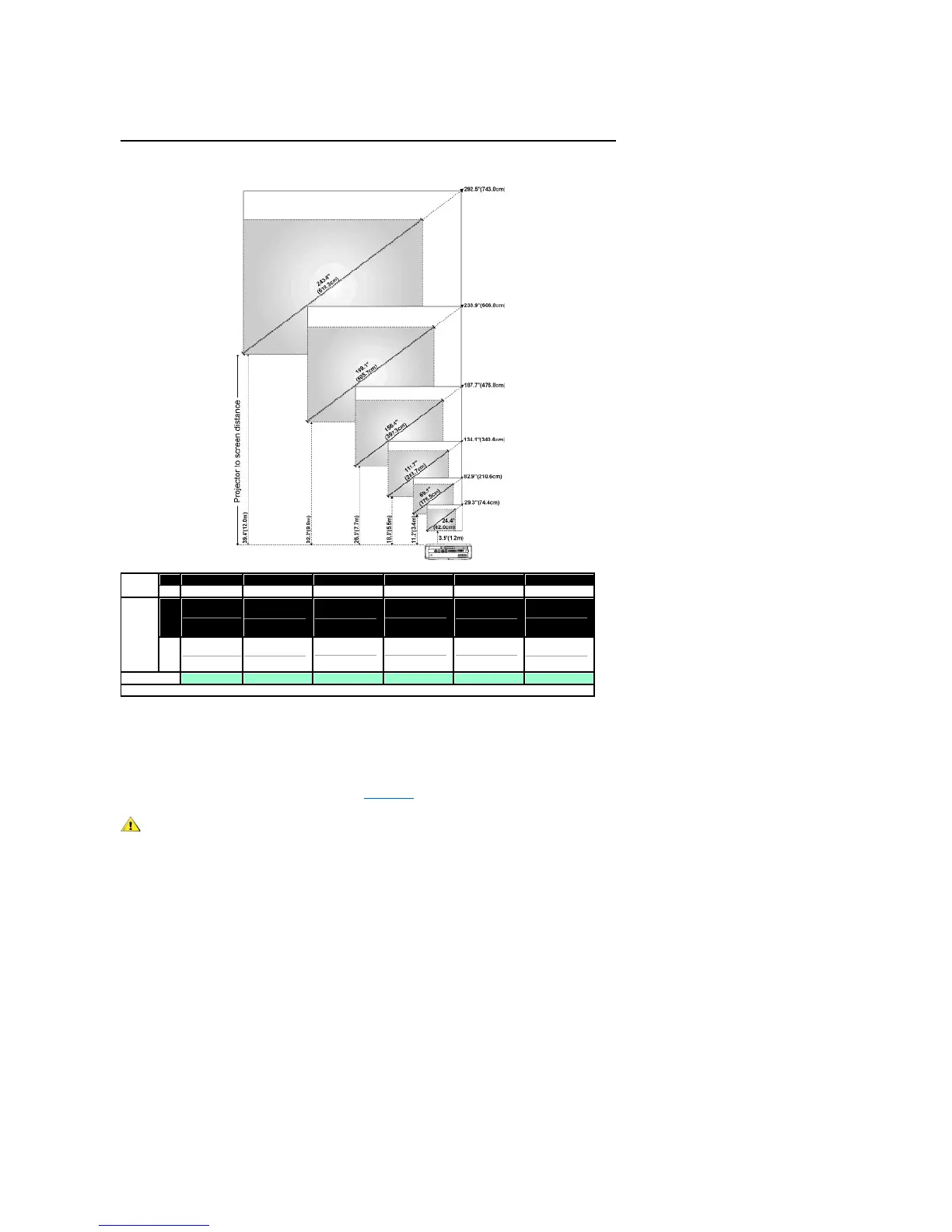
Adjusting Projection Image Size

Screen
(Diagonal)
Max.
29.3" (74.4cm)
82.9" (210.6cm)
134.1" (340.6cm)
187.7" (476.8cm)
238.9" (606.8cm)
292.5" (743.0cm)
Min.
24.4" (62.0cm)
69.1" (175.5cm)
111.7" (283.7cm)
156.4" (397.3cm)
199.1" (505.7cm)
243.8" (619.3cm)
Screen
Size
Max.
(WxH)
23.4"X17.6"
(59.4cmX44.7cm)
66.3"X49.7"
(168.4cmX126.2cm)
107.3"X80.4"
(272.5cmX204.2cm)
150.2"X112.6"
(381.5cmX286.0cm)
191.1"X143.3"
(485.4cmX364.0cm)
234.0"X175.5"
(594.4cmX445.8cm)
Min.
(WxH)
19.5"X14.6"
(49.5cmX37.1cm)
55.3"X41.4"
(140.5cmX105.2cm)
89.4"X67.0"
(227.1cmX170.2cm)
125.1"X93.9"
(317.8cmX238.5cm)
159.3"X119.5"
(404.6cmX303.5cm)
195.0"X146.3"
(495.3cmX371.6cm)
Distance
3.9'(1.2m)
11.2'(3.4m)
18.0'(5.5m)
25.3'(7.7m)
32.2'(9.8m)
39.4'(12.0m)
* This graph is for user reference only.
Changing the Lamp
Replace the lamp when you see " Lamp is approaching the end of its useful life in
full power operation. Replacement suggested!" message on the screen by carefully
following these instructions. If this problem persists, contact Dell.
CAUTION: The lamp becomes very hot with in use. Do not attempt to replace the lamp after use until the projector
has been allowed to cool down for at least 30 minutes.
Lamp Changing Procedure:

Related product manuals