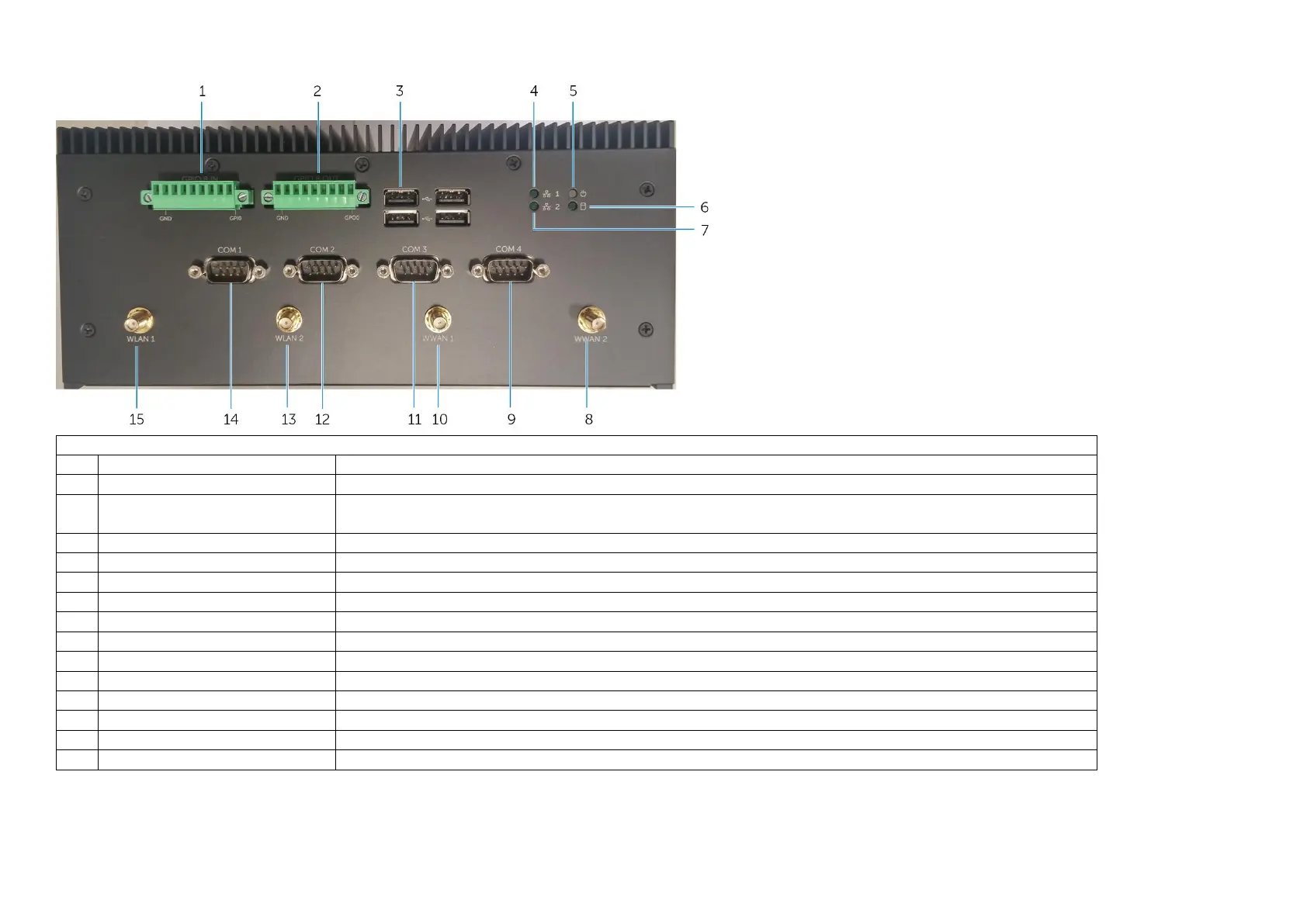
Bottom - View
Connect to a GPIO-out enabled device or dongles
Connect to a GPIO-in enabled device or dongles
Connect peripherals such as storage devices, printers, displays and so on. Provides data transfer
speeds up to 480 Mbps.
Indicates the connectivity status and network activity of the network port one.
Indicates the power‑state of the system.
Hard-drive activity light
Turns on when the system reads from or writes to the hard drive.
Indicates the connectivity status and network activity of the network port two.
Mobile broadband antenna port 2
Connect an antenna to increase the range and strength of the mobile broadband signals.
Connect a RS232 cable to configure the system.
Mobile broadband antenna port 1
Connect an antenna to increase the range and strength of the mobile broadband signals.
Connect a RS232 cable to configure the system.
Connect a RS232 cable to configure the system.
Connect a wireless antenna to increase the range and strength of the wireless signals.
Connect a RS232 cable to configure the system.
Connect a wireless antenna to increase the range and strength of the wireless signals.


 To Next Page