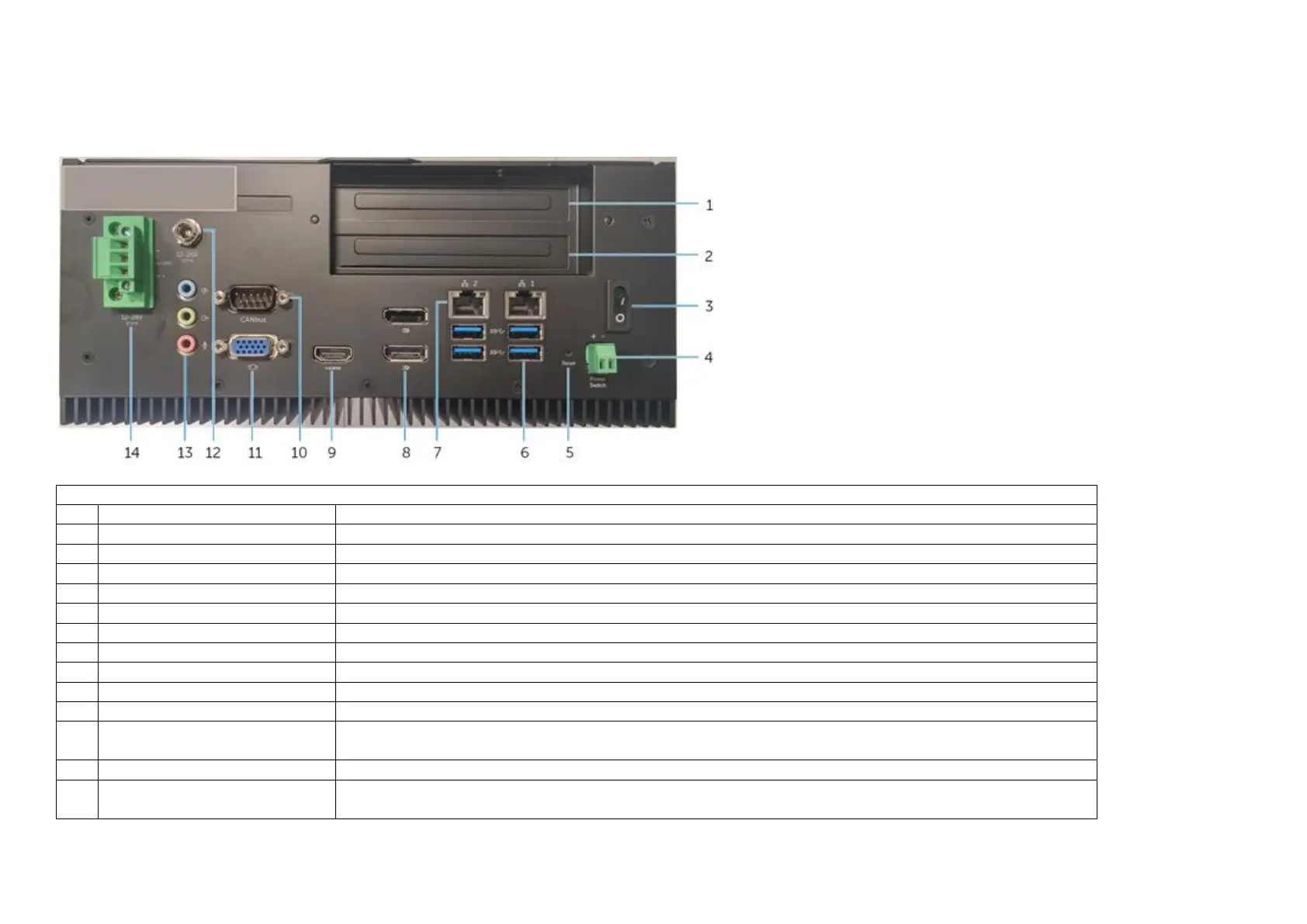
System Features
Top - View
Supports an optional PCIe discrete graphics solution, 20-25W(12V/2A) graphics card and 10W thermal capability.
Supports an optional PCIe discrete graphics solution, 20-25W(12V/2A) graphics card and 10W thermal capability.
Press and hold for 2 seconds to turn on the system if it is turned off.
Install a remote power switch
Press and hold to hard reset the system
Connect peripherals such as storage devices, printers, displays and so on. Provides data transfer speeds up to 5 Gbps.
Connect an Ethernet (RJ45) cable from a router or a broadband modem for network or internet access.
Connect a Monitor or another DisplayPort enabled device. Provides video and audio output.
Connect a Monitor or another HDMI‑in enabled device. Provides video and audio output.
Connect to a CANbus port enabled device or dongles.
Connect a monitor or another VGA enabled device. Provides video output.
+19.5 VDC power port (barrel
connector)
Connect a +19.5 VDC power connector to provide power to your system
Connect a speaker, a headphone, a microphone, or a headphone and microphone combo (headset).
+24V DC power Phoenix connector
Connect a +24V DC power Phoenix connector to provide power to your system


 To Next Page