To Next Page

M
michael35Sep 10, 2025
What to do if no memory/RAM is detected on Dell Inspiron 3910?
- GGregory BrownSep 12, 2025
If your Dell Desktop displays 'No Memory/RAM detected', check the memory modules to ensure they are properly installed.

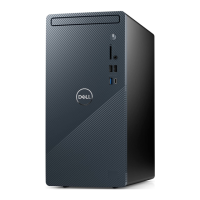
What to do if no memory/RAM is detected on Dell Inspiron 3910?
If your Dell Desktop displays 'No Memory/RAM detected', check the memory modules to ensure they are properly installed.
What to do if timeout waiting on ME to reply to HECI message on Dell Inspiron 3910 Desktop?
If your Dell Desktop shows 'Timeout waiting on ME to reply to HECI message', power cycle the computer and try again.
How to fix Memory DIMM power rail failure on Dell Inspiron 3910 Desktop?
If your Dell Desktop has a Memory DIMM power rail failure, check the power connections to the memory modules.
 General
| Processor | 12th Generation Intel Core i3/i5/i7 |
|---|---|
| Operating System | Windows 11 Home/Pro |
| Wireless | Wi-Fi 6, Bluetooth 5.2 |
| RAM | Up to 64GB DDR4 |
| Storage | Up to 1TB SSD |
| Graphics | Intel UHD Graphics |
| Optical Drive | DVD-RW |
| Ports (Front) | USB 3.2 Gen 1, USB 2.0, Audio |
| Ports (Rear) | HDMI, Ethernet, Audio |
| Ports | USB 2.0, USB 3.2 Gen 1, USB 3.2 Gen 2, HDMI, DisplayPort, Ethernet, Audio |