
 Need help?
Do you have a question about the Dell Inspiron 5591 2n1 and is the answer not in the manual?
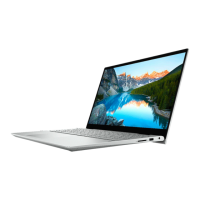
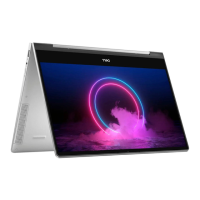
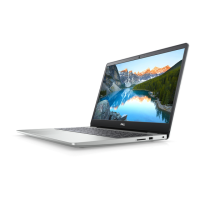
The Dell Inspiron 5591 2n1 is a versatile 2-in-1 laptop designed for various uses, offering multiple modes of operation including Notebook, Tablet, Stand, and Tent. This device combines the functionality of a laptop with the flexibility of a tablet, making it suitable for both productivity and entertainment.
The Inspiron 5591 2n1 has a sleek design with dimensions that make it portable yet functional. Its height ranges from 18.72 mm (0.74 in.) at the front to 19.95 mm (0.79 in.) at the rear. The width is 363.86 mm (14.33 in.), and the depth is 250 mm (9.84 in.). The maximum weight of the computer is 2.19 kg (4.82 lb), though this can vary based on the specific configuration and manufacturing variability.
The laptop is powered by 10th Generation Intel Core processors, offering options including Intel Core i3, i5, and i7. All processor options have a wattage of 15 W. The Intel Core i3 features 2 cores and 4 threads with speeds up to 4.1 GHz, 4 MB L3 cache, and Intel UHD Graphics. The Intel Core i5 offers 4 cores and 8 threads with speeds up to 4.2 GHz, 6 MB L3 cache, and Intel UHD Graphics. The Intel Core i7 also has 4 cores and 8 threads but boasts speeds up to 4.9 GHz, 8 MB L3 cache, and Intel UHD Graphics. The chipset is a CML-U PCH-LP.
The Inspiron 5591 2n1 supports Windows 10 Home (64-bit) and Windows 10 Professional (64-bit).
The device features two SODIMM slots for DDR4 memory, operating at a speed of 2666 MHz. It supports a maximum memory of 16 GB and a minimum of 4 GB. Memory per slot can be 4 GB, 8 GB, or 16 GB. Various configurations are supported, including single-channel (1 x 4 GB, 1 x 8 GB, 1 x 16 GB) and dual-channel (2 x 4 GB, 4 GB + 8 GB, 2 x 8 GB) setups. The DRAM bus width is 64-bit, and it includes 32 MB of Flash EPROM. The PCIe bus operates at up to Gen3.
For storage, the Inspiron 5591 2n1 offers flexible options. It can accommodate a 2.5-inch hard drive with SATA AHCI 6 Gbps interface, providing up to 2 TB of storage. Alternatively, it supports M.2 2230/2242/2280 solid-state drives with a PCIe Gen 3.0x4 NVMe interface, offering up to 1 TB of storage. An optional M.2 2280 Intel Optane Memory H10 with solid-state storage is also available, utilizing PCIe Gen3.0x2 for NVMe and Intel Optane Memory, providing up to 512 GB of QLC NAND Flash storage and up to 32 GB of Optane memory. Intel Optane Memory H10 functions as both a non-volatile storage cache/accelerator and a solid-state storage solution, enhancing read/write speeds for hard-drive storage. This feature requires a 9th Generation or higher Intel Core i3/i5/i7 processor, Windows 10 64-bit (Anniversary Update or higher), and Intel Rapid Storage Technology driver version 17.2 or higher.
The laptop is equipped with a variety of ports for connectivity. On the right side, it has an SD-card slot and a USB 2.0 port (480 Mbps data transfer). A wedge-shaped security-cable slot is also present. On the left side, there's a power-adapter port, a USB 3.1 Gen 1 (Type-C) port with Power Delivery/DisplayPort (up to 15 W power output, requires a USB Type-C to DisplayPort adapter for DisplayPort devices), an HDMI 1.4b port, two USB 3.1 Gen 1 ports (5 Gbps data transfer), and a headset port.
For wireless connectivity, the Inspiron 5591 2n1 offers two wireless module options: Intel 9462 and Intel 9560. Both support dual-band 2.4 GHz/5 GHz Wi-Fi 802.11a/b/g, Wi-Fi 4 (802.11n), Wi-Fi 5 (802.11ac), and Bluetooth 5.0. The Intel 9462 offers transfer rates up to 433 Mbps, while the Intel 9560 goes up to 867 Mbps. Both modules support 64-bit/128-bit WEP, AES-CCMP, and TKIP encryption.
The audio system features Realtek High Definition Audio with a Realtek ALC3204 controller. It supports stereo conversion and high-definition audio through an internal interface. External audio is handled via a headset combo connector. The device includes two speakers with an internal speaker amplifier (audio codec integrated). The speaker output averages 2 W and peaks at 2.5 W. External volume controls are managed via media-control shortcut keys. A digital-array microphone provides sound input.
The display is a 15-inch FHD touch panel with wide viewing angles and a luminance of 200 nits. The active area dimensions are 344.16 mm (13.6 in.) in height, 193.59 mm (7.60 in.) in width, and 394.87 mm (15.6 in.) diagonally. It has a native resolution of 1920 x 1080, resulting in 2.07 megapixels and 141 pixels per inch (PPI). The contrast ratio is a minimum of 700:1, with a maximum response time of 35 milliseconds rise/fall and a refresh rate of 60 Hz. Horizontal and vertical viewing angles are +/- 85 degrees. The pixel pitch is 0.179. Maximum power consumption is 4.2 W. The display has a glossy finish and supports touch input.
The laptop includes one HD fixed-focus front camera with CMOS sensor technology. It has a still image resolution of 0.92 megapixels (HD) and a video resolution of 1280 x 720 (HD) at 30 fps. The camera has a 78.6-degree diagonal viewing angle. A camera-status light indicates when the camera is in use. Left and right microphones provide digital sound input for audio recording and voice calls.
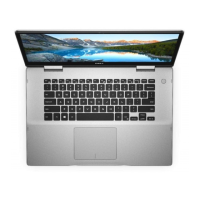
The touchpad has a resolution of 1229 horizontal and 929 vertical. Its dimensions are 105 mm (4.13 in.) horizontal and 80 mm (3.15 in.) vertical. It supports standard touchpad gestures for Windows 10, including tap to left-click and two-finger tap to right-click. Dedicated left-click and right-click areas are also present.
The keyboard is available in standard and backlit options. It features a QWERTY layout with 80 keys for United States and Canada, 81 keys for United Kingdom, and 84 keys for Japan. The key pitch is 19.05 mm (X) and 18.05 mm (Y). Some keys have two symbols for alternate characters or secondary functions, accessible via Shift or Fn keys. The primary behavior of function keys (F1-F12) can be customized in the BIOS setup program.
The power adapter is a 45 W unit with a 4.5 mm x 2.9 mm connector. It accepts an input voltage of 100 VAC-240 VAC at 50 Hz-60 Hz, with a maximum input current of 1.30 A. The continuous output current is 2.31 A, and the rated output voltage is 19.50 VDC. The battery is a 3-cell "smart" lithium-ion/polymer (42 WHr) with a voltage of 11.40 VDC and a maximum weight of 0.2 kg (0.44 lb). Its dimensions are 5.90 mm (0.23 in.) height, 184.15 mm (7.25 in.) width, and 97.15 mm (3.82 in.) depth. The operating temperature range for the battery is 0°C to 35°C (32°F to 95°F), and storage temperature is -40°C to 65°C (-40°F to 149°F). Operating time varies, but charging time is approximately 5.5 hours when the computer is off. The Dell Power Manager application allows control over charging time, duration, start, and end times. The battery has an approximate life span of 300 discharge/charge cycles. A CR-2032 coin-cell battery is also included.
An optional capacitive fingerprint reader is available, with a sensor resolution of 108 pixels x 88 pixels. The sensor area is 5.49 mm x 4.47 mm, and the pixel size is 114 x 114 pixels. This allows for secure login by placing a finger on the power button.
The computer is designed to operate within a temperature range of 0°C to 35°C (32°F to 95°F) and can be stored from -40°C to 65°C (-40°F to 149°F). Relative humidity for operation is 10% to 90% (non-condensing), and for storage, it's 0% to 95% (non-condensing). Vibration (maximum) is 0.66 GRMS during operation and 1.30 GRMS during storage. Shock (maximum) is 110 G† during operation (hard drive in use) and 160 G‡ during storage (hard drive head parked). Altitude (maximum) for operation is -15.2 m to 3,048 m (-50 ft to 10,000 ft), and for storage, it's -15.2 m to 10,668 m (-50 ft to 35,000 ft). The airborne contaminant level is G1 as defined by ISA-S71.04-1985.
The Inspiron 5591 2n1 is designed for ease of use. To set up, simply connect the power adapter and press the power button. The system guides users through Windows setup, recommending network connection for updates and either signing in with a Microsoft account or creating an offline account. Dell provides several pre-installed applications like My Dell (centralized location for key Dell apps, help articles, warranty status, and updates), SupportAssist (pro-actively checks hardware/software health, OS recovery, and warranty renewal), and Dell Update (critical fixes and device drivers). Dell Digital Delivery allows downloading purchased software not pre-installed. The power button can be customized in Windows. The power and battery-status light indicates charging status and can also be used for system diagnostics.
For support and maintenance, Dell offers various resources. Users can find information on Dell products and services at www.dell.com. The My Dell app and SupportAssist provide tools for system health checks and troubleshooting. Dell Update ensures the system has the latest drivers and fixes. Dell's knowledge base (www.dell.com/support) offers articles on product specifications, operating system, setup, data backup, troubleshooting, diagnostics, factory restore, and BIOS information. For direct assistance, users can contact Dell for sales, technical support, or customer service via www.dell.com/contactdell. Contact information can also be found on purchase invoices or product catalogs if an internet connection is unavailable.



 To Next Page
 General