
 Need help?
Do you have a question about the Dell Inspiron 7586 and is the answer not in the manual?
Steps for connecting power, initial Windows setup, and network configuration for the Inspiron 7586.
Locating and utilizing pre-installed Dell software such as My Dell and SupportAssist for system management.
Procedure for creating a bootable USB recovery drive to troubleshoot and restore Windows operating system.
Identification of ports and connectors on the right (SD card, USB) and left (Power, HDMI, USB-C) sides.
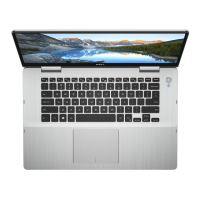
Details on the base of the laptop, including touchpad, left/right click areas, and power button with fingerprint reader.
Identification of display elements (microphones, camera) and bottom components (speakers, service tag).
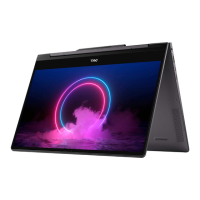
Visual guide to the different operational modes of the Inspiron 7586: Notebook, Tablet, Stand, and Tent.
Covers physical dimensions, weight, processor details, and chipset specifications for the Inspiron 7586.
Details the supported operating system and comprehensive memory specifications including type, speed, and capacity.
Lists external and internal ports, connectors, and wireless module specifications for connectivity.
Provides specifications for audio systems, storage types, and the media-card reader.
Details keyboard layout, camera specifications, and touchpad resolution and gestures.
Covers power adapter specs, battery details (type, capacity, life), and display panel specifications.
Details discrete and integrated graphics, fingerprint reader, and computer environment operating limits.
Information on accessing product documentation, troubleshooting guides, and Dell's knowledge base.
How to contact Dell for sales, technical support, and customer service inquiries.
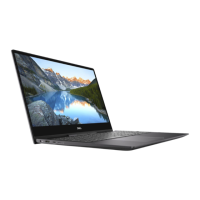
The Dell Inspiron 7586 is a versatile 2-in-1 laptop designed for a range of uses, from standard notebook tasks to tablet-style interaction. Its convertible design allows it to adapt to various modes, including Notebook, Tablet, Stand, and Tent, providing flexibility for work, entertainment, and presentations.
The Inspiron 7586 serves as a personal computer, offering standard computing functionalities such as web browsing, document creation, media consumption, and communication. It features an integrated camera and microphones for video conferencing and recording. Audio output is provided by left and right speakers, with an internal speaker amplifier for enhanced sound. The device supports external displays through an HDMI port and a USB 3.1 Gen 1 (Type-C) port with Power Delivery/DisplayPort capabilities, allowing users to extend their workspace or connect to larger screens.
For data storage, the Inspiron 7586 includes options for a 2.5-inch hard drive and an M.2 2280/2230 solid-state drive. It also supports Intel Optane memory, which functions as a storage accelerator to improve system responsiveness. A media-card reader is integrated for convenient access to data from SD cards.
Connectivity options include USB 3.1 Gen 1 ports for connecting peripherals like external storage and printers, and a USB 3.1 Gen 1 (Type-C) port that supports both data transfer and power delivery, enabling faster charging for compatible devices. Wireless communication is handled by an Intel wireless module supporting Wi-Fi 802.11a/b/g/n/ac and Bluetooth 5.0.
The device is powered by a power adapter connected to a dedicated port, and it includes a battery for portable use. A power and battery-status light indicates the battery's charge status and hard-drive activity.
The Inspiron 7586 is designed for intuitive interaction. The touchpad provides a responsive surface for navigation, with distinct left-click and right-click areas. It supports various touchpad gestures for Windows 10, enhancing user efficiency. The keyboard is backlit, making it suitable for use in low-light conditions, and features a QWERTY layout. Shortcut keys provide quick access to functions such as volume control, media playback, display switching, search, keyboard backlight toggle, brightness adjustment, wireless control, scroll lock, Fn-key lock, pause/break, sleep, system request, and the application menu.
A notable feature is the power button, which integrates a fingerprint reader for secure and convenient login. Users can customize the power-button behavior in Windows to suit their preferences. The display is a touch-enabled panel, available in Full HD or Ultra HD, with support for an MPP Pen (sold separately) for more precise input. The display also includes a camera and dual microphones for video calls and voice commands. The camera-status light indicates when the camera is active.
The 2-in-1 design allows for multiple usage scenarios:
Dell provides several pre-installed applications to enhance the user experience. "My Dell" serves as a centralized hub for Dell applications, help articles, warranty information, and software updates. "SupportAssist" proactively checks the computer's hardware and software health and offers troubleshooting tools. "Dell Update" ensures the device has the latest critical fixes and drivers. "Dell Digital Delivery" facilitates the download of purchased software applications.
The Inspiron 7586 incorporates features and resources to aid in maintenance and troubleshooting. Users are encouraged to create a USB recovery drive for Windows, which can be used to troubleshoot and fix problems with the operating system. Dell's SupportAssist includes an OS Recovery tool for system issues.
For ongoing updates, Dell Update automatically provides critical fixes and device drivers. The Dell Power Manager application allows users to control battery charging time, duration, and start/end times, which can help prolong battery life.
In case of issues, Dell offers extensive self-help resources. The Dell support website (www.dell.com/support) provides access to troubleshooting information, user manuals, product specifications, technical help blogs, drivers, and software updates. The "Knowledge Base" on the support site contains articles covering a wide range of computer concerns. Users can identify their product using the Service Tag number or Product ID to access relevant documentation, including the "Me and My Dell" manual.
For direct assistance, Dell provides contact information for sales, technical support, and customer service, with availability varying by country/region. If an internet connection is unavailable, contact information can typically be found on the purchase invoice, packing slip, bill, or Dell product catalog. The device's internal components, such as memory and storage, are designed for potential upgrades or replacements, as indicated by the memory slots and M.2 slots.
 General
| Processor | 8th Generation Intel Core i5-8265U or i7-8565U |
|---|---|
| Display | 15.6-inch FHD (1920 x 1080) IPS Touchscreen |
| RAM | 8GB/16GB DDR4, 2400MHz |
| Storage | 256GB/512GB PCIe NVMe SSD |
| Graphics | Intel UHD Graphics 620 |
| Operating System | Windows 10 Home |
| Ports | 2 x USB 3.1 |
| Wireless | 802.11ac Wi-Fi, Bluetooth 4.2 |
| Webcam | 720p HD |
| Audio | Waves MaxxAudio Pro |
| Weight | 4.41 lbs (2.0 kg) |




 To Next Page