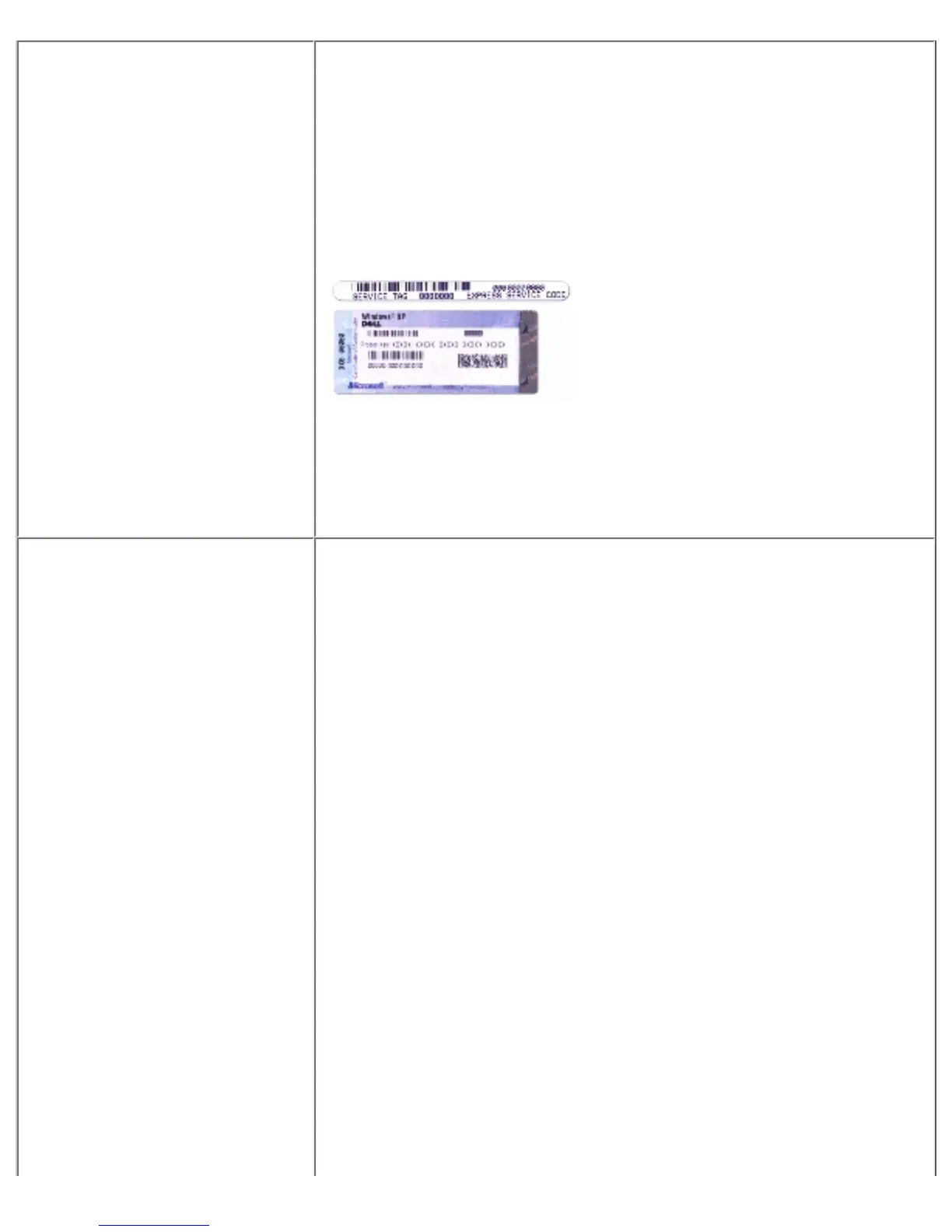
● Service Tag and
Express Service Code
● Microsoft Windows
License Label
Service Tag and Microsoft® Windows® License
These labels are located on the bottom of your computer.
● Use the Service Tag to identify your computer when you use
support.dell.com or contact support. It is recommended
that you keep a copy of the Service Tag in a secure location
in case your computer is lost or stolen.
● Enter the Express Service Code to direct your call when
contacting support.
● Solutions
Troubleshooting hints
and tips, articles from
technicians, and online
courses, frequently
asked questions
● Community Online
discussion with other
Dell customers
● Upgrades Upgrade
information for
components, such as
memory, the hard
drive, and the
operating system
● Customer Care Contact
information, service call
and order status,
warranty, and repair
information
● Service and support
Service call status and
support history, service
contract, online
discussions with support
● Reference Computer
documentation, details
on my computer
configuration, product
specifications, and
Dell Support Website support.dell.com
NOTE: Select your region to view the appropriate support site.
To download Notebook System Software:
file:///S|/Integration%20Specialist/Hardware%20Docu...on/Kim%20&%20Jay/Dell%20Laptops/D620UG/findinfo.htm (3 of 5) [12/4/2008 10:53:58 AM]














 To Next Page