EasyManua.ls Logo

Dell Latitude D820 - About Your Computer; Front View

Dell Latitude D820
102 pages
Print Icon
To Next Page IconTo Next Page
To Previous Page IconTo Previous Page
Loading...
Back to Contents Page
About Your Computer
Dell™Latitude™D820User'sGuide
Front View
Left Side View
Right Side View
Back View
Bottom View
Front View
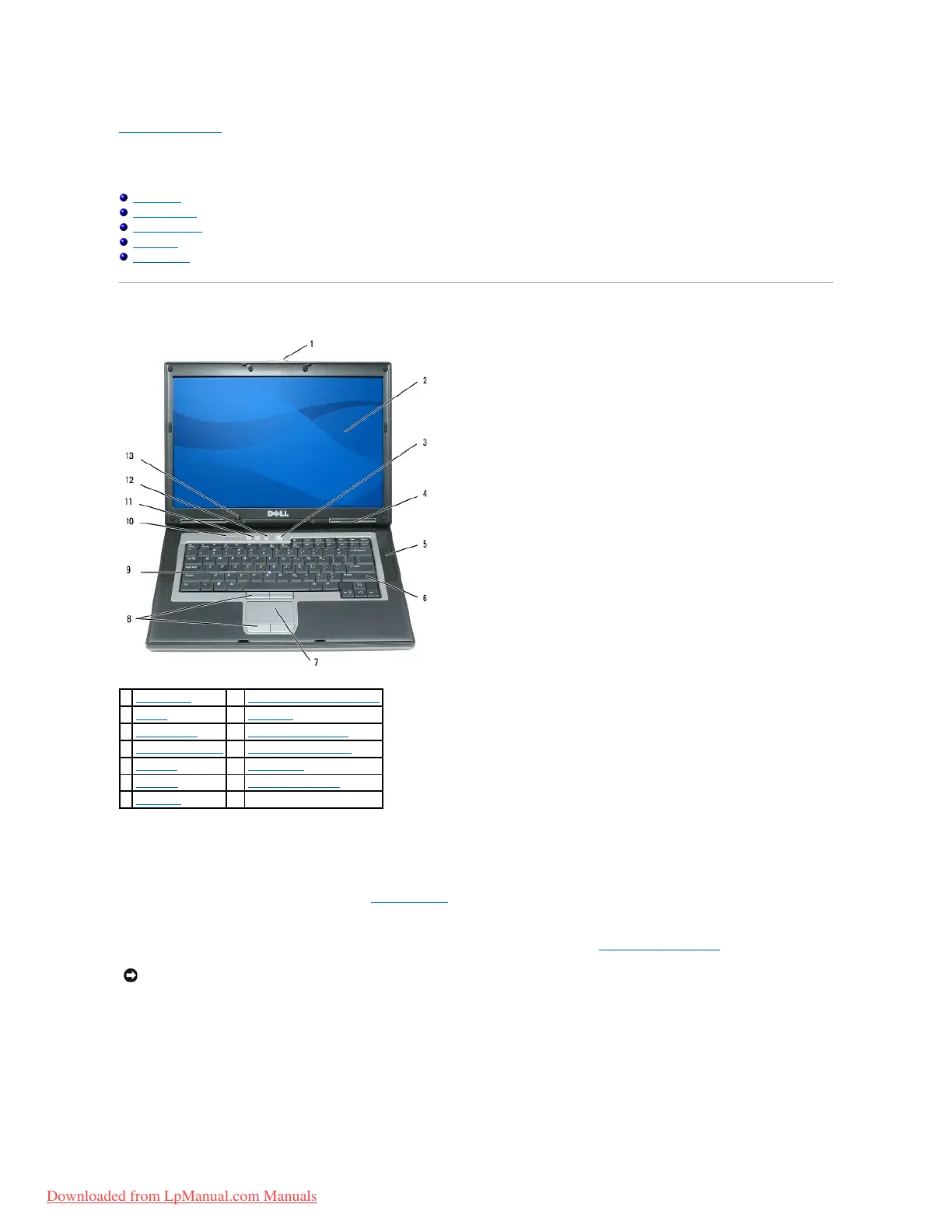
display latch Keeps the display closed.
display For more information about your display, see Using the Display.
power button Press the power button to turn on the computer or exit a power management mode (see Power Management Modes).
If the computer stops responding, press and hold the power button until the computer turns off completely (which may take several seconds).
device status lights

1
display latch
8
touch pad/track stick buttons
2
display
9
track stick
3
power button
10
keyboard status lights
4
device status lights
11
volume control buttons
5
speakers (2)
12
mute button
6
keyboard
13
ambient light sensor
7
touch pad
NOTICE: To avoid losing data, turn off your computer by performing a Microsoft®Windows®operating system shutdown rather than by pressing the
power button.
Downloaded from LpManual.com Manuals

Table of Contents

Other manuals for Dell Latitude D820

Related product manuals