Views of XPS 15 9530
Right
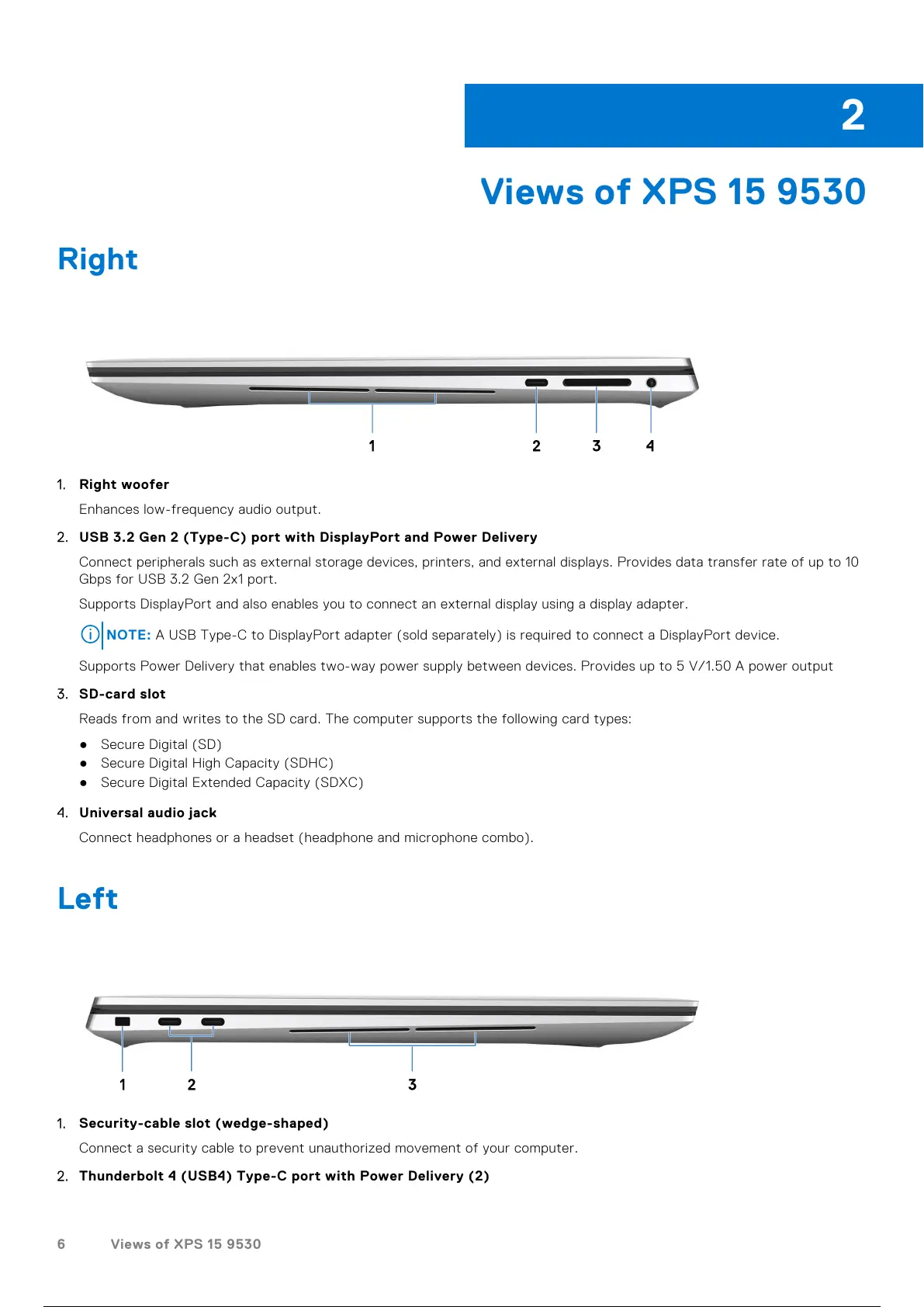
1. Right woofer
Enhances low-frequency audio output.
2. USB 3.2 Gen 2 (Type-C) port with DisplayPort and Power Delivery
Connect peripherals such as external storage devices, printers, and external displays. Provides data transfer rate of up to 10
Gbps for USB 3.2 Gen 2x1 port.
Supports DisplayPort and also enables you to connect an external display using a display adapter.
NOTE: A USB Type-C to DisplayPort adapter (sold separately) is required to connect a DisplayPort device.
Supports Power Delivery that enables two-way power supply between devices. Provides up to 5 V/1.50 A power output
3. SD-card slot
Reads from and writes to the SD card. The computer supports the following card types:
● Secure Digital (SD)
● Secure Digital High Capacity (SDHC)
● Secure Digital Extended Capacity (SDXC)
4. Universal audio jack
Connect headphones or a headset (headphone and microphone combo).
Left
1. Security-cable slot (wedge-shaped)
Connect a security cable to prevent unauthorized movement of your computer.
2. Thunderbolt 4 (USB4) Type-C port with Power Delivery (2)
2
6 Views of XPS 15 9530
7 / 25 6 / 23 7 / 25



 To Next Page