Expanded Video Mode
When working in MS-DOS® text mode, you can select the font used to display text. Press
<Fn><F7> to toggle between regular video mode (serif font) and expanded video mode (a serif
font with extra leading). In expanded video mode, items in resolutions other than 800 x 600
expand to fill the screen, which is useful if you are working in 800 x 600 resolution on a
12.1-inch super video graphics array (SVGA) display.
NOTE: You may have difficulty using the display fonts feature with MS-DOS programs
that use downloaded fonts. For optimum video performance in these cases, do not use
expanded video mode.
Video Drivers and Video Resolution
The Dell-installed video drivers work with the operating system to let you customize the video
resolution, number of screen colors, and refresh rate of your display.
NOTE: The Dell-installed video drivers are designed to offer the best performance on
your computer. Dell recommends that you use only these drivers with your
factory-installed operating system.
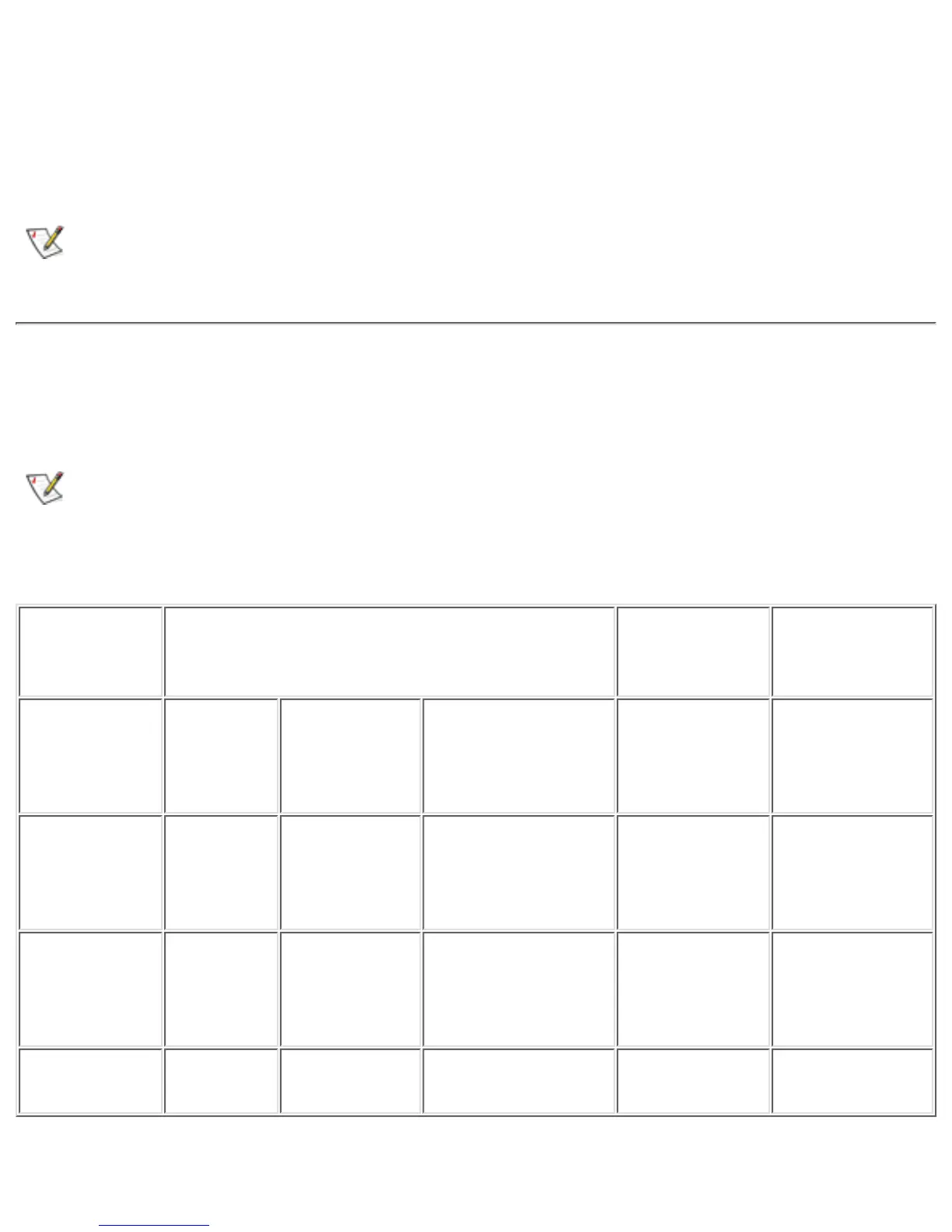
Table 2. Combinations of Resolutions and Colors Supported
Resolution Color Options
Display
Refresh
Rate
External
Monitor
Refresh Rate
640 x 480 256
colors
High Color
(16-bit)
(65,536
colors)
True Color
(24-bit)
(1,677,721 colors)
60 Hz 60, 75, or 85
Hz
800 x 600 256
colors
High Color
(16-bit)
(65,536
colors)
True Color
(24-bit)
(1,677,721 colors)
60 Hz 60, 75, or 85
Hz
1024 x 768* 256
colors
High Color
(16-bit)
(65,536
colors)
True Color
(24-bit)
(1,677,721 colors)
60 Hz 60, 75, or 85
Hz
1280 x 1024* 256
colors
N/A N/A 60 Hz 60 Hz
* At this resolution, only an external monitor will display the entire desktop area at one time. For
file:///C|/Documents and Settings/Administrator/De...w Web/Documentation/LS/LS User's Guide/display.htm (2 of 6) [5/31/2000 9:46:13 AM]










 To Next Page