15
Keyboard
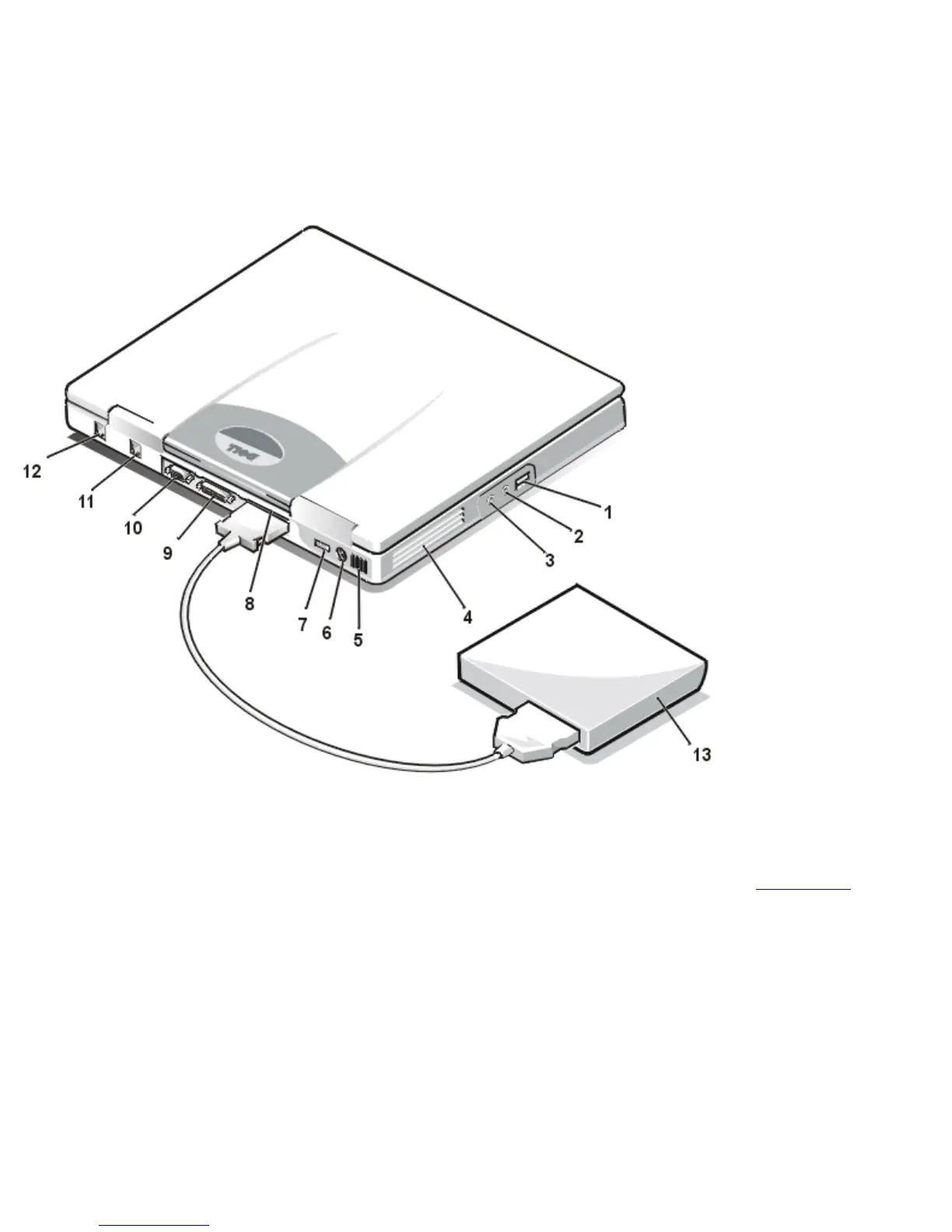
NOTICE: To avoid overheating the computer, do not place the external media bay close to the air inlet or fan
intake/exhaust vents (see Figure 2).
NOTICE: Do not confuse the modem and NIC connectors on your computer. Do not plug a telephone line into the
NIC connector (see Figure 2).
Figure 2. Back/Left View of the Computer
1
USB connector
2
Speakers and
headphones
(line-out/speaker-out)
jack
3
Microphone (MIC IN)
jack
4
Fan intake/exhaust
vents
5
Air inlet
6
PS/2 connector
7
AC adapter
connector
8
External media bay
connector
9
Parallel connector
10
Video connector
11
Modem connector
12
NIC connector
13
External media bay
Figure 3. Bottom View of the Computer
1
Docking connector
2
Reset switch access
hole
3
Microphone (MIC IN)
jack
4
Speakers and
headphones
(line-out/speaker-out)
jack
5
USB connector
6
Speaker
7
Battery latch
8
Battery charge gauge
file:///C|/Documents and Settings/Administrator/De...New Web/Documentation/LS/LS User's Guide/intro.htm (2 of 5) [5/31/2000 9:42:15 AM]










 To Next Page