2
DELL U2421E
S13
S10
S12
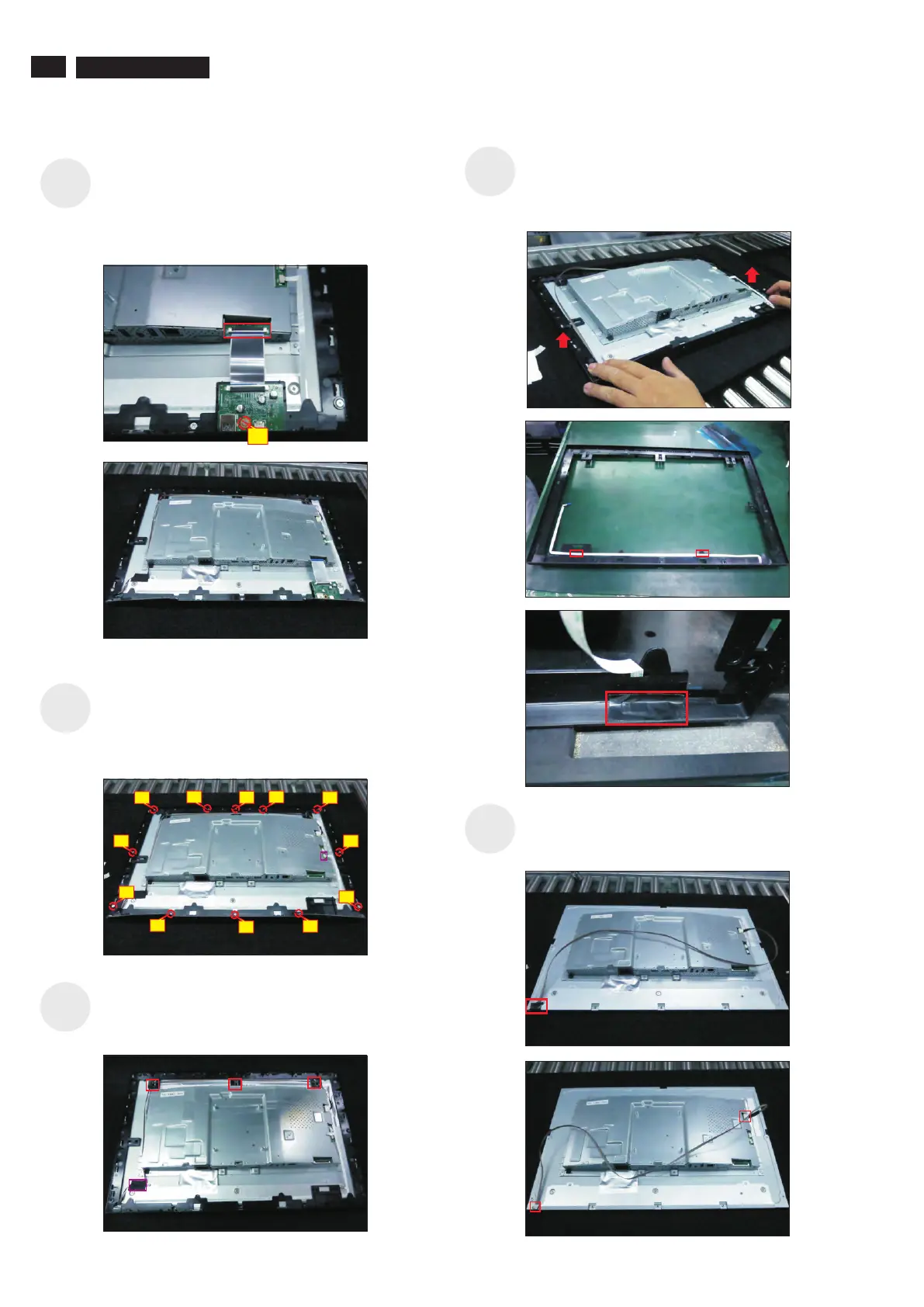
Use a Philips-head screwdriver to release 1 screws
for unlocking the USB board, then disconnect the
USB FFC cable away from the connector of the
interface board and remove the Usb board unit.
(No.1screw size=M3x6, Torque=4±0.5kgfxcm)
S11
S9
1
Disconnect the LED cable from the connector of the
interface board. Use a Philips-head screwdriver to
remove 12pcs screws for unlocking the middle bezel
with front bezel.
(No.1~4 screw size=M3x5, )Torque=5±0.5kgfxcm
Lift up and take away the middle bezel, then put it on
a cushion foam. Tear off the tape on the back of
middle bezel for releasing the LED cable, then tear
off the mylar tape for releasing the LED board.
Tear off 1pcs conductive tape for uncovering the
panel lamp connector, then disconnect the panel
lamp cable from the panel and board.
3
2
1
6
7
5
4
8
9
10
11
12
Tear off 1pcs mylar tape for unfixing the panel lamp
cable, then release the panel lamp cable from the
hooks of the middle bezel.







 To Next Page