EasyManua.ls Logo

Dell Vostro V13 - System Setup Guide; System Setup Overview and Access

Dell Vostro V13
6 pages
Print Icon
To Next Page IconTo Next Page
To Previous Page IconTo Previous Page
Loading...
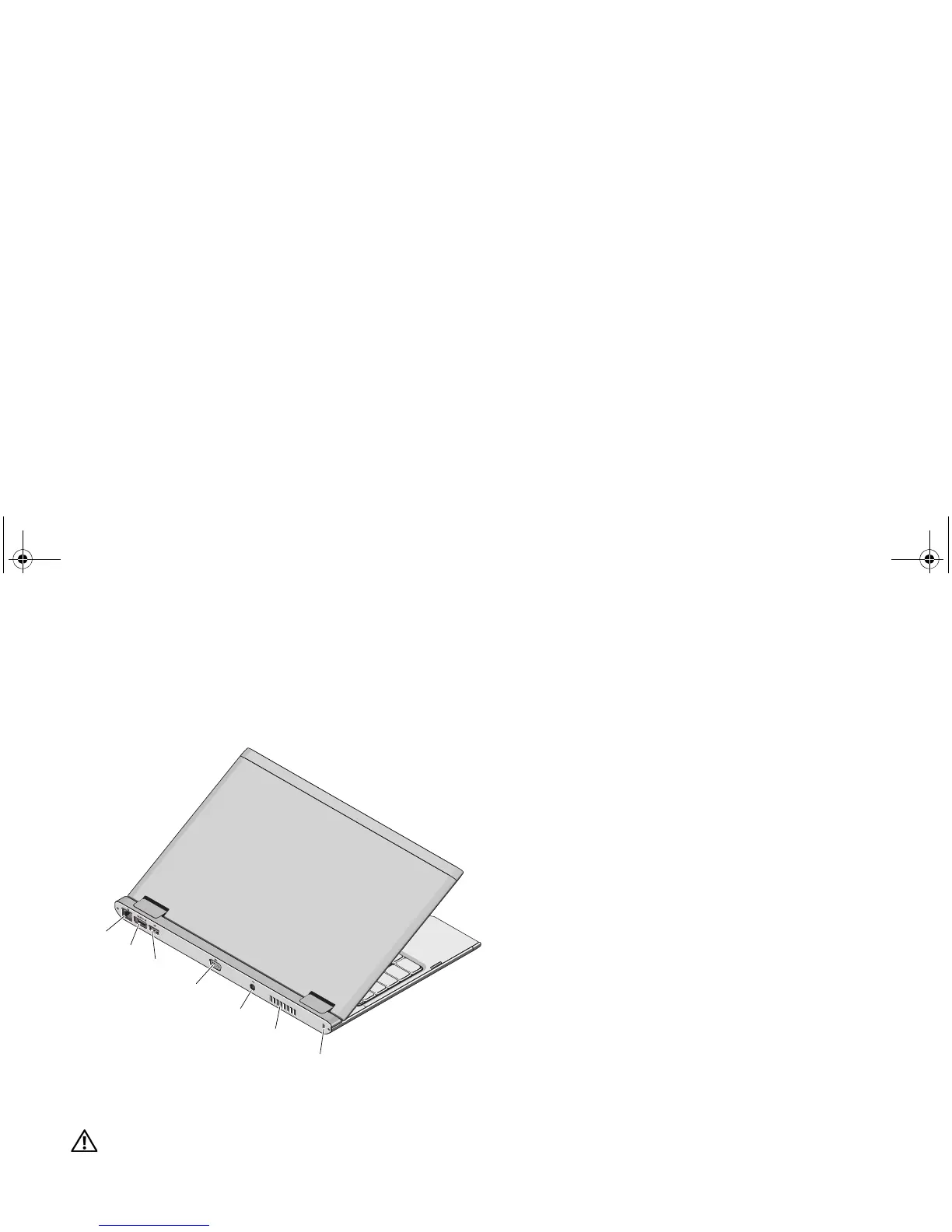
Back View
WARNING: Do not block, push objects into, or allow dust to accumulate in the air vents. Do not store your Dell computer in a low-airflow
environment, such as a closed briefcase, while it is running. Restricting the airflow can damage the computer or cause a fire. The computer
turns on the fan when the computer gets hot. Fan noise is normal and does not indicate a problem with the fan or the computer.

5
4
3
2
1 network connector
2 eSATA/USB connector
3 USB connector
4 video connector
5 AC adapter connector
6 cooling vent
7 security cable slot
6
7
1
YK2KYcc0.fm Page 2 Wednesday, October 28, 2009 1:30 PM

Other manuals for Dell Vostro V13

Related product manuals