EasyManua.ls Logo

DeLonghi ECAM29081XTB - Page 15

DeLonghi ECAM29081XTB
19 pages
Print Icon
To Next Page IconTo Next Page
To Previous Page IconTo Previous Page
Loading...
Doc. Nr.: DSDL_23016_A
[15]
Press the desired button to display the corresponding statistics data:
BUTTON
STATISTIC DATA
ESPRESSO
Number of Coffee Beverages
MY LATTE
Number of Milk Beverages
CAPPUCCINO
Number of Milk Jug Cleanings
MILK JUG CLEAN/DESCALE
Number of Descaling Processes
X2/RINSE
Litres of Water
MID AROMA COFFEE BEAN
Number of Filters Installed
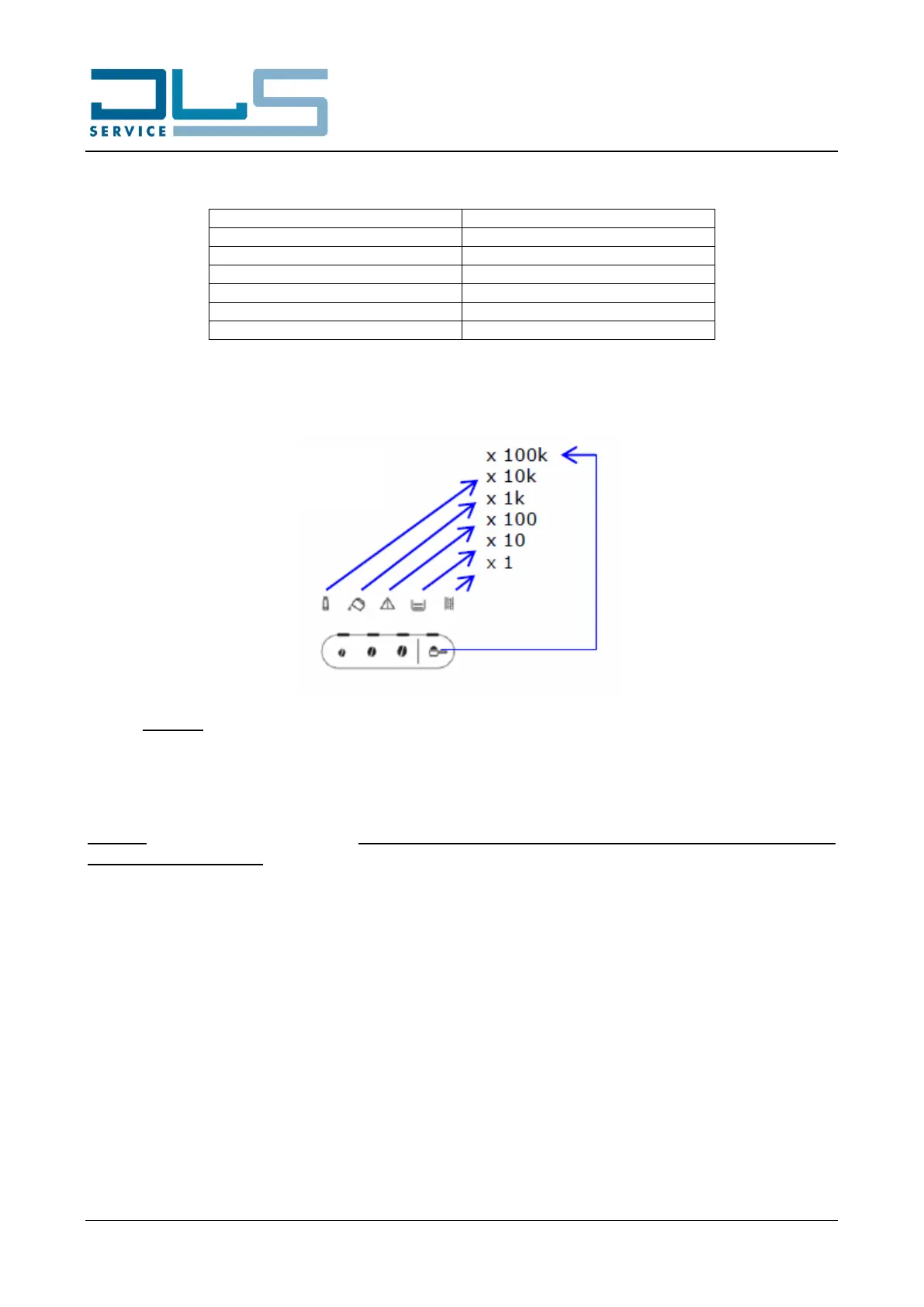
After having pressed the desired button, the appliance will display the corresponding statistic value
with the sequential flashing of the below lights:
Example: To display a total amount of 24 coffee beverages, the appliance will display:
- 4 flashings of the DESCALE light;
- followed by 2 flashings of the GROUNDS CONTAINER light.
NOTICE: To exit the statistics mode, press the SETTINGS button again or wait for 120 seconds without
operating on the machine. The appliance will come back to the ready to use mode.