EasyManua.ls Logo

DELTA DORE TYXIA 641 - User Manual

DELTA DORE TYXIA 641
15 pages
Print Icon
To Next Page IconTo Next Page
Loading...
PACK TYXIA 641
Pack volets roulants et lampe d’appoint connectés
Noce d’installaon
Installaon instrucons
Installaonsanleitung
FR
EN
DE
Question and Answer IconNeed help?

Do you have a question about the DELTA DORE TYXIA 641 and is the answer not in the manual?

Overview

This document describes the DELTA DORE TYXIA 641 pack, which includes connected roller shutter receivers and an auxiliary light switch, along with a home automation box. The pack is designed to control roller shutters and an auxiliary light, integrating them into a connected home system.

Function Description:

The TYXIA 641 pack provides a comprehensive solution for automating roller shutters and an auxiliary light. It consists of:

  • TYXIA 5630 Roller Shutter Receivers (x5): These receivers are designed to control roller shutters with a maximum current of 1A. They can be installed in a flush-mounted box behind a switch or control push-button, or in a sealed box inside the roller shutter, ensuring a safe distance from metal parts. The receivers allow for local control via a connected switch and remote control via the TYDOM application. They support learning the shutter travel time automatically during each complete cycle.
  • TYXIA 6610 Receiver Switch (x1): This receiver switch is used to control an auxiliary light, creating an extension for the light. It replaces an existing light switch and integrates the light into the connected home system.
  • TYXIA 2330 Transmitter Switch (x1): This is a wireless transmitter switch used to control the TYXIA 5630 receivers. It allows for local control of roller shutters.
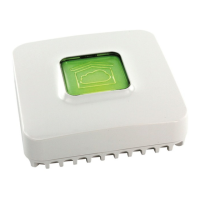
  • TYDOM 1.0 Home Automation Box (x1): This central hub connects the devices to the internet, enabling remote control and configuration via the TYDOM smartphone and tablet application. It must be installed near an ADSL box line and connected via an Ethernet cable.

Important Technical Specifications:

TYXIA 2330 Transmitter Switch:

  • Battery life: 10 years (CR 2430)
  • Radio frequency: 868.7 MHz to 869.2 MHz
  • Maximum wireless power: < 10 mW
  • Receiver category: 2
  • Wireless range: 100 to 300 meters outside (variable depending on associated equipment, installation conditions, and electromagnetic environment)
  • Insulation class: III
  • Dimensions: 80 x 80 x 11 mm
  • Degree of protection: IP 40, IK 04
  • Operating temperature: -10 °C to +40 °C
  • Storage temperature: -10 °C to +70 °C
  • Installation environment: Normal pollution levels
  • Number of associated emitters: Maximum 16. For more than 16, refer to the TYXIA 2330 notice on the DELTA DORE website.

TYXIA 5630 Roller Shutter Receiver:

  • Control wires: Not insulated from the mains power supply. All connected equipment must be CE marked and meet low voltage device requirements. Local control wires can be extended up to 10m (separate from 230V).
  • Wire stripping length: 7mm.
  • Wire cross-section: 0.75 - 1.5 mm² (solid or stranded wires).
  • Motor control wires: Connect to terminals 3 and 4 (lowering to 3, raising to 4).
  • Switch connection: Connect to IN1 - COM - IN2 terminals.
  • Power supply: Connect 230V power supply to terminals 1 and 2.

TYXIA 6610 Transmitter Switch:

  • Main power supply: 230 V~/240 V~, +/-10%, 50/60 Hz, 2 VA
  • Radio frequency: 868.7 MHz to 869.2 MHz
  • Maximum wireless power: < 10 mW
  • Receiver category: 2
  • Wireless range: 100 to 300 meters outside (variable depending on associated equipment, installation conditions, and electromagnetic environment)
  • Dimensions: 77 x 37 x 27 mm
  • Degree of protection: IP 40, IK 04
  • Operating temperature: 0 °C to +40 °C
  • Storage temperature: -10 °C to +70 °C
  • Pollution level: 2
  • Rated impulse withstand voltage: 2.5 kV
  • Operation type: S1 continuous duty service S1
  • Switch type: 1 single pole
  • Number of operating cycles: 100,000
  • Circuit cut-off: Brownout μ
  • Number of receivers: 16 maximum

TYDOM 1.0 Home Automation Box:

  • Main power supply: 230 V~/240 V~, +/-10%, 50/60 Hz
  • Radio frequency: 868.7 MHz to 869.2 MHz
  • Maximum wireless power: < 10 mW
  • Receiver category: 2
  • Wireless range: 100 to 300 meters outside (variable depending on associated equipment, installation conditions, and electromagnetic environment)
  • Insulation class: III
  • Dimensions: 100 x 100 x 30 mm
  • Degree of protection: IP 30
  • Operating temperature: -10 °C to +40 °C
  • Storage temperature: -20 °C to +70 °C
  • Installation environment: Normal pollution levels
  • Connectivity: Ethernet port for ADSL box connection.
  • MAC address: Used for configuration with the TYDOM application.

Usage Features:

Installation:

  • TYXIA 2330 Transmitter Switch: Must not be placed on a metal surface.
  • TYXIA 6610 Transmitter Switch: Replaces the existing light switch. Installation involves connecting light wires and mains supply, placing wires in cable ducts, inserting cable glands, closing the unit, tightening screws, fitting non-slip pads, and reconnecting power. Ensure the installation is switched off before starting.
  • TYXIA 5630 Roller Shutter Receiver: Requires the roller shutter's high and low stops to be set before installation. Use an electrically isolated tool for configuration actions. Switch off power supply during installation.
  • TYDOM 1.0 Home Automation Box: Connect to the ADSL box via Ethernet and to the mains power supply. Download the free 'TYDOM' application from Google Play or App Store. Configure the application by entering the last 6 characters of the TYDOM 1.0's MAC address while connected to the local WIFI network.

Wireless Association:

  • TYXIA 2330 with TYXIA 5630 Receivers:
    1. On the receiver(s), press the button for 3 seconds until the LED flashes, then release.
    2. On the TYXIA 2330 switch, press the T1 button for 3 seconds until the red LED lights up, then release. The search for motor/receiver begins, and a green LED indicates detection.
    3. Association is confirmed when the transmitter LED stops flashing.
  • TYDOM Application with TYXIA 5630 Receivers:
    1. From the TYDOM homepage, press 'Settings', then 'My devices'.
    2. Select 'Add a device', then 'Blinds'.
    3. Follow on-screen instructions, pressing the receiver button for 3 seconds when prompted.
  • TYDOM Application with TYXIA 6610 Receiver Switch:
    1. From the TYDOM homepage, press 'Settings', then 'My devices'.
    2. Select 'Add a device', then 'Lighting'.
    3. Follow on-screen instructions, pressing and holding the receiver button for 3 seconds when prompted.

Learning for Shutter Travel Time (TYXIA 5630):

  • Perform a complete cycle from stop to stop: lower or raise the roller shutter completely, then reverse the action until the opposite stop is reached. Do not interrupt the travel.
  • The learning process automatically adjusts the shutter travel time for each complete cycle.

Installation Configuration (TYXIA 5630):

  • Operating Modes:
    • Mode 1 (default): Hold switch (Raise/Stop/Lower).
    • Mode 2: Double push-button (Raise/Lower).
    • Mode 3: Single push-button (Raise/Stop/Lower/Stop).
  • To modify mode: Press the receiver's button for 6 seconds (LED flashes, then steady). Briefly press the button to select the mode (number of flashes corresponds to the mode). Confirm by pressing the button for 3 seconds until the LED switches off.
  • Favourite Position:
    1. Place the roller shutter in the desired favourite position.
    2. Press the and buttons for 5 seconds to save position 1.
    3. Press the and V buttons for 5 seconds to save position 2.
    4. The motor activates twice to confirm.

Maintenance Features:

Troubleshooting (TYXIA 2330 Transmitter Switch):

  • Removing a motor or functional receiver:
    1. Press T1 button for 3 seconds.
    2. Successively press the button to select the motor to remove.
    3. Press the ✓ button (roller shutter starts up, association removed).
    4. Press T1 button.
  • Removing all out-of-service/missing/switched-off motors/receivers:
    1. Press and hold T1 button for 3 seconds.
    2. Press the and buttons.
    3. Press T1 button.
  • Reset/Removal of all motors or receivers:
    1. Press and hold T1 button for 3 seconds.
    2. Simultaneously press the and ✓ buttons until the LED flashes once (red then green).
    3. Press T1 button.
  • Battery replacement: The red LED flashes each time you press the button if the battery is faulty.

Troubleshooting (TYDOM 1.0 Home Automation Box):

  • LED Signals and System Status:
    • Green and flashing: System accessible locally and remotely, user logged in.
    • Green on and steady: System accessible locally and remotely.
    • Orange and flashing: System accessible locally, user logged in.
    • Orange and steady: System accessible locally.
    • Red and steady: No allocated IP address.
  • Diagnostic function: Briefly press the button (viewing LED for 10 seconds).
    • Yellow and flashing: Fixed IP OK.
    • Blue and flashing: DHCP OK / Upnp OK.
    • Blue and flashing (2x): DHCP OK / Upnp Error (check Upnp activation on BOX).
    • Blue and flashing (3x): DHCP in progress (check DHCP activation on BOX).

Summary of Functions Accessible Using the Button of the TYXIA 5630 Receiver:

  • Press briefly: Checks receiver operating mode (1 red flash for Mode 1, 2 for Mode 2, 3 for Mode 3).
  • Press and hold for x seconds:
    • 3 seconds: Wireless association (LED flashes, then release).
    • 6 seconds: Configuration (LED flashes, then becomes steady, release).
    • 10 seconds: Remove an association (LED flashes rapidly, release).
    • 15 seconds: Delete password (LED flashes quickly, release).
    • 20 seconds: Remove all associations (LED switches off after rapid flashing, release; receiver has no wireless connection).
    • 30 seconds: Factory reset (LED flashes, then switches off; receiver has no wireless connection, configuration reset to Mode 1 by default).
    • 3 seconds (Fixed DHCP / IP): Magenta LED flashes slowly, release.
    • >15 seconds (Delete password): Magenta LED flashes quickly, release.
    • >30 seconds (Reset): LED turns off, then release (Use of DHCP, Delete password, Clear associations). It is advised to use the TYDOM application for these functions.

DELTA DORE TYXIA 641 Specifications

General IconGeneral
BrandDELTA DORE
ModelTYXIA 641
CategorySwitch
LanguageEnglish

Related product manuals