Delta Temperature Controller User Manual
© DELTA ELECTRONICS, INC. ALL RIGHTS RESERVED - 13 - 2007-09-17
Parameters relevant to ON/OFF control
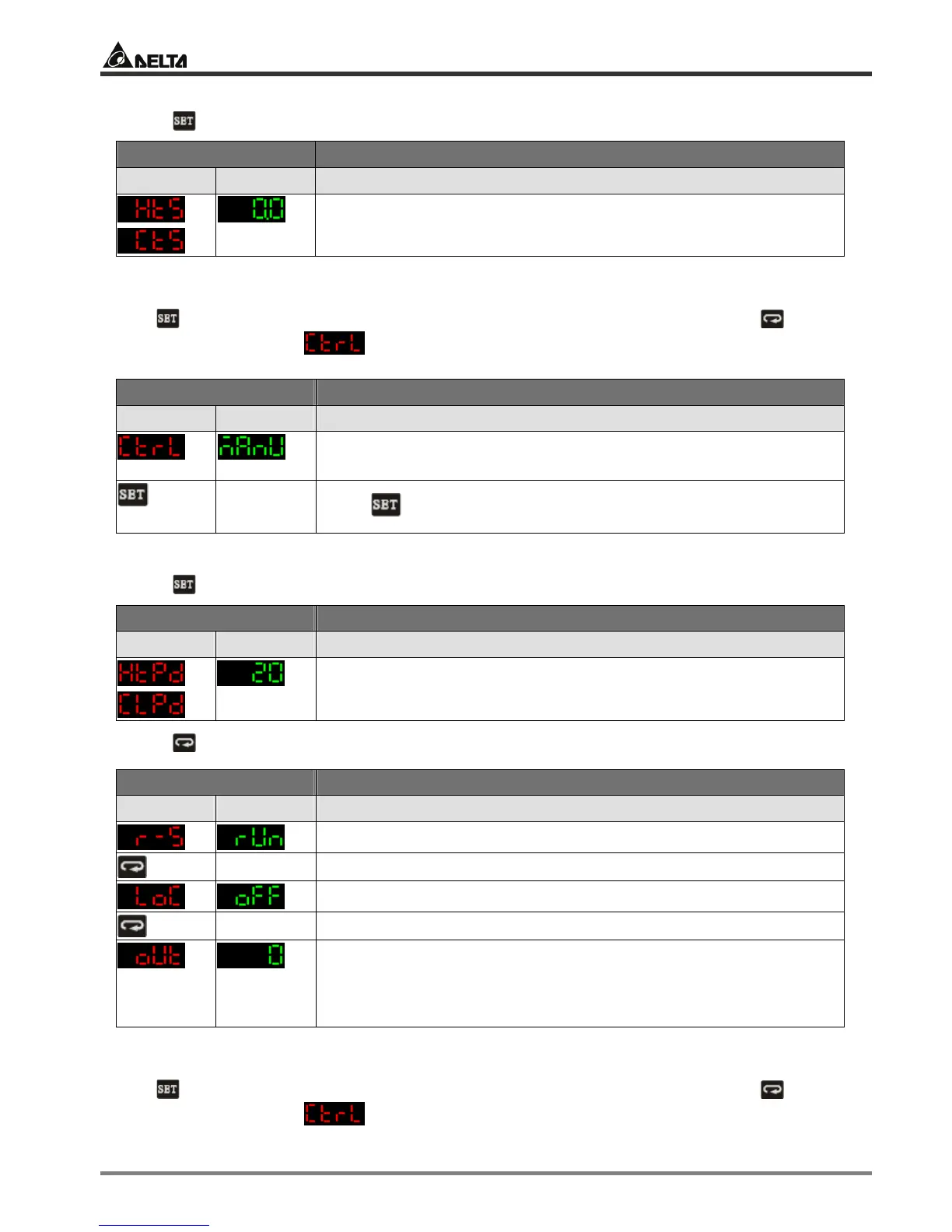
Press in the main screen of DTA to enter the “regulation mode”.
Display Explanations
PV SV Status of the temperature controller
or
Set up hysteresis. Default = heating hysteresis. Can be set as
cooling hysteresis as well. Both default values are “0”.
2.2 MANUAL
Press for 3 seconds in the main screen to enter the “initial setting mode”. Press several
times until the parameter is displayed.
Display Explanations
PV SV Status of the temperature controller
The control modes include: PID, ON/OFF, MANUAL.
Default = PID. Select “MANUAL” here.
Back
to top
Press to return to the main screen.
Parameters relevant to MANUAL control
Press in the main screen of DTA to enter the “regulation mode”.
Display Explanations
PV SV Status of the temperature controller
or
Set up heating or cooling control cycle. Default = heating, 20
seconds per cycle.
Press in the main screen of DTA to enter the “operation mode”.
Display Explanations
PV SV Status of the temperature controller
Run/stop
Key-locked function
Manually adjust the output percentage. Assume the percentage
value = 50 and the cycle = 20 seconds plus heating control, the
system will conduct heating output for 10 seconds and stop for the
other 10 seconds.
2.3 PID
Press for 3 seconds in the main screen to enter the “initial setting mode”. Press several
times until the parameter is displayed.


 To Next Page
 Loading...