Delta Temperature Controller User Manual
2007-09-17 - 16 - © DELTA ELECTRONICS, INC. ALL RIGHTS RESERVED
Display Explanations
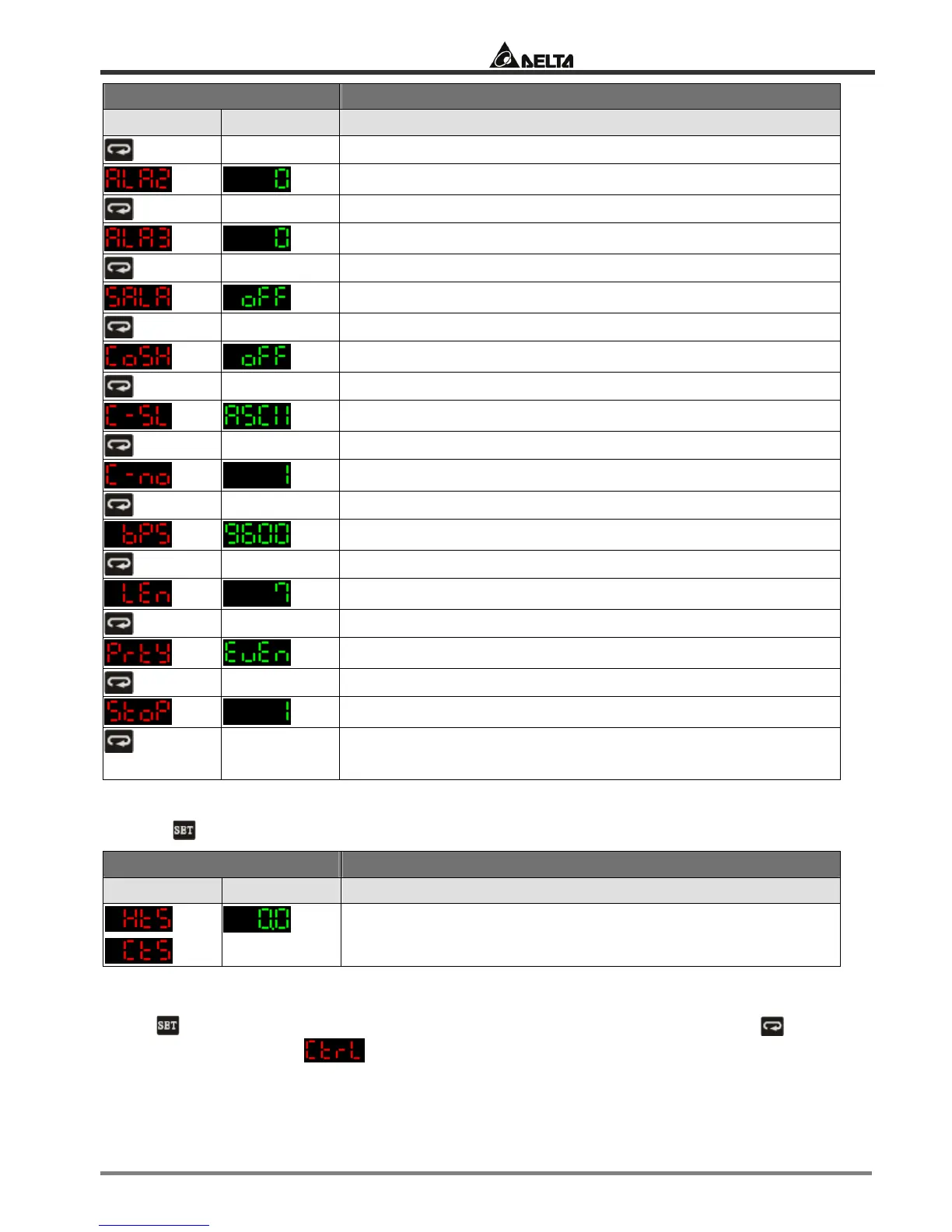
PV SV Status of the temperature controller
Set up Alarm mode 2. Default = alarm output disabled.
Set up Alarm mode 3. Default = alarm output disabled.
Set up system alarm
ON/OFF of communication write-in. Default = OFF
Select communication format
Communication address
Communication speed
Data length (in bits)
Parity bit
Stop bit
Back to
top
Parameters relevant to ON/OFF control
Press
in the main screen of DTB to enter the “regulation mode”.
Display Explanations
PV SV Status of the temperature controller
or
Set up hysteresis. Default = heating hysteresis. Can be set as
cooling hysteresis as well. Both default values are “0”.
3.2 MANUAL
Press for 3 seconds in the main screen to enter the “initial setting mode”. Press several
times until the parameter
is displayed.


 To Next Page