Chapter 2 HMI-WPLSoft Introduction|DOP-EXIO Series
Revision March, 2008, Doc. Name: 2007PDD23000014 2-5
Extension Name Explanation
5
* .RCM
Ö
The default comment file for special D/special M.
6
* .DOP*
Ö
HMI ScrEdit (Screen Editor) file.
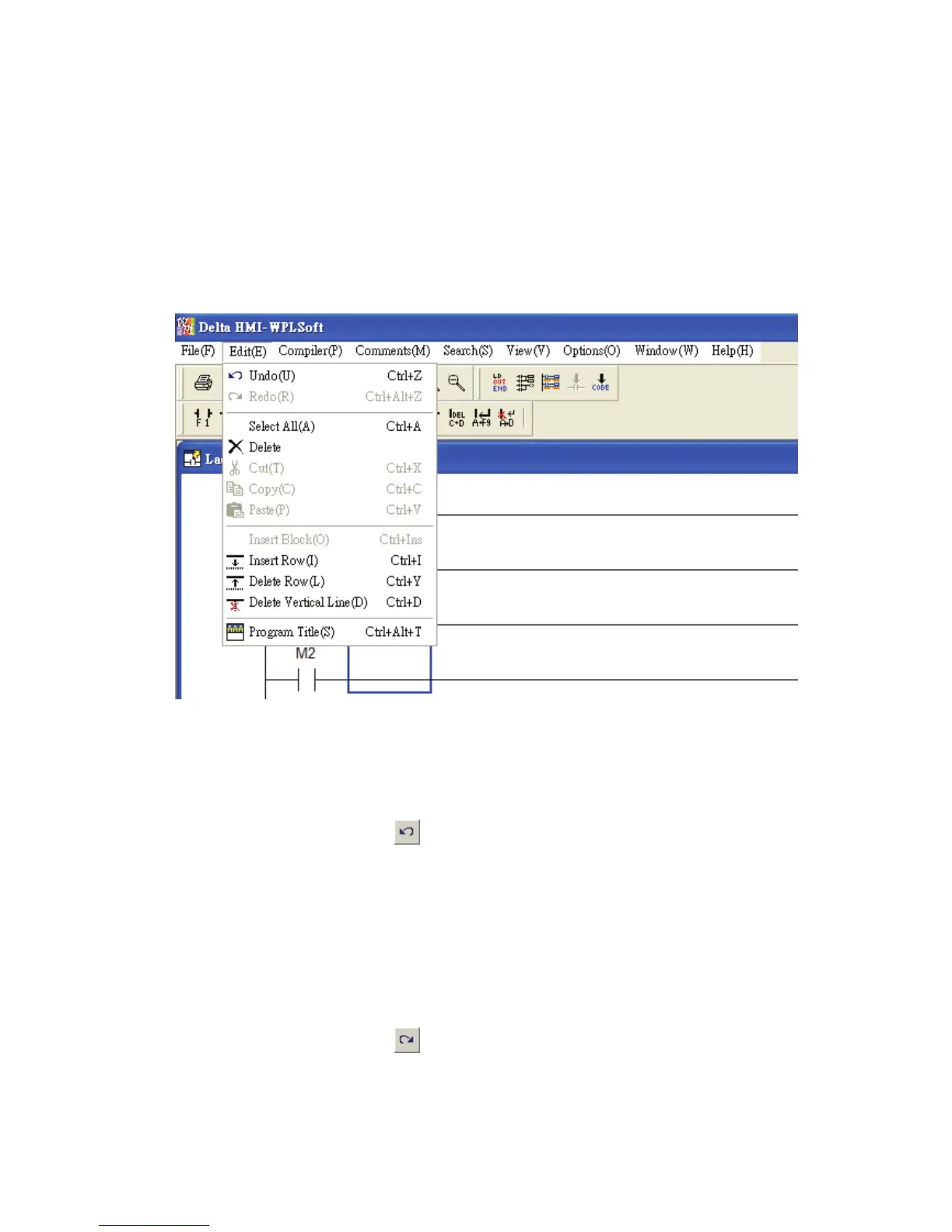
2.2 Edit
The “Exit” function is shown as follows, including pull-down menu options:
Undo(U) Ö Undo the most recent actions (the system allows the user to perform
undo action for max. 10 times)
Method 1: Click “Edit(E)” > “Undo(U)”.
Method 2: Click the icon
on the toolbar.
Method 3: Use keyboard shortcuts by pressing keys (Ctrl) + (Z).
Method 4: Right click the mouse to get a pop-up menu and select “Undo” in the
pop-up menu.
Redo(R) Ö Redo the undo action.
Method 1: Click “Edit(E)” > “Redo(R)”.
Method 2: Click the icon on the toolbar.
Method 3: Use keyboard shortcuts by pressing keys (Ctrl) + (Alt) + (Z).



 To Next Page