EasyManua.ls Logo

Delta Rockwell 22-101 - User Manual

Delta Rockwell 22-101
17 pages
Print Icon
To Next Page IconTo Next Page
Loading...
DELTA
POWER
TOOL
DIVISION
RC>~KVVELL
MANUFACTURING
COMPANY
PITTSBURGH
8.
PENNSYLVANIA
~
I I
ROC
Ell
428-01-651-5001
DATED
1M
1-10-61
PM-1738
13"
x
5"
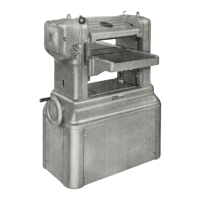
PLANER
MODEL
# 22-101
SERIAL
#
Dy3675
I.
INSTALLATION
A.
SELECTING
FLOOR
SPACE
The
planer
should
be
placed
with
adequate
room
both
in
front and back for
dressing
long
stock.
It
should
set
on a
level
foundation and
can
be
bolted
permanently
in
place
if
preferred.
If
a
central
dust
collecting
system
is
accessible,
it
can
be
connected
to the
planer
by
installing
1t22-115
shaving
hood.
This
hood and other
accessories
are
available
from your
Delta
dealer.
IMPORTANT
We
urge you
to
read
these
instructions
carefully
and
save
them for future
reference.
When ordering re-
placement
parts
from your
Delta
dealer,
always
furnish
part number,
description,
model number and
serial
num-
ber of your machine.
B. REMOVING
PROTECTIVE
COATING
Remove
protective
coating
from machined
surfaces
using
kerosene
or
similar
solvent.
Do
not
use
lacquer
thinner
or
acetone.
C. INSTALLING
MOTOR
FIG. 2.
1.
Place
motor pulley on
shaft,
approximately
1/16"
from end of motor and
tighten
set
screw.
Remove
rear
panel
from
planer
base
and
bolt
motor
to
motor
plate.
~
2. Remove
plate
on right hand
side
of
planer
and
align
motor pulley and
cutterhead
pulley.
Use
a
narrow
straight
edge
or
string,
and
slide
motor
to
the
right
or
left
so
that
both
pulleys
are
in
line.
3.
Tighten
set
collars
on
tie
rod and
install
"V"
belt.
Motor
can
be
adjusted
up
or
down
by
turning
nuts
on
"I"
bolts
to
appJ..y
correct
belt
tension.
Belt
should
only be
tight
enough
so
that
it
can
be
"flexed"
approximately
1",
applying
finger
pres-
sure
midway
between
the
pulleys.
Tighten
both
nuts
against
motor
plate.
Tighten
screw
and locknut ( 15 ) (
45
) under-
neath
rear
tie
rod.
See
FIG.
22 of
parts
list.
D.
ELECTRICAL
CONNECTIONS
When
using
magnetic
starters,
Delta
No. 49-393,
49-394
or
49-395, a
special
cover
plate,
Delta
No.
49-376
is
required.
This
cover
plate
includes
the
neces-
sary
installation
instructions.
When
using
Manual
starters,
Delta
No. 1320
or
1328, See
Fig.
3,
and:
1. Remove
cast
iron cover on
left
side
of
planer.
2.
Delta
starters
are
enclosed
in
a
steel
box.
The
starter
mechanism must be removed from
this
box
and
installed
in
planer
as
shown
using
three
10-32 x lh" Rd. Rd. Machine
screws
furnished
with
planer.
3.
Install
proper
heater
elements,
connect
starter
to
motor and
replace
cast
iron
cover.
Figure
2
Question and Answer IconNeed help?

Do you have a question about the Delta Rockwell 22-101 and is the answer not in the manual?

Summary

I. INSTALLATION

A. SELECTING FLOOR SPACE

Planer placement and foundation requirements for optimal operation and dust collection.

B. REMOVING PROTECTIVE COATING

Instructions for removing protective coating using appropriate solvents.

C. INSTALLING MOTOR FIG. 2

Steps for installing the motor, including pulley alignment and belt tension.

D. ELECTRICAL CONNECTIONS

Guidance for connecting magnetic or manual starters and necessary cover plates.

II. ADJUSTMENTS

A. LEVELING TABLE FIG. 4

Procedure to ensure the table is parallel to the cutterhead for accurate cuts.

B. TABLE GIBS FIG. 5

Adjusting table gibs to compensate for wear and ensure smooth vertical movement.

C. TABLE ROLLS FIG. 6

Setting table rolls relative to the table surface for proper stock feeding.

D. FEED ROLLS FIG. 7

Ensuring proper spring tension for feed rolls for uniform stock feeding.

E. CHIPBREAKER FIG. 7

Description and removal procedure for the chipbreaker.

F. PRESSURE BAR FIG. 8

Adjusting the pressure bar for proper stock support during planing.

G. SETTING KNIVES FIG. 9, FIG. 10

Procedure for setting planer knives using a setting gauge.

H. CUTTERHEAD FIG. 11

Details on removing and replacing the cutterhead for maintenance or repair.

I. DEPTH SCALE FIG. 12

Adjusting the depth scale to indicate the correct cutting depth.

J. SHIFTER OR CLUTCH FIG. 13

Troubleshooting and adjusting the clutch mechanism for proper operation.

III. MAINTENANCE

RAISING MECHANISM, FIG. 15

Lubricating the raising mechanism screws and greasing the gears.

PLANER KNIFE SETTING JIG

Features

Overview of the Planer Knife Setting Jig's capabilities for accurate knife setting.

Using the Jig

Step-by-step guide for removing, replacing, and resetting planer blades with the jig.

Setting knives to a manufacturers specification

Detailed procedure for indexing jigs and setting knives to precise heights.

Delta Rockwell 22-101 Specifications

General IconGeneral
BrandDelta Rockwell
Model22-101
CategoryPlaner
LanguageEnglish