EN-15
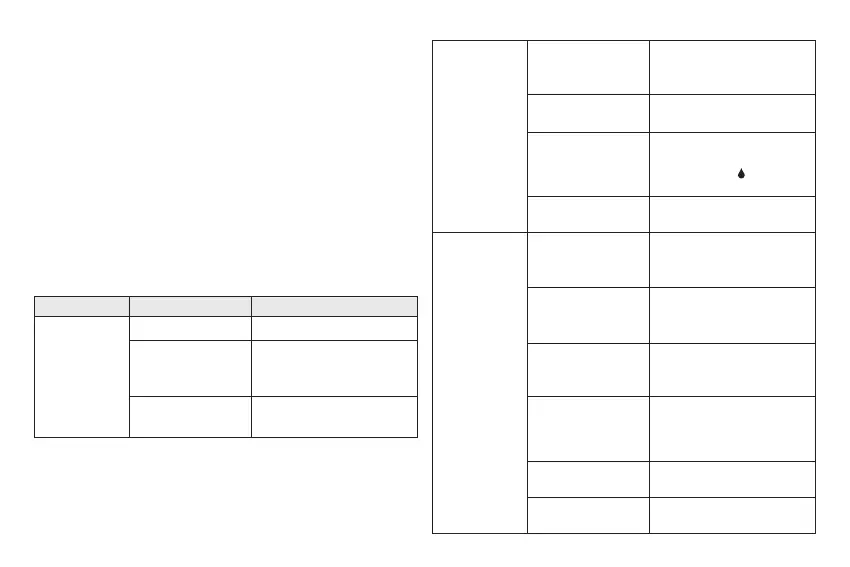
Symptom Cause What To Do
The device
does not
display a
message after
inserting a test
strip.
Batteries exhausted. Replace the batteries.
Test strip inserted
upside down or
incompletely.
Insert the test strip with
contact bars end rst and
facing up.
Defective device or
test strips.
Please contact customer
service.
Announcement of Error Message by
Universal Tone
• Hi or Lo Result: Results larger than 600 mg/dL (33.3 mmol/L) are
represented as 999, i.e. three groups of nine short beeps with pauses
between the groups.
• Results smaller than 10 mg/dL (0.5 mmol/L) are represented as 000,
i.e. three long beeps.
• Low Battery Warning: When the batteries will soon be exhausted, 2
quick beeps are announced three times in succession. This warning is
sounded when the meter is switched on.
• Other Errors: Other Error Messages are announced by 2 quick beeps
four times in succession.
Blood Glucose Measurement
The test does
not start after
applying the
sample.
Insucient blood
sample.
Repeat the test using a new
test strip with larger volume
of blood sample.
Defective test strip.
Repeat the test with a new
test strip.
Sample applied
after the device
is automatically
turned o.
Repeat the test with a new
test strip. Apply sample only
when ashing “ “ appears
on the display.
Defective device.
Please contact customer
service.
The control
solution
testing result is
out of range.
Error in performing
the test.
Read instructions
thoroughly and repeat the
test again.
Control solution vial
was poorly shaken.
Shake the control solution
vigorously and repeat the
test again.
Expired or
contaminated
control solution.
Check the expiration date of
the control solution.
Control solution
that is too warm or
too cold.
Control solution, device, and
test strips should be at room
temperature (20°C to 25°C /
68°F to 77°F) before testing.
Defective test strip.
Repeat the test with a new
test strip.
Device malfunction.
Please contact customer
service.


 To Next Page