TOUCH
2
O
®
WITH TOUCHLESS
™
TECHNOLOGY
1
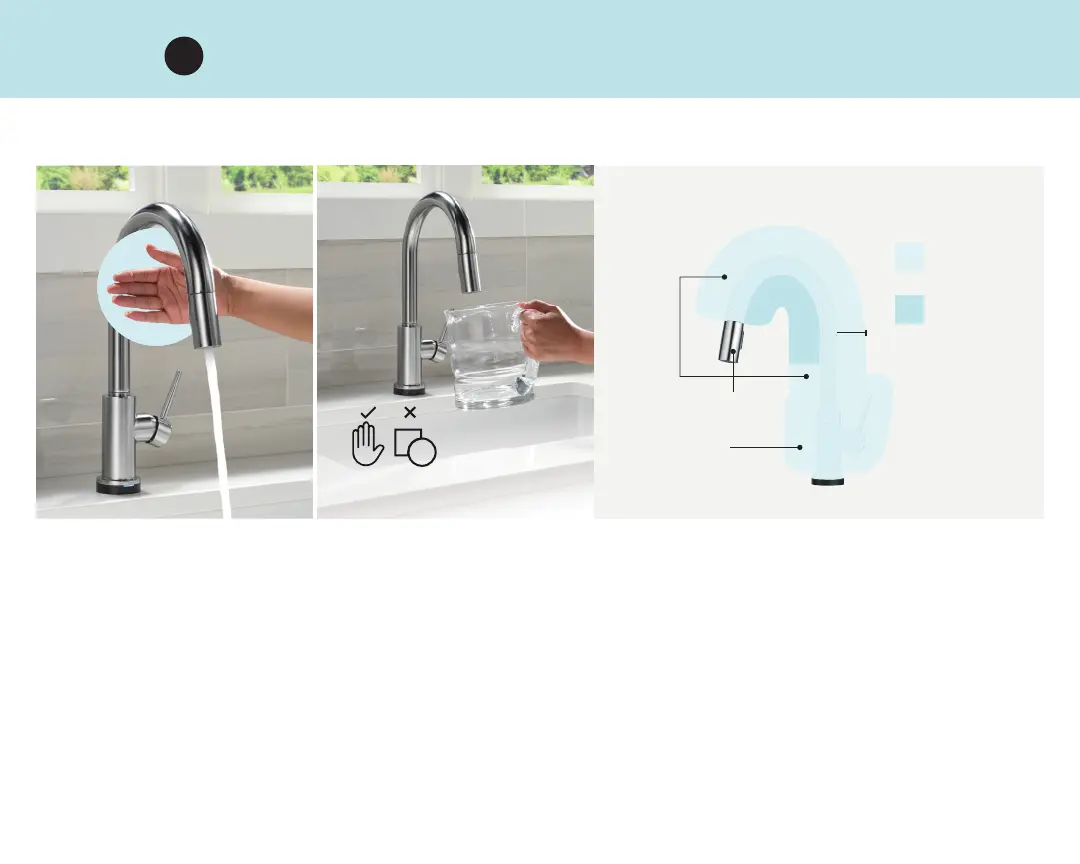
• Turn the faucet handle to the on position
• Place your hand within inches of the faucet to turn water on and off
• Touchless Technology is most sensitive under the arc of the spout
• Faucet senses humans, not objects, everywhere but the pull-down wand
TURN ON AND OFF BY PLACING YOUR HAND
NEAR THE SPOUT, BASE OR HANDLE
ACTIVATION
ZONE
MOST
SENSITIVE
SENSES HUMANS,
NOT OBJECTS
SPOUT
WAND
BASE OR
HANDLE
4"
Touchless mode also responds to touch activation.



 To Next Page