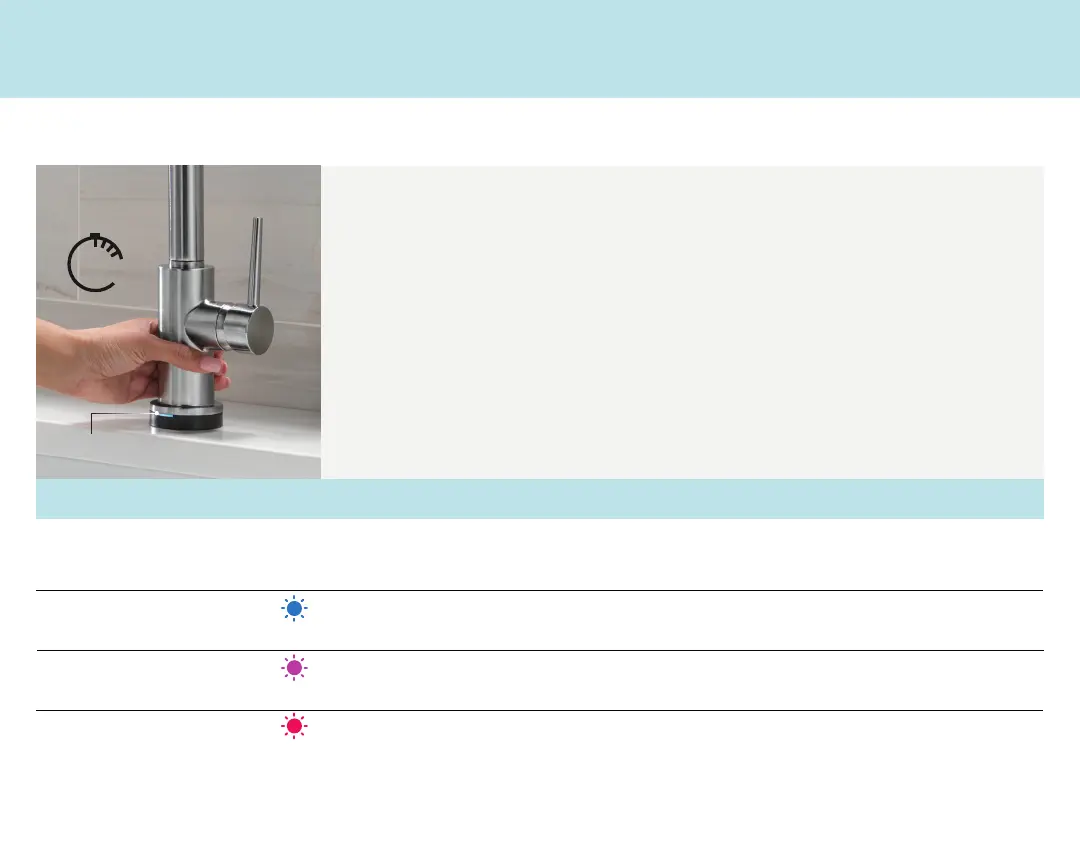
CHANGING MODES
Faucet will turn on and off using the handle regardless of mode or connection to power.
CURRENT MODE:
HIGH SENSITIVITY | TOUCH
2
O
®
WITH TOUCHLESS
™
TECHNOLOGY
TO CHANGE MODES:
. Turn the faucet handle to the off position
. Grab the faucet base and hold for seconds
. LED indicator will flash to signal what mode the faucet is in (See chart below)
. Turn the faucet handle to the on position
HOLD BASE
SECS
6
HANDLE OFF
LED INDICATOR
WILL FLASH
MODE LED INDICATION BEST FOR*
High Sensitivity Blue Flashes Stainless Steel Sinks
Granite Countertops
Low Sensitivity Purple Flashes Porcelain or Acrylic Sinks
Quartz, Formica® (Laminate), or Corian® Countertops
Touchless Off Red Flashes Touch
O® or manual only operation
*Your sink or counter material may affect the faucet’s touchless sensing ability.
Please use the chart above to cycle through the modes so your faucet is in the right sensitivity setting to work best in your kitchen.



 To Next Page