
 Need help?
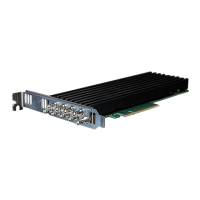
Do you have a question about the DELTACAST DELTA-hd-elp-d 80 and is the answer not in the manual?
Introduces the DELTACAST FLEXIBLE VIDEO I/O PRODUCTS solution.
Guides users through the process of physically installing DELTACAST devices and accompanying software.
Provides instructions for hardware installation of PCIe cards.
Details the installation process for the DELTACAST FLEX Solution.
Explains how to install DELTACAST devices and accompanying software on a computer.
Provides instructions for installing DELTACAST software solutions on Windows operating systems.
Details the process for installing DELTACAST VideoMaster redistributable package on Mac OS.
Addresses general issues like driver installation conflicts and computer crashes related to DELTACAST devices.
Focuses on troubleshooting common problems encountered with DELTACAST PCIe cards.
Provides troubleshooting steps for the DELTACAST FLEX Solution.
 General
| Resolution Support | Up to 1080p60 |
|---|---|
| Audio Support | Embedded SDI Audio |
| Interface | PCI Express x4 |
| Operating System Support | Windows, Linux |
| SDK Support | Yes |
| Product Type | Video I/O Card |
| Video Input | HD-SDI |
| Video Output | HD-SDI |
| Form Factor | Low profile |


 To Next Page