EasyManua.ls Logo

Deltaco Gaming DH410 - User Manual

Deltaco Gaming DH410
20 pages
Go to English
Print Icon
To Next Page IconTo Next Page
Loading...
GAM-109
DAN Manual
DEU Benutzerhandbuchl
ENG Manual
EST Kasutusjuhend
FIN Käyttöopas
FRA Manuel d’utilisation
HUN Felhasználói kézikönyv
WIRELESS GAMING HEADSET
LAV Lietošanas pamācība
LIT Naudojimo instrukcija
NDL Gebruiksaanwijzing
NOR Brukermanual
POL Instrukcja obsługi
SPA Manual del usuario
SWE Användarmanual
Question and Answer IconNeed help?

Do you have a question about the Deltaco Gaming DH410 and is the answer not in the manual?

Overview

This document describes the GAM-109 Wireless Gaming Headset from DELTACO GAMING.

Function Description

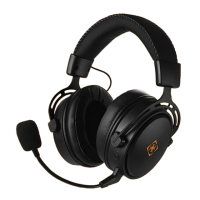
The GAM-109 is a wireless gaming headset designed for an immersive audio experience. It features a detachable microphone for clear communication during gameplay and a comfortable over-ear design. The headset connects wirelessly via a USB receiver, offering freedom of movement. It also includes a 3.5mm audio cable for wired use, ensuring compatibility with a wide range of devices. The headset is equipped with LED indicators for power, charging status, and microphone status. Volume adjustment and mute/unmute functions are easily accessible on the headset.

Important Technical Specifications

  • Connectivity: 2.4 GHz wireless via USB receiver, or wired via 3.5mm audio cable.
  • Compatibility: Compatible with PC, PlayStation 4, and MacOS. Wired mode is compatible with 3.5mm connections, for example, Xbox One. For MacOS devices, a USB-A to USB-C adapter (not included) may be required.
  • Microphone: Detachable, with mute/unmute functionality.
  • Charging: USB-A to Micro USB charging cable (5V/1A). The LED indicator turns red during charging and off when fully charged. A full charge takes approximately 2 hours. The headset will play a tone and automatically turn off after 15 minutes of inactivity if the battery is below 10%.
  • Battery Life: The headset automatically turns off after 5 minutes of inactivity to conserve battery.
  • Controls: Volume adjustment, power on/off, microphone mute/unmute.
  • LED Indicators: Power status, charging status, USB receiver connection status, microphone status.

Usage Features

Power On/Off: To turn on the headset, press the power button (2) for 2 seconds. The LED (3) will light up to confirm power on status. To turn off the headset, press and hold the power button (2) for 3 seconds. The LED (3) will turn off to confirm power off status. The headset automatically powers off after 5 minutes of inactivity.

Microphone Usage: To mute the microphone, press the microphone button (6). To unmute, press the microphone button (7). The microphone is detachable.

Wireless Connection:

  1. Press the power button (2) on the headset for 2 seconds to turn it on.
  2. The LED (3) will light up to confirm power on status.
  3. Insert the USB receiver (8) into a USB port on your device.
  4. If the LED (9) on the USB receiver flashes, the connection is successful. If the LED (9) on the USB receiver is solid, the connection has failed.

Wired Connection: To use the headset in wired mode, connect the included 3.5mm audio cable to the headset and your device. When connecting a 3.5mm audio cable, the headset turns off wireless mode and enters wired mode automatically.

Charging: Connect the USB cable to the headset and a USB power adapter (5V/1A). The LED (1) will light up red during charging and turn off when fully charged. Charging takes approximately 2 hours. If the battery is below 10%, the headset will play a tone and automatically turn off after 15 minutes.

Maintenance Features

Cleaning: Clean the product using a dry cloth.

Safety Instructions:

  1. Keep the product dry. Keep it away from all liquids. This product is not waterproof.
  2. Do not open up or try to repair the product by yourself.
  3. Keep the product and packaging out of reach of children to prevent accidents and choking hazards.
  4. Do not drop or expose to shock damage.

Warranty and Support: For warranty information, visit www.deltaco.eu. For support, more product information can be found at www.deltaco.eu. Contact customer support via e-mail: help@deltaco.eu.

Deltaco Gaming DH410 Specifications

General IconGeneral
BrandDeltaco Gaming
ModelDH410
CategoryHeadsets
LanguageEnglish

Related product manuals