Need help?
Do you have a question about the Deltaco Gaming GAM-030 and is the answer not in the manual?
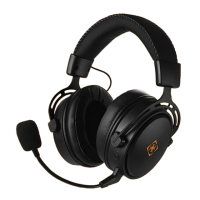
Features an adjustable headband for comfortable wear.
Equipped with 57 mm drivers for audio output.
Integrated control for adjusting audio volume.
Includes USB-A and 3.5mm audio connectors, with an adapter for console compatibility.
Connects via audio cable; USB-A powers LEDs. Adjust volume before use.
Clean the product using only a dry cloth.
Keep dry, do not open, keep away from children, avoid shock damage.
Refer to www.deltaco.eu for warranty details.
Find more info at www.deltaco.eu or contact help@deltaco.eu.
 General
| Type | Over-ear |
|---|---|
| Driver Size | 50 mm |
| Frequency Response | 20 Hz - 20 kHz |
| Impedance | 32 Ohm |
| Microphone | Yes |
| Connector | 3.5 mm |
| Microphone Frequency Response | 100 Hz - 10 kHz |
| Microphone Sensitivity | -38 dB |


 To Next Page